Events and actions
Making a widget do something - and reaching your own code when the built-in actions run out.
An event is a trigger on a widget and a list of actions to run when it fires. Both come from
the SquareLine Studio model, so if you have used that, this is the same thing with a few
additions: swipe triggers on every widget, and hardware actions that reach the data layer. The
generator writes one ui_event_<Name>() handler per widget that has events,
registers it with lv_obj_add_event_cb(), and dispatches on the event code inside.
Adding one
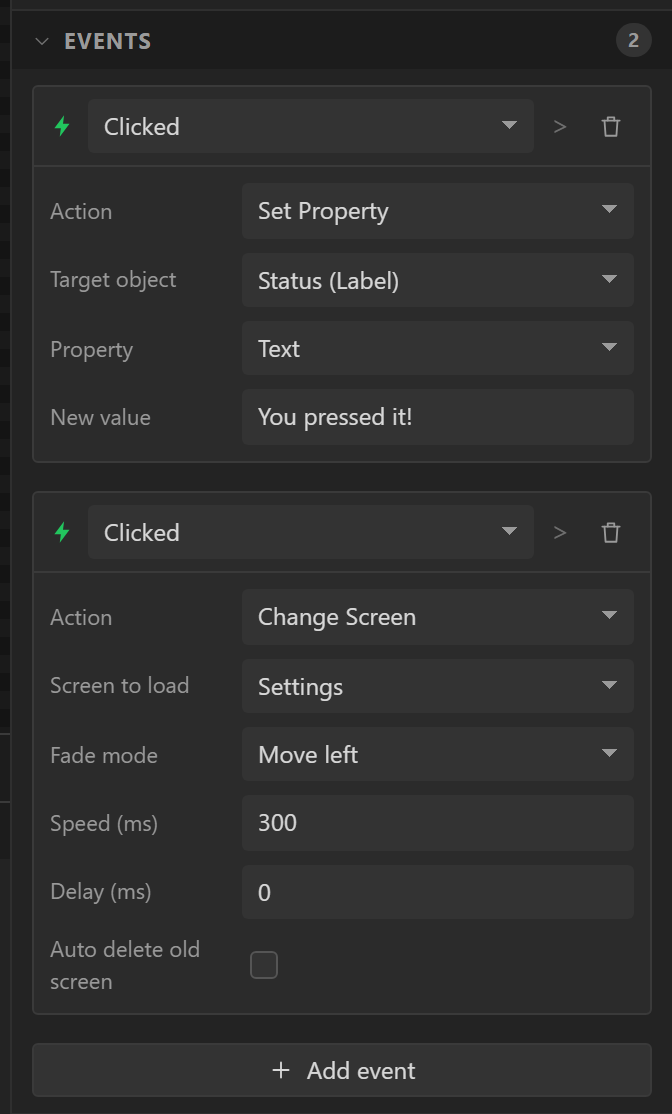
Select the widget, scroll the Inspector to Events, click add, pick the trigger, then add actions to it. Each action has its own fields - a Change Screen needs a screen, an Increment Slider needs a target and an amount. An action with an empty required field is reported by the validator as an error, since the generator cannot emit it.
Triggers
| Trigger | Fires when |
|---|---|
| Pressed | The finger goes down. |
| Clicked | Pressed briefly then released, without scrolling. The one to use for buttons. |
| Short clicked | A brief tap. |
| Long pressed | Held past the long-press time. |
| Long pressed repeat | Repeatedly while still held after a long press - for auto-repeat. |
| Released | The finger lifts, click or not. |
| Focused / Defocused | Keyboard or encoder focus moves onto or off the widget. |
| Value changed | A slider, arc, switch, checkbox, dropdown, roller, spinbox or textarea changed. |
| Ready / Cancel | A process finished or was abandoned - the keyboard's tick and cross. |
| Checked / Unchecked | A checkable object toggled. |
| Gesture (any) | A swipe in any direction. |
| Swipe up / down / left / right | A swipe in that direction. |
| Key | A key was sent to the widget from a keypad or encoder. |
| Edited / Insert | Text changed or text was inserted in a textarea. |
| Screen loaded / unloaded, Screen load start / unload start | Screens only. |
The four Screen triggers are only offered on a screen, and are the place for anything that should happen as a page appears - refreshing a readout, starting an animation. Screen loaded fires after the load animation; Screen load start before it. An ESPHome page has one moment for each, as the change starts, and both are written as that.
The Internet Radio has five of its own, offered on that widget only: Station chosen, Started playing, Stopped, Track changed and Stream failed - see building a radio. The Data list has one, Item chosen: a row was tapped and its item is now the list’s chosen one. The Web server has File received, and the Firmware update has Update started, Update finished and Update failed. An Animation that plays a number of times has Finished, a Sprite has Sequence finished when a sequence that plays once reaches its end, and so has a Timer that counts down: it has reached nothing.
Actions
| Action | Fields | Does |
|---|---|---|
| Call function | Function name, Do not export to code | Calls a function you write in ui_events.c, or - ticked - one you have written elsewhere. |
| Change Screen | Screen, fade mode, speed, delay, auto delete | Loads another screen with an animation. |
| Delete screen | Screen | Frees a screen from RAM. |
| Increment Arc / Bar / Slider | Target, value (and animation time) | Adds a signed amount to the target's value. |
| Set badge count | Notification badge, Adds / Sets / Clears, a number | Changes the count on a Notification badge, which is what shows and hides its mark. |
| Step spinbox | Target, direction | Increments or decrements the spinbox by its step. |
| Modify Flag | Target, flag, Add / Remove / Toggle | Changes an object flag - toggling Hidden is the usual case. |
| Set Flag | Target, flag, on/off | Sets a flag to a known state. |
| Set Opacity | Target, opacity | Sets the target's main-part opacity. |
| Set Property | Target, property, value | Sets Text, Value, Value (animated), Image source, Range min or max, Selected index, Background colour or Text colour. |
| Play Animation | Target, property, start, end, duration, delay, path, repeat count, playback | Animates X, Y, width, height, opacity, scale or rotation with an easing path. |
| Set text value from arc / slider | Target label, source, prefix, postfix | Writes the source's value into a label as text. |
| Set text value when checked | Target label, source, checked text, unchecked text | Writes one of two strings depending on a checkbox or switch. |
| Switch Theme | Light / Dark | Re-initialises the theme at runtime. |
| Set variable | Variable, mode, value | Writes a data-layer variable. See below. |
| Set digital output | Output, Activate / Deactivate / Toggle | Drives a digital output, on an MCU pin or an extender. |
| Beep | Beep with, the buzzer or the speaker's tone or tune, how long, how many, the gap | Sounds a buzzer on a digital output, or the board's own speaker, and carries on. See Beep. |
| Write to peripheral | Peripheral, channel, value | Writes to a writable channel such as a PCA9685 output. |
| Refresh inputs now | - | Reads every peripheral, analog and digital input immediately. |
| Set backlight | From a widget, brighter or dimmer by a step, or a fixed level; never below | Dims or brightens the display. See below. |
Change Screen, in detail
The most used action. Besides the target screen it takes a fade mode - None, Over
left/right/top/bottom, Move left/right/top/bottom, Fade in, Fade out, Out left/right/top/bottom
- a speed in milliseconds, a delay, and auto delete, which frees the
screen being left. It becomes _ui_screen_change() in ui_helpers.c, which
creates the target if it has been freed and calls lv_screen_load_anim(). The preview
runs it too, switching the canvas to the target screen.
Call function
The escape hatch. Give it a function name and the generator declares it in
ui_events.h and writes a stub in ui_events.c:
void my_callback(lv_event_t * e)
{
    // TODO: your code here
}
ui_events.c is written fresh with every export, like every other file in the zip:
unzip a new export over your folder and a copy you have filled in is replaced with empty stubs.
Keep your own copy and copy it back, or put your functions in a file of your own, which no export
contains, and tick Do not export to code (below). Your own code
has the whole of it. Inside a callback you have the whole LVGL API and every ui_<Name> object from
ui.h. An automation can run Call function too, and
then e is NULL.
Do not export to code, under the function’s name, is for a function you have
already written somewhere of your own - in the sketch, or in a file beside it. An export writes
every stub afresh, and an empty my_callback in ui_events.c beside yours
is the same function defined twice, which the linker refuses. Ticked, the stub is left out and a
comment says so; the function is still declared in ui_events.h and the event still
calls it, so if it is not in your code the build stops on an undefined reference rather than
running nothing. One tick is enough where several events call the same function. In the
MicroPython export the function has to be in the copy of ui_events.py you keep, and
in the ESPHome one it has to be a script of that name in a file of your own.
Hardware actions
These actions belong to the data layer and are the bridge from a touch to the firmware's state. Set variable writes a variable - a fixed value, a formula, an amount added, a toggle for a Boolean, a piece of text for a Text variable, or the value of a widget - and every binding that reads it updates on the next refresh. Set digital output drives an output on an MCU pin or an I/O extender. Write to peripheral pushes a value to a writable channel (a PCA9685 PWM channel, a NeoPixel colour). Refresh inputs now forces an immediate read of everything rather than waiting for the poll interval. All of them are available to automations too.
Beep
Beep sounds a buzzer, or the board’s own speaker, and carries on: nothing waits for it, and a second beep replaces one still sounding. Beep with comes first, because it decides which of the other settings apply.
| Beep with | Settings | What sounds |
|---|---|---|
| An active buzzer | Buzzer, Each beep, Beeps, Gap between | The buzzer’s own tone: its output is switched on and off. |
| A passive buzzer: a tone | Buzzer, Frequency, Each beep, Beeps, Gap between | A square wave at that frequency on the buzzer’s pin. |
| A passive buzzer: a tune | Buzzer, Notes, Each beep, Gap between | One square wave a note. |
| The speaker: a tone | Frequency, Each beep, Beeps, Gap between, Loudness | A square wave made by the audio player and played through the board’s audio output. No buzzer. |
| The speaker: a tune | Notes, Each beep, Gap between, Loudness | The same, one note at a time. |
The Buzzer is a digital output from Hardware › I/O. A passive buzzer’s
pitch needs one of the chip’s own pins: on an I/O expander’s line it is switched with no
pitch, and the Errors tab says so. Notes are names (C5, F#4, Bb3, with A4 at 440 Hz),
frequencies in Hz, or - for a rest, separated by spaces. Each lasts as long as
Each beep, and a tune holds 64.
Beep through the speaker
The speaker needs no buzzer and no pin. The beep is made by the player and goes out through whatever Hardware › Audio has: the chip’s own DAC on a Cheap Yellow Display, an I2S amplifier, or a codec such as the ES8311. So audio has to be switched on there; while it is off the beep does nothing, and the Errors tab and the event’s own card say so. It goes out through the same output as a station, so the player’s volume applies on top of the beep’s own Loudness, and the level meters show it.
A beep is mixed into whatever is playing rather than played instead of it. A station, a sound of the design or a phone’s stream carries on, turned down by half while a beep sounds and back to its own level in the gaps and after. A notification that stopped the radio would leave it stopped, and starting a stream again is a new connection and seconds of silence. With nothing playing, the beep plays by itself.
Two things follow from the speaker being the player’s:
- A beep is timed by the sound that carries it, so while a station’s stream has stalled the beep waits with it.
- On a board whose codec has a microphone sharing the speaker’s port (the LCDWIKI ES3C35P), a beep with nothing else playing takes the port as a station does. A recording or a send under way stops. The Errors tab says so for a design that records or sends.
The Arduino and ESP-IDF exports write Beep. The MicroPython and ESPHome exports do not write it yet, and the action is greyed there with the reason. In Preview a beep through the speaker plays in the browser through the player’s volume, over the preview’s own music if it is playing, and moves the meters.
Audio actions
Present once Hardware › Audio is switched on. See Audio and stations.
| Action | What it does |
|---|---|
| Play audio | A station from the list, a fixed address, an address held in a Text variable, or a toggle between playing and stopped. A .pls or .m3u link is followed to the stream inside it. |
| Stop audio | Stops and frees the decoder. |
| Next or previous station | Steps through the Internet Radio’s station list, wrapping. |
| Set volume | From a slider, arc or bar; a fixed level; or a step up or down. The widget’s own range maps onto 0-100 %. |
Set microphone sensitivity is the same three choices for the microphone.
For a volume control you usually want a two-way binding rather than this action: a slider bound to the player’s volume is the volume, and follows it when something else changes it.
Settings actions
These write what the device remembers - see Settings.
| Action | What it does |
|---|---|
| Set setting | Writes one entry: a fixed value, a piece of text, the value of a widget, or a variable. |
| Save settings | Writes everything that changed to the device now, including the entries that do not save automatically. This is the Save button beside a calibration. |
| Reset settings | Clears them and restores the defaults, immediately. |
| Settings file | Writes a copy to the filesystem as plain text, or reads one back. Passwords are never written to it. |
A setting marked secret narrows Set setting to one source: a widget somebody typed into on the device. The fixed-value modes are not offered for one, because a value in the design is a value in the project file and in the firmware.
Set the clock
Sets the time of day by hand, for a Clock on a board that has no network, or before one answers. A settings screen is two rollers and a button: the button's event is Set the clock, with Hour at one roller and Minute at the other.
- Six figures, each optional: hour, minute, second, day, month and year. One left at (none) stays as it is, so the two rollers set the time and leave the date alone. The seconds start at 0 when an hour or a minute is given without them.
- From widgets or from variables. A spinbox, slider, arc or bar gives its value. A
roller or a dropdown gives the number written on its chosen line -
07,2026- and where the line is not a number, its place in the list, counting from 1 for a day or a month and from 0 for the rest: a month roller of names is right as it stands. - The figures are the time in the first Clock's zone - what that Clock is showing. Each is held to what a calendar has: the 31st of a short month is its last day, a year of two figures is this century's, and the year stays within 2024 to 2099.
- It is written to the clock module the Clock keeps its time on, when it has one. With none, the time lasts until the power goes, and the Problems tab says so.
- With Internet time on and a network joined, a time server corrects whatever was set within the hour. Turn it off on the Clock for a time that is only ever set by hand.
In the preview the action sets the preview's own time, which runs on from there until you leave it. Arduino export.
Set backlight
Dims or brightens the display, in percent. It has four modes:
- The value of a widget - for a slider, arc or bar, on Value changed. The widget's whole range maps onto 0-100 %, so a 0-255 slider works as well as a 0-100 one. A switch or checkbox is full on or off.
- Brighter by a step and Dimmer by a step - for a pair of buttons, on Clicked, stepping from wherever the level is now.
- A fixed level - a "night mode" button, or an automation that dims the screen.
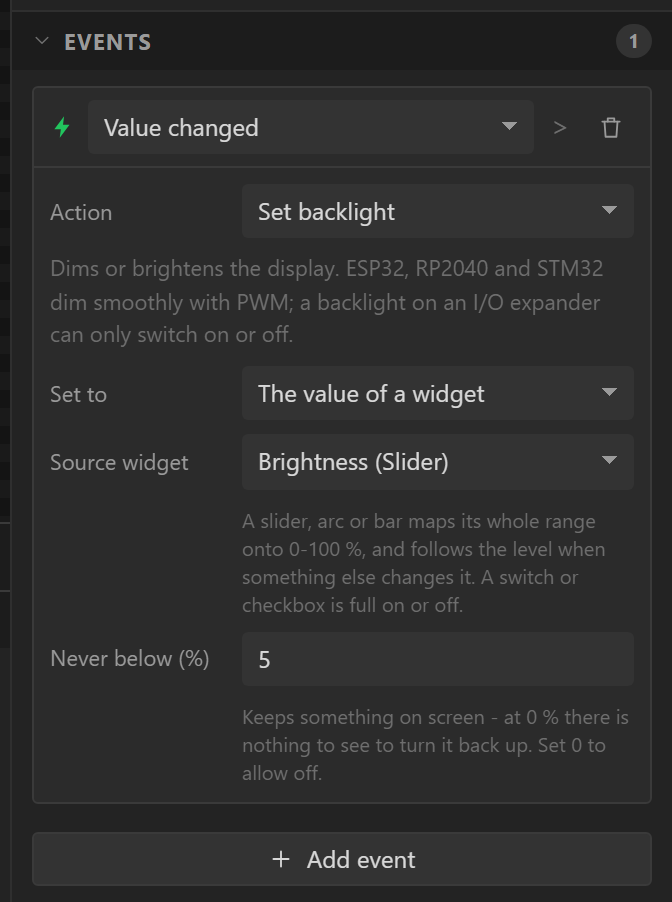
Choose the action on a slider and it reads itself on Value changed; choose it on a button and it steps brighter. Never below (5 % unless you change it) stops a slider or a Dimmer button taking the screen to black, where there would be nothing left to see to turn it back up - set it to 0 to allow off.
A widget the level is read from also shows the level: it starts at the Display tab's
default when its screen is built, and moves when a button or anything else changes the level, so
a brightness slider and a pair of buttons stay in step. In the firmware this is
ui_backlight.cpp, which calls the sketch's backlight_set(). PWM dims
smoothly on ESP32, RP2040 and STM32; a backlight on an ordinary pin of an I/O expander, or with PWM
switched off, can only switch on and off, and the validator says so. With no backlight at all the
action does nothing, and that is a warning too.
On an AMOLED board there is no backlight pin and the action works all the same: the panel is its own light, and the level goes to its controller as its brightness command. Nothing has to be set up for it - the Display tab says the panel dims this way and gives the level each boot starts at.
On a screen whose backlight is a device on I2C - Waveshare's DSI-TOUCH-A screens for the ESP32-P4-NANO - the level is written to that chip's register, 0 to its full value, and the action works as it does for a pin. A level the chip already holds is not sent again. Arduino export only.
Wake the screen, and Screen off now
The two actions of Screen off when idle, in the Hardware group, with nothing to set. Screen off now puts the light out at once, as the timeout does; Wake the screen lights it again at the level it had and starts the time with nothing happening again. A touch, motion and the wake button wake it by themselves, and the touch that does presses nothing - so Wake the screen is for a timer, a pin, an encoder or anything else that is not a touch. Neither needs the timeout switched on: a button can put the screen out and a touch bring it back. When a design is in a dimmed or dark state, a Set backlight sets the level it comes back at. On a board whose light cannot be switched both do nothing, and the validator says why.
Wi-Fi actions
For a design with a WiFi Setup or WiFi by phone. Free; Arduino export. The Web server follows Wi-Fi (Network).
| Action | Fields | What it does |
|---|---|---|
| Wi-Fi on or off | Do: Switch it on, Switch it off or On if it is off, off if it is on | Off takes the radio off the air, which saves power: no network, no access point, and the Web server stops with it, a download in progress included. On brings it back, rejoins the stored network and starts the Web server once the board has an address. |
| Set Wi-Fi network | Network name from, Password from: A widget, A variable or A setting (the password also None: an open network) | Stores the network and joins it now, and a restart joins it again. Read on the board when it runs. A name over 32 bytes, a password over 63 characters or under 8 is refused. The password is never printed. |
Web request
Asks a web data source now, without waiting for its turn. On a button it is a Refresh; on a screen's Loaded it brings a page up to date as it opens; in an automation it sends a reading somewhere every so often. For a source that is only asked when something asks - a message posted to a chat, a command to a server - this is what sends it. Choose the source; that is its one setting. The event returns at once and the answer arrives when it arrives. Arduino export, ESP32.
Choose list item
Makes another item of a list its chosen item: the next one, the one before, the first, the last, or none. Next and before can go round at the ends; without that they stop there. From nothing chosen, next is the first item and before is the last. On a detail screen it is the Next and Previous buttons; on a screen’s Loaded it chooses the first item so the screen never opens empty; in an automation on a timer it turns a detail screen into a slideshow. Everything that shows the chosen item - an Item text, a variable reading one of its fields, the lit row of a Data list - follows. Arduino export.
Play frames
Acts on an Animation: plays it, or carries on where it was paused - and begins again once it has finished; pauses it on the frame it is showing; stops it, and shows its resting frame; or starts again from the first frame. It is not Play Animation, which moves a widget’s place, size or opacity. Arduino export.
On a Sprite it also takes a Sequence of its sheet for plays and starts again: that sequence, from its first frame unless it is the one paused. Left at the one it has, it carries on with the sequence the Sprite last played. Arduino, ESP-IDF and MicroPython exports.
Timer
Acts on a Timer: starts it, or carries on from where it stopped; stops it where it is; starts it if it is stopped and stops it if it is running, which is one button doing both; puts it back to the beginning, running or not as it was; or puts it back and starts it. A countdown that has finished stays at nothing until it is put back.
It is for a Timer set to run when an event starts it. One that runs while a variable is on follows the variable, so Start and Stop do nothing to it and the Errors tab says so; putting it back to the beginning still works. Arduino export.
Set badge count
Acts on a Notification badge. The badge’s icon is always there; its mark - the number, or the dot - shows while its count is above 0. This action changes the count: it adds to it (a negative number takes away, and it stops at 0), sets it to a number, or clears it, which is setting it to 0 and takes the mark away. A button that adds one and another that clears is the usual pair.
It is for a badge whose count is a number set here. One whose count follows a variable or a list is changed by changing that: the next refresh would put the variable’s number back, and the Errors tab says so with the action to use instead. Arduino and MicroPython exports.
Publish to MQTT
Says something on the MQTT broker the design is connected to.
Topic is where - home/panel/setpoint - and Payload is what; in either,
a variable’s name in braces puts its value in, as it stands when the event runs:
home/{room}/setpoint, {setpoint}. A number is written with the
variable’s own decimal places, an on/off as ON or OFF.
With The payload is JSON on, text from a variable is written as JSON text has to be - a
quote in it escaped - and an on/off as true or false, so
{"room": "{room}", "on": {armed}} is always JSON whatever the room is called.
The broker keeps it publishes retained: whoever listens later is told at once.
The event returns at once; the message is sent from the client’s own task. Nothing is said while there is no connection - it is not saved up. In preview the Console says what the board would have said. Arduino export, ESP32.
Show toast
Part of Pro when code is generated. Designing and previewing with it is free. A toast is a short message that comes up over whatever screen is showing, stays a moment and goes. Nothing is placed in the design for it: it is an action, and the firmware draws it.
- Message. What it says. It is as long as you write it and wraps to the screen's width.
- Add a value. Puts a variable's value into the message: where
{}is written, or after the words when it is not. It is {} C with a variable holding 21.5 says It is 21.5 C. A true or false variable says on or off. - Kind. Information, Success, Warning or Error, which is the colour it is shown in.
- Length. How long it stays, in seconds: 2.5 unless you change it, from 0.3 to 60. It is counted from when the message has arrived.
- Where. The bottom of the screen or the top, and From the edge is how far from it, 12 px to begin with.
- Colours of its own. A background and a text colour in place of the ones its kind gives it, for a message that should look like the rest of your design.
- Corner radius. 8 px to begin with; 0 is square.
- Arrives and Leaves. How it comes and goes: fading, sliding from its edge (which is dropping down at the top of the screen and rising at the bottom), flying in from the left or the right, popping up from nothing, or at once. The two are chosen separately, so a message can drop in and fade away.
- Motion takes. How long arriving takes, and leaving: 0.2 seconds to begin with.
Each of these belongs to the action, so two buttons can show two toasts that look and move differently.
A tap sends a toast away early. One showing and four waiting is the most there can be, and the
same message is never shown twice at once, so an automation that
runs every second can say something without filling the screen with it. In your own code it is
ui_toast("text", UI_TOAST_OK, 2500, false), or ui_toastf() written as
printf is. ui_toast_look() and ui_toast_motion() say how the
next message looks and moves, and only the next. In a MicroPython export the same three are
MSG.toast('text', MSG.TOAST_OK, 2500, False), MSG.toast_look() and
MSG.toast_motion(), from ui_messages.py.
Ask first
Part of Pro when code is generated. Every event has an Ask first switch under its action. Switched on, the event puts a question on the screen with two buttons, and its action runs only when the first is pressed. Write the question and, if you like, what the two buttons say; they say Yes and No otherwise.
It works with every action, since the action itself is unchanged: on Yes the same event is sent to the same widget again, and this time it runs. Use it on a button. On a switch the switch has already moved by the time the question is asked, and a swipe cannot ask at all, because it has no direction left by the time the question is answered; the Problems tab says so. One question is on the screen at a time.
Both are in the Arduino and the MicroPython exports. An ESPHome project cannot use them, and an event that asks first is an error there, not a warning, and the export will not be built until it is taken off: one that ran the action without the question would do the one thing the question was there to prevent.
In the preview
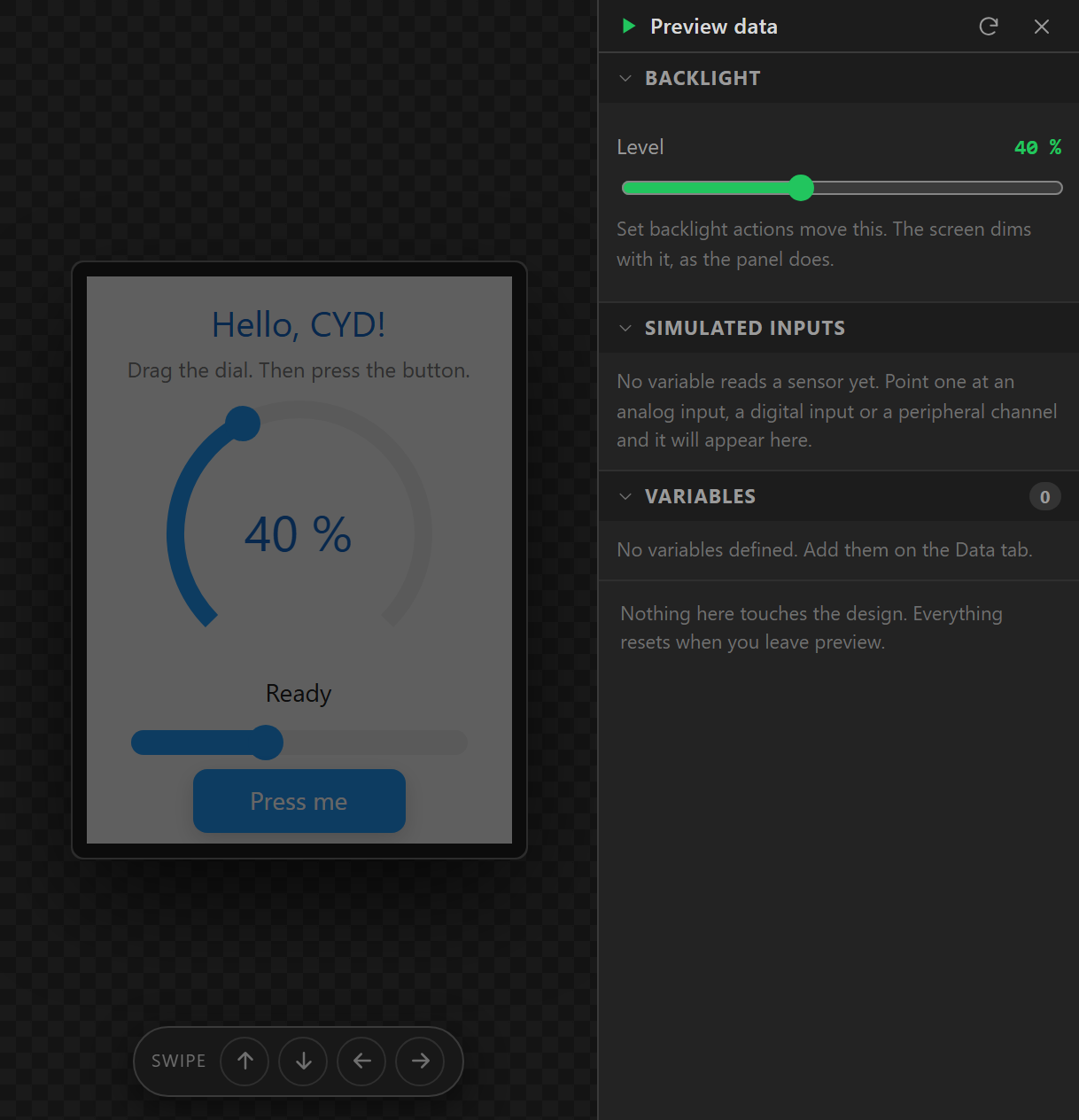
Events run in preview: a Clicked button changes screen, toggles a flag, steps a value, sets a variable. A toast is shown on the screen and a question is asked, with its buttons working. A Set backlight action dims the whole screen by its level, and the preview drawer has a Backlight slider of its own. Since a mouse cannot swipe, a pad at the bottom of the canvas sends the four gestures and shows whether anything on the screen listens for each. Play Animation, Switch Theme and peripheral writes cannot be simulated and say so in the Console tab rather than silently doing nothing.
Event bubbling
A tap on a label inside a panel is a tap on the label, not the panel. Set the label's Event bubble flag and the panel's handler sees it as well; set Gesture bubble for swipes to travel the same way. A screen's swipe triggers rely on this: a swipe that starts on a widget without Gesture bubble stops there.