MicroPython export
The same design as Python for lvgl_micropython on an ESP32 - what it covers, how to build it, and what it costs in flash next to the Arduino export.
Besides the Arduino project, the export dialog can write a design out as MicroPython for lvgl_micropython, the MicroPython firmware with LVGL built in. Screens, widgets, styles, events, variables, bindings and automations all come across. Nothing is compiled on your machine except the firmware, and the UI can be edited on the board and re-run from the REPL without a rebuild.
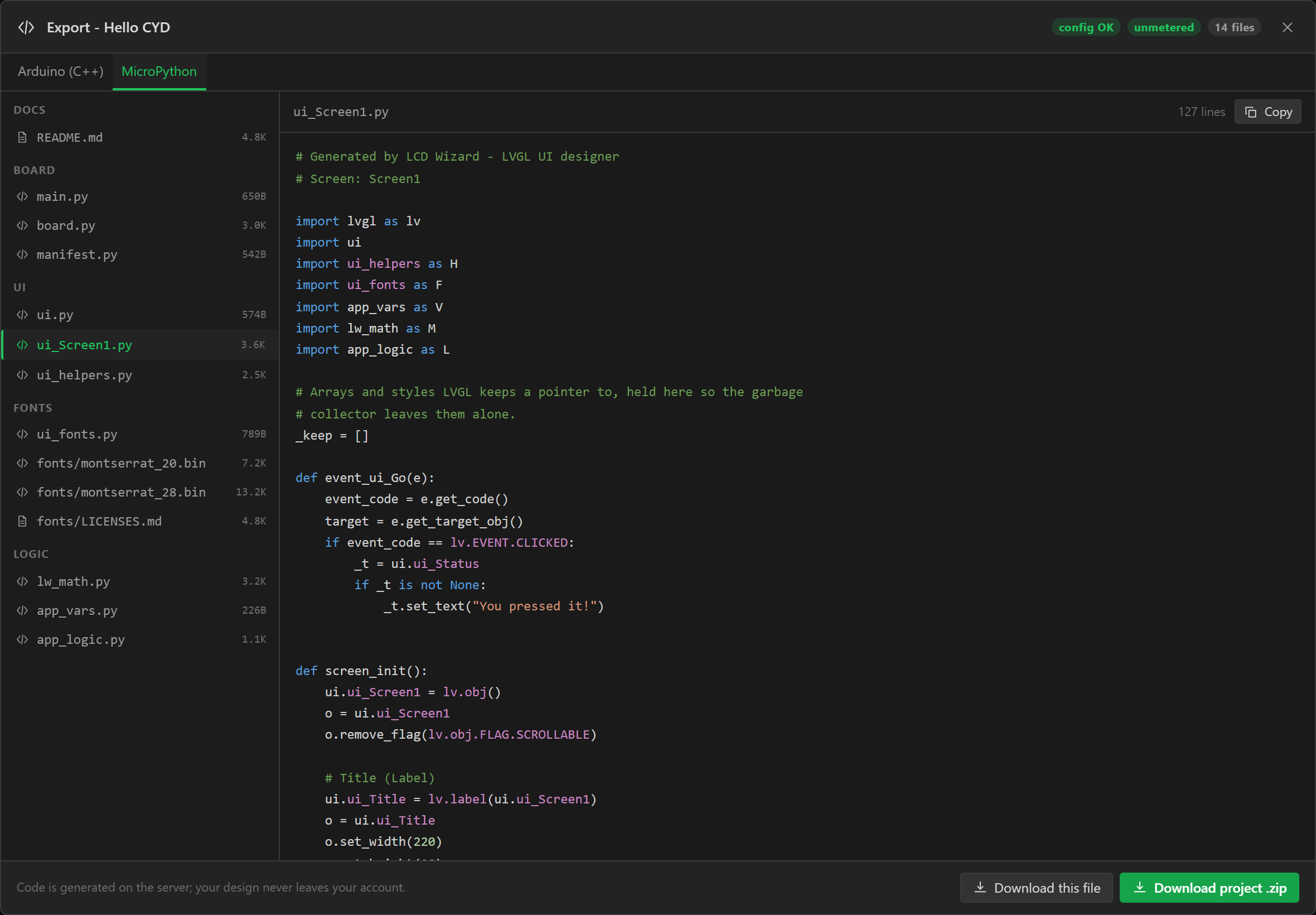
Choosing it
The toolchain is picked when the project is made, in the setup wizard, and stays with it - it decides which boards and widgets the designer offers, so it is not a choice worth leaving until the end. Pick MicroPython on the first step and the board list and palette follow. It cannot be changed afterwards; a design is built for one toolchain.
The export dialog names the toolchain across the top and checks the design against it as soon as it opens. What the MicroPython export cannot build yet is listed as an error with the reason, and Generate code stays off until it is fixed. About this export names the firmware build the design needs and anything that goes on the board as a file.
A MicroPython build is one generation, metered exactly like an Arduino one - see Accounts and limits. A design it refuses costs nothing.
What it covers
| Supported | Not yet | |
|---|---|---|
| MCU | ESP32, ESP32-S2, ESP32-S3, ESP32-C3, ESP32-C6 | ESP32-C5 and P4, STM32, RP2040 |
| Panel | On SPI or an 8-bit parallel bus: ILI9341, ILI9342, ST7789, ST7796, GC9A01, GC9107, ILI9488, ILI9486, ILI9481, HX8357D, ILI9225, SSD1351. On an RGB bus (ESP32-S3): any plain RGB panel, and the ST7701. On quad SPI (ESP32-S3): ST77922, ST77916, SPD2010, AXS15231B, RM67162, RM690B0, CO5300, SH8601 | The NV3041A; a quad SPI panel on any chip but an ESP32-S3; 16-bit parallel panels; the GC9503V |
| Touch | XPT2046 (calibrated on the board), FT6236, FT6206, FT5x06, CST816S, CST820, GT911, CST328, CST226SE, FT3168 / FT6146, CST9217 / CST9220, and the touch halves of the ST77922, AXS15231B and SPD2010 | Encoder and button inputs |
| Board presets | ESP32 + ILI9341 2.8" SPI, ESP32-2432S028R "Cheap Yellow Display", ESP32-2432S028C (capacitive CYD), WT32-SC01, M5Stack Core2, ESP32-S3 + ILI9341 SPI, ESP32-S3 + GC9A01 1.28" round, WT32-SC01 Plus and LilyGO T-Display-S3 (parallel), Sunton ESP32-8048S043 and 8048S070, Waveshare ESP32-S3 Touch LCD 4.3 and 7, Guition ESP32-4848S040 (RGB), the LCDWIKI 3.5" ES3C35P and Waveshare’s ESP32-S3 Touch LCD 1.46B, 1.85, 1.85C, 3.49 and 3.5B and the LilyGO T-Display-S3 AMOLED (quad SPI), and every other board with one of those chips, a panel and a touch controller from the rows above - which is most of Waveshare's ESP32-S3, C3 and C6 boards | The STM32 and RP2040 presets |
| Design | Every LVGL widget and option, every style property and state, their triggers and actions, variables, formulas, bindings, automations, analog inputs, digital I/O, backlight, images, library and imported fonts, icons | Custom calendar day names; styles on a Ticks part, which LVGL 9 does not have |
| I/O expanders | All nine: PCF8574, PCF8575, MCP23017, MCP23S17, CH422G, TCA9554 / PCA9554, PCA9555 and Waveshare’s two IO extensions - digital inputs and outputs on their pins, and a display reset, a touch reset or a backlight that runs through one | - |
| Peripherals | SHT31 / SHT35, AHT10 / AHT20, SEN66, MLX90614, BH1750, MCP9808, ADS1115, INA219, MAX17048, AXP2101, MPU6050, ADXL345, QMI8658, HC-SR04, DS3231, DS1302, PCF85063, MAX6675, MAX31855, MCP3008, PCA9685, NeoPixel strings and SD cards (SPI and the chip’s own 1- and 4-line interface), with Write to peripheral for the two that take values | BME280, BMP280, SCD40 / SCD41 and VL53L0X, whose arithmetic or start-up is not carried yet; the CAN bus, which the firmware has no driver for; RS485 / Modbus, which has no driver here yet; and an SD card whose CS is a pin of an I/O expander |
| Ready-made | The ones that are LVGL and nothing else: Show toast, Ask first, the Notification badge, the QR code, the Map and its markers, the Animation with Play frames and Finished, and an arc’s follower | The ones that need settings kept on the board, lists, audio or a network connection of their own: WiFi Setup, the Clock, the Weather card, MQTT, the Data list, the Web server and firmware update, the Internet Radio, the microphone and the AI Assistant. Each is greyed in a MicroPython project with the reason, and a design that still holds one - an older project, a copy of somebody else’s - is refused with that reason before anything is generated or counted against your plan |
| Web data | Sources asked over http and https, their values read into variables, what each source says of itself, the Web request action, and the presets that are values - MET Norway’s weather among them - with the card of labels each brings. The board joins your network from a file you fill in | A source whose rows fill a list, and so the presets that are lists; the Weather card; a variable that reads the network’s own address or signal |
The firmware is lvgl_micropython at commit d2d26467, which is LVGL 9.4. A design
drawn for LVGL 8 is exported as LVGL 9 all the same.
Parallel and RGB panels
The firmware has more display buses than SPI, and the export writes two of them as it writes
SPI: board.py builds the bus the firmware’s own class takes, from the pins and
timings on the Display tab.
- An 8-bit parallel bus (
lcd_bus.I80Bus) on an ESP32, S2 or S3: DC, WR and eight data lines, with the same panel drivers SPI uses. The bus has no RD line; a board that wires one has it held high. The firmware’s own example of this bus is the WT32-SC01 Plus, pin for pin. - An RGB bus (
lcd_bus.RGBBus) on an ESP32-S3: sync, a pixel clock and sixteen data lines, with the porches and polarities of the Display tab. The module needs PSRAM: the bus keeps two whole frames there - 1.5 MB for 800 × 480 - and turns the picture itself, on the chip’s other core, so a rotated design costs nothing. - An ST7701 shows nothing until its registers are loaded over three wires of their
own. The firmware carries seventeen such loads, numbered as GFX Library for Arduino numbers
its own, and the design’s start-up sequence chooses one: sequence 9 is the Guition
ESP32-4848S040 in both. Set side by side, command for command, sequences 3 to 9 are the
same bytes in the two. In 1 and 2 the firmware has one register and its value the wrong
way round, so that register is never written; the export writes it again after the
sequence, as the Arduino library does, and says so in
board.py. - An RGB panel has no command for inverting its colours, so Invert on the Display tab is left out with a warning.
- The firmware build takes the driver’s name as it takes any other:
DISPLAY=rgb_displayfor a plain RGB panel,DISPLAY=st7701. The export’s README has the whole line for your board.
What has been checked: the generated calls against the firmware’s own source, name by name; every board booted on a stand-in for its bus that refuses a wrong pin, a wrong order or a missing line; and an ESP32-S3 firmware image built with these drivers in it. No picture has been seen: timing, colour order and tearing are things only a board shows.
Quad SPI panels
A panel on four data lines is the one kind the export does not hand to the firmware’s
driver of its name. board.py carries the driver itself - a class called
QuadPanel, standing on the firmware’s own display framework - and it is yours
to read and change like the rest of the file.
The reason is in the firmware. Its SPI bus sends whatever “command” it is given,
then the data. A panel on this bus wants that command to be four bytes: 0x02 and
the command inside a 24-bit address for a command and its parameters, 0x32 for
pixels, which then go out on all four lines. Read at the commit this export pins - and still so
on the firmware’s main branch in October 2026 - its drivers for these panels do not all do
that, and some do not run at all:
- ST77916: the start-up commands are framed; the window and the pixels are sent with no opcode at all, which a panel ignores. The start-up never switches the display on. (This one is known to the firmware’s own issue tracker, where a corrected driver was posted and not yet merged.)
- AXS15231B:
reset()usestimewithout importing it, and the start-up file writes parameters of up to 31 bytes through a four-byte view, so four are sent. Its touch driver stopped at its import (name 'lv' isn't defined) when run on the firmware’s own PC build. - SPD2010: its touch driver reads through a method the firmware’s I2C device does not have, so its first read raises.
- RM67162 refuses four lines outright.
So a quad SPI panel is supported once the export has its own driver and register load for it. The register load is always the one the Arduino export of the same design sends - the panel maker’s where the design carries it, GFX Library for Arduino’s otherwise - so a panel gets one start-up whichever export drives it.
| Controller | Boards | How it is driven | Turned | On a board |
|---|---|---|---|---|
| ST77922 | LCDWIKI 3.5" ES3C35P | In parts, every redrawn area widened to 4 columns, which is all the controller takes. Its touch half is read every point of the report, because the controller lets go of a report only once it has been read to its end | By board.py | Flashed on 8 October 2026, upright and turned 90: the screen and touch were right both ways |
| ST77916 | Waveshare ESP32-S3 Touch LCD 1.85 and 1.85C | In parts, any window. Touch is the firmware’s CST816S driver | By the controller | Not yet |
| SPD2010 | Waveshare ESP32-S3 Touch LCD 1.46B | In parts widened to 4 columns, SPI mode 3. Its touch half is the controller’s own state machine: started, switched to point mode, each report drained | By board.py | Not yet |
| AXS15231B | Waveshare ESP32-S3 Touch LCD 3.5B and 3.49 | A whole frame every time, from a buffer in PSRAM: over this bus the controller takes no notice of the row a window starts on. Its touch half is asked for a report with an 11-byte command | By board.py, with a second frame of PSRAM | Not yet |
| RM67162 | LilyGO T-Display-S3 AMOLED; Waveshare ESP32-S3 AMOLED 1.91 (both versions) | In parts, every redrawn area widened to even columns and rows. Touch is the CST226SE on the LilyGO, read as lewisxhe’s SensorLib reads it, and the FT3168 on the Waveshare | By the controller | Not yet |
| RM690B0 | Waveshare ESP32-S3 Touch AMOLED 2.41 (both versions) | In parts widened to even columns and rows, in a window that starts at column 16 of the controller’s memory. Touch is an FT6336, through the firmware’s own FT6x36 driver | By the controller | Not yet |
| CO5300 | Waveshare’s ESP32-S3 Touch AMOLED 1.32, 1.43, 1.43C, 1.64, 1.75, 1.75C, 1.8, 2.06 and 2.16 | In parts widened to even columns and rows, in a window on a 480-wide memory; on three of them under the orientation byte Waveshare runs the panel with. Touch is the FT3168 / FT6146, the CST9217 / CST9220 or the CST820 | By board.py | Not yet |
| SH8601 | Waveshare ESP32-S3 Touch AMOLED 1.8 (first version) and one batch of the 1.43 | As the CO5300 | By board.py | Not yet |
A turned design. Three of these controllers turn the picture themselves, and
board.py sends them the same setting the Arduino export does. The other five
cannot - the Arduino export turns the picture for them in a canvas - so here
board.py turns each part LVGL draws (lv.draw_sw_rotate) into a second
buffer of the same size before sending it, and widens parts across the picture’s rows
where the controller wants its columns on a multiple of 4. Either way a design turned 90
degrees looks the same from both exports. One thing to know if you edit the file: LVGL counts
its quarter turns the other way round from the designer, so the designer’s 90 is
lv.DISPLAY_ROTATION._270 on these panels - that is what keeps a touch under the
finger, since LVGL turns the touch panel’s points by its own count.
The NV3041A is not driven yet, and quad SPI is driven on an ESP32-S3 only: Waveshare’s ESP32-C6 AMOLED boards are the Arduino export’s for now, and the designer says so where the board is chosen. An AMOLED’s brightness is whatever its start-up sets; nothing changes it afterwards yet.
The firmware build needs no DISPLAY= for such a panel: the framework the class
stands on is in every build. An ESP32-S3 with PSRAM is the only module this has been built
for.
What has been checked, for every one of them, upright and turned: the class runs on the real
MicroPython with the firmware’s own framework and LVGL drawing, against a model of the
panel that refuses anything a panel would ignore and keeps the glass as it physically is. What
it holds afterwards is LVGL’s own picture of the screen, pixel for pixel, laid over it the
way LVGL turns a touch - so a turned design passes only if the picture is where a finger on it
would be looked for. Each of the firmware’s faults above, put into the class on purpose,
stops that test. The touch classes are run against a chip that answers as the protocol says.
Only the ST77922 has been seen on glass, upright and turned 90 by board.py;
the others share its class and its framing, and differ in their register load and their touch
half. A panel turned by its own controller has not been on a board yet.
A turned design
Rotation in the designer means what it means to the Arduino libraries: 90 puts the top of the
picture along the right-hand edge of the panel as it sits upright. A design turned in the designer
comes out the same way round from this export as from the Arduino one, with touches under the
finger. That took more than passing the number on, and one thing in it is worth knowing if you
edit board.py.
- LVGL counts quarter turns the other way. Its 90 is the Arduino libraries’ 270,
and LVGL turns every touch by its own count. So for the designer’s 90,
board.pysaysROTATION = lv.DISPLAY_ROTATION._270, with a comment saying why. - The firmware’s drivers do not agree with each other about which way a quarter
turn goes. Run as they are, its ILI9341, ST7789, GC9A01, ILI9486, ILI9481 and HX8357D drivers
draw a quarter turn one way while LVGL looks for touches the other, and its ST7796 and
ILI9488 drivers agree with LVGL. So for a quarter turn
board.pygives the driver its orientation table, worked out from the setting the driver itself uses upright. - A panel that is a window on its controller’s memory - a 172 x 320 or a
135 x 240 ST7789, most of the small Waveshare boards - starts at a different column and row
once it is turned. The firmware adds the upright pair whichever way the picture faces, so
board.pypasses the pair for the design’s rotation. - An RGB panel is turned by the bus, LVGL’s way round, so it only needs the first
of these. A quad SPI panel is turned by
board.py’s own class.
If you exported a turned design before 8 October 2026, export it again. Until then a design turned 90 or 270 was handed to LVGL as LVGL’s 90 or 270 and left to the driver: on the first group of controllers above the picture was right and every touch landed on the opposite side of the screen; on an ST7796, an ILI9488 or an RGB panel the touches were right and the picture was upside down compared with the Arduino export, so it now comes out the other way up; and a turned window panel was drawn displaced. Upright designs were not affected, and nor was one turned 180 unless its panel is a window that is not centred.
Two controllers are left as they were, because their drivers turn the picture with code of their own that nothing here has run: the ILI9225 and the SSD1351. A turned design on either carries a warning in the export dialog.
Two more things the same check found, both fixed in the export:
- ILI9488 on SPI. The firmware’s driver refuses to start unless it is given 24-bit colour on that bus, which the controller needs, and the export was passing 16-bit. It passes 24-bit now; LVGL then draws three bytes a pixel, which is half as much again of the chip’s memory in drawing buffers.
- GC9107. The firmware’s driver stops with a
TypeErrorthe first time anything is drawn - one line in it calls the wrong thing.board.pyputs the right call back, with a comment.
How this was checked: each of the firmware’s own drivers was run from its source on the firmware’s PC build, with its own display framework and real LVGL drawing, through a model of the glass that places each pixel where the controller would. What the glass holds is compared, pixel for pixel, with LVGL’s own picture laid over it the way LVGL turns a touch. That is done for every driver at all four rotations, and for every window panel among the board presets. The export as it was before fails the same check, which is how it was found. None of it has been on a board: the one turned panel seen on glass is the quad SPI ES3C35P.
Peripherals
On Arduino a sensor is a library. MicroPython has none of those libraries, so each part in the
table above has a small driver module of ours instead – lw_bh1750.py,
lw_mpu6050.py and so on – written from the source of the Arduino library that
reads the same part, and exported only when the design has that part. hardware.py
starts each one, reads it on its own interval and keeps the values; a variable with the device as
its source follows it, exactly as on Arduino. From your own code:
import hardware
if hardware.per_Light_ok():
    print(hardware.per_Light_lux())
hardware.per_Strip_set_fillColor(0xFF8000)
The export’s README lists every call for the parts your design has.
- A part that is not there does not stop the screen. On MicroPython a chip that does
not answer is an exception, so every start and every read is caught: the part is named once
on the serial port, its
_ok()answersFalse, and its values stay where they were. One that drops off the bus later keeps its last values and is read again when it comes back. - Five parts cannot tell they are missing. A thermocouple amplifier and the MCP3008 only talk, a NeoPixel string only listens, and an HC-SR04 that is not there looks like one with nothing in front of it, so each always “starts” and reads 0 with nothing connected – on Arduino too.
- Two parts are on pins of their own, not a bus. The DS1302 is clocked by hand on its three pins, as the Arduino library clocks it, and the HC-SR04 is a pulse out and a pulse timed coming back. Neither takes one of the chip’s I2C or SPI controllers.
- Buses are shared where the pins are the same. A device on the touch panel’s I2C pins, or on the panel’s SPI clock pin with a CS of its own, rides that bus. A bus on other pins takes a controller of its own, and the chip has two of each kind (an ESP32-C3 or C6 one): a design that needs more is refused with the sentence saying which.
- Reads share the screen’s thread. Most take under a millisecond. An SHT31 waits 20 ms for its measurement, and an ADS1115 converts five values one after another – 40 ms at the default rate, over half a second at the slowest. The AHT20 would take 80 ms and is read without waiting instead: each read collects the measurement the one before asked for. An HC-SR04 waits for its echo: about 6 ms for something a metre away, and the whole of its furthest distance – 25 ms at four metres – when nothing is in range.
- The clocks are not set at first boot. On Arduino “Set time on first
boot” writes the time the sketch was compiled. Nothing is compiled here, so the setting
is left out with a warning, and the clock is set from the REPL or your own code:
hardware.per_Clock_set_time(2026, 10, 8, 14, 30, 0).per_Clock_lost_power()says whether it has stopped since. - An SD card is a folder. Mounted at
/sd(SPI) or/sdcard, its files are ordinary files:open('/sd/log.csv', 'a').
I/O expanders
Every I/O expander the designer has is driven
here, by a driver module of ours as the peripherals are: lw_tca9554.py,
lw_pcf857x.py, lw_mcp23x17.py and so on, exported only when the design
has the part.
import hardware
if hardware.ext_Port_ok():
    hardware.ext_Port_write(3, True)
print(hardware.ext_Port_read(2))- A digital input or output can sit on a pin of one, and behaves as one on a pin of the chip does: debounced, active low or high, written by Set digital output, read by a variable. The pin is made an input or an output by the entry that uses it.
- A board’s own lines can run through one. Where the panel’s reset, the
touch panel’s reset or the backlight is on an expander - as on several Waveshare
boards -
board.pyopens that bus and starts the expander before the panel, and pulses the reset through it with the times the Arduino sketch uses. The firmware’s own display driver is given no reset pin, since it could not reach one there. - A backlight on an expander pin switches on and off; on the PWM channel of Waveshare’s IO extension it dims, 0 to 100.
- One that is not there does not stop the screen. It is named on the serial port,
its
_ok()answersFalse, its pins readFalseand writing one does nothing. An MCP23S17 cannot tell: SPI has no acknowledge. - Every read of a pin is a transfer on the bus, in the screen’s thread, as on Arduino: a fraction of a millisecond each at 400 kHz.
Wi-Fi and web data
Web data works here as it does in the Arduino export: a source is an address, how often it is asked, and the values to take out of the JSON that comes back, each read by a variable. The board asks the service itself, with your key. What differs is how the board gets onto a network, and three things that follow from this being Python.
import lw_web
if lw_web.web_met_weather_ok():
    print(lw_web.web_met_weather_temp())
else:
    print(lw_web.web_met_weather_error())
lw_web.web_met_weather_ask() # now, without waiting for its turn- Your network is a file on the board, not part of the design. There is no WiFi Setup
widget in a MicroPython project. The export carries
wifi_secrets.py, blank: put your network’s name and password between its quotes and copy it over withmpremote cp wifi_secrets.py :. The design never holds a Wi-Fi password, and neither do we. It is the one module that is not frozen into the firmware, so another network is that file copied again, with nothing rebuilt. Every export carries it blank again, so keep your filled-in copy and do not copy a later export’s over it. - It joins in the background.
lw_wifi.pyasks to join when the board starts and looks a few times a second whether it has; after a drop it tries again. Nothing waits for it. The serial port says what it is doing, and until it has joined each source’s last problem says why not:No network: wifi_secrets.py has no network name in it yet
,the password for … was not accepted
,… was not found
. From your own code:lw_wifi.joined(),ip(),problem(). - The screen does not wait for an answer. A request takes seconds, so each is built on the screens’ own thread - it reads your variables - and then asked on a thread of its own, which does the waiting: the name looked up, the connection made, the answer read. The finished values are put where the variables read them on the screens’ thread again. One request is out at a time, and the others wait their turn.
- The answer is never held whole. MET Norway’s forecast is about 38 KB, which a
board with no PSRAM could not hold as a Python object. It is read 512 bytes at a time by
lw_json.py, the same reader the Arduino export has in C, and only the values your paths point at are kept - text at whatever length it comes. There is no Length to cut it to: a Text variable here is a Python string. - What goes wrong is said, and asked again. No network, a name that is not found, a server that is not there or stops half way, an answer that is cut short or is not JSON, no memory: each becomes that source’s last problem, in words, with a status below 0 where the request never arrived, and the source is asked again 20 seconds later. None of it stops the timer the screens run on.
- https is asked without checking the certificate, as in the Arduino export: the answer is private on its way and is not proved to come from who it says it does. A secure connection takes about 40 KB of the chip’s own memory while it is made, and the arithmetic of the handshake holds the Python interpreter for a moment at a time, so the screen may miss a redraw or two while a source over https is being asked. On a board with no PSRAM that memory has not been measured; the export dialog says so of such a design.
Not here yet: a source whose rows fill a list, since this export has no lists, and with it the presets that are lists; the Weather card, whose place a preset’s own card of labels takes (Add its card, on the source); and a variable that reads the network’s own address or signal strength. A design that holds one is refused with that reason.
None of this has run on a board. It has asked a server on a PC - under CPython and on lvgl_micropython’s own unix port, with that port’s sockets, threads and TLS - but the ESP32’s Wi-Fi is stood in for there, and how much memory a secure connection leaves on a real board, and how long the screen holds still for one, are not known until somebody tries. How it was tested is below.
Every file
| File | What it is |
|---|---|
main.py | Runs at boot: brings the board up, mounts the S: drive fonts and images are read from, builds the UI and starts the task handler. |
board.py | Display, touch and backlight bring-up, with the pins and bus settings at the top. |
ui.py | Every object as a module global (ui.ui_Button1), the theme, and init(). |
ui_<Screen>.py | One per screen: creates its widgets, styles and events. |
ui_<Screen>__part2.py ... | The rest of a screen too big for one module - see below. |
ui_helpers.py | What event code calls: screen changes and deletes, flags, increments. |
ui_events.py | Stubs for Call function actions, for you to fill in. Written fresh by every export: keep your own copy. |
ui_fonts.py, fonts/ | Fonts the firmware does not have built in, loaded from /fonts with a built-in fallback, and a UI_ICON_... string for every icon. |
ui_backlight.py | Levels for Set backlight actions, and the widgets that show them. |
ui_messages.py | Toasts and Ask first, drawn on LVGL’s top layer. In your own code: MSG.toast('Saved', MSG.TOAST_OK, 2500, False), with MSG.toast_look() and MSG.toast_motion() for how the next one looks and moves. |
ui_parts.py | The Notification badge and the QR code: PT.badge_set(ui.ui_Badge1, 5), PT.qr_set(ui.ui_QRCode1, 'https://example.com'). |
ui_frames.py | Animations: FR.play(), pause(), stop(), restart(), FR.set_frame(ui.ui_Animation1, 2), and FR.EVENT_DONE, sent to the image when its last run ends. |
ui_map.py | Maps and their markers: MAP.marker_set_lat(ui.ui_Marker1, 51.5) and marker_set_lon(). |
| Those four are written only when the design uses what is in them, and each is frozen into the firmware with the rest. | |
app_vars.py, app_logic.py, hardware.py, lw_math.py | Variables (import app_vars as V), bindings and automations, analog and digital I/O and the peripherals, and formula arithmetic that behaves like the C export. |
lw_<part>.py, lw_dev.py | A driver for each kind of peripheral in the design, and the register access they share. Frozen with the rest. |
lw_web.py, lw_http.py, lw_json.py, lw_wifi.py | Web data, in a design that has any: its sources and a function for every value, what asks an address on a thread of its own, what reads the answer as it arrives, and what joins the network. Frozen with the rest. |
wifi_secrets.py | Yours. Your network’s name and password, blank in every export. Not frozen: fill it in and copy it to the board. |
*.bin | Images in LVGL 9's binary format. |
manifest.py | Freezes every module except main.py and wifi_secrets.py into the firmware. |
README.md | The exact firmware command for this board, what to copy, and what each file is. |
Building and flashing
lvgl_micropython compiles the display and touch drivers into the firmware, so the firmware is built for the board - and that build can take the UI with it. The generated README carries the command for your board; for a CYD it is:
git clone https://github.com/lvgl-micropython/lvgl_micropython
cd lvgl_micropython
git checkout d2d26467
python3 make.py esp32 BOARD=ESP32_GENERIC DISPLAY=ili9341 INDEV=xpt2046 \
  FROZEN_MANIFEST=/full/path/to/MyUI_micropython/manifest.py deploy
It needs Linux or macOS - on Windows, WSL - with the ESP-IDF prerequisites lvgl_micropython's
README lists. deploy flashes the board when the build finishes (add
PORT=/dev/ttyUSB0 if it is not found). Then copy what is not frozen with
mpremote:
pip install mpremote
mpremote cp main.py :
mpremote cp -r fonts :
mpremote reset
A .py copied to the board replaces the frozen module of the same name, so
ui_events.py - or anything else - can change without a rebuild. The UI runs on an
LVGL timer, which leaves the REPL free: mpremote repl, then import ui
and poke at ui.ui_Screen1. A resistive panel asks for a few taps on the first boot
and keeps the result in NVS; board.S.indev.calibrate() runs it again.
Without freezing - a board with PSRAM and a small design - build the firmware without
FROZEN_MANIFEST and copy the whole folder: mpremote cp -r . :.
Sizes compared with the Arduino export
Measured on 15 September 2026 by building both exports of the same designs for the CYD
(ESP32-2432S028R, 4 MB flash, no PSRAM). Arduino: LVGL 9.2.2 and TFT_eSPI, built by PlatformIO
with the generated platformio.ini. MicroPython: lvgl_micropython d2d26467
(LVGL 9.4, ESP-IDF 5.5), BOARD=ESP32_GENERIC DISPLAY=ili9341 INDEV=xpt2046, with the
design frozen in. KB is 1024 bytes.
The Arduino export has since moved to LVGL 9.4.0, the release the MicroPython firmware carries. The Arduino figures below are the 9.2.2 measurements; the same design built on 9.4.0 is about 33 KB larger (26 to 37 KB across nineteen designs, measured on 6 October 2026), which leaves the comparison where it was.
Firmware and flash
| Design | Arduino | MicroPython | UI frozen in | Files fit (A / MP) |
|---|---|---|---|---|
| lvgl_micropython alone | - | 2,804 KB | - | - / 1,228 KB |
| Hello LCD, 1 screen | 611 KB | 2,811 KB | 7 KB | 896 / 1,220 KB |
| Every widget, 4 screens | 641 KB | 2,836 KB | 33 KB | 896 / 1,192 KB |
Arduino and MicroPython are the firmware images; UI frozen in is how much of the MicroPython image is the design; files fit is the flash filesystem left for fonts and images. The every-widget design has 397 objects.
An ESP32-C6 build is bigger: lvgl_micropython with an ST7789 and a CST816S comes to 3,378 KB, which on a 4 MB module leaves about 800 KB of filesystem. That image was built here, at the same commit; it has not been flashed to a board.
The gap is the runtime, not your design. An Arduino build compiles only what the design uses:
lv_conf.h turns on just its widgets and fonts, and the linker drops the rest. The
lvgl_micropython firmware carries the MicroPython interpreter and all of LVGL 9.4 through its
binding, whatever the design uses - 2.7 MB before the first screen. On top of that the UI is
compact bytecode: frozen in, the Hello LCD example adds 7 KB to the firmware and every widget
across four screens adds 33 KB.
Flash left over goes the other way. The Arduino export on 4 MB divides it with fixed partitions - Big app, 3 MB for the program and 896 KB for LittleFS, so most of that 3 MB sits empty. make.py sizes lvgl_micropython's program partition to the firmware and gives the rest of the chip to the filesystem, which is where MicroPython keeps fonts and images - so a small frozen design has more room for files than the Arduino build does. A big one takes it back: our stress test, two screens with every style property on every part, is 1.06 MB of Python in 33 modules and adds 349 KB frozen, leaving 876 KB for files.
What the export itself weighs
| Design | Arduino: files, total, zip | MicroPython: files, total, zip |
|---|---|---|
| Hello LCD | 18 files, 52 KB (UI C 10 KB), 21 KB zipped | 14 files, 46 KB (Python 16 KB, fonts 20 KB), 24 KB zipped |
| Every widget | 28 files, 174 KB (UI C 124 KB), 42 KB zipped | 16 files, 88 KB (Python 81 KB), 20 KB zipped |
The Hello LCD example uses Montserrat 20 and 28. The firmware has only 12, 14 and 16 built in, so those two go on the board as uncompressed LVGL font files - 20 KB of the filesystem - where the Arduino build compiles them into the program. Images are always files on MicroPython, including ones set to compile in. An L8 greyscale image is written as RGB565, because LVGL 9.4 cannot draw L8 from a file: two bytes a pixel instead of one.
RAM, and why the UI is frozen
MicroPython compiles a .py when it is imported, and that takes about five times
the file's size in free heap, all at once. An ESP32 without PSRAM has around 100 KB left once
LVGL is running, so the export cuts each screen into modules of about 16 KB -
ui_Screen1.py, ui_Screen1__part2.py and so on - that are imported one at
a time and dropped. One widget is never split across modules, so a widget with hundreds of style
overrides still makes a large one.
| Design | Largest module | Free heap needed to import it | Frozen |
|---|---|---|---|
| Hello LCD | 3.6 KB | about 19 KB | none - it is already bytecode in flash |
| Every widget | 18 KB | about 90 KB - more than a board without PSRAM has | |
| Every style property (stress test) | 76 KB | about 381 KB |
That is why the README's first step builds the UI into the firmware: frozen modules run from flash and need no RAM to compile at all. The README says how much the largest module needs, and warns when it is more than a board without PSRAM has.
How it behaves differently
- Objects live on the
uimodule, so an event on one screen reaches widgets on another. A deleted screen puts its names back toNone, and an action aimed at one is skipped rather than touching freed memory. - Deleting a screen that is on the display, or being loaded or animated away, is refused and printed on the REPL. LVGL would otherwise keep drawing freed memory and crash.
- Formulas follow the C export, not Python: dividing by zero gives infinity, a bad
reading never raises, integers are clamped to 32 bits and
%dformats truncate. - An exception in your code stops the task handler, with a traceback naming the file and line - the screen freezes where a C sketch would carry on.
- A Map’s arithmetic is in the board’s own numbers, which on an ESP32 are single precision where the Arduino export and the canvas work in double. On a map of a city that is a hundredth of a pixel. On one a hundred metres across a marker can land a pixel from where the canvas put it.
- An Animation’s frames are files, as every image is here, so each is read off the board again when it comes round. Keep the frames small and the run short.
Something wrong?
| Symptom | Cause and fix |
|---|---|
MemoryError when main.py imports the UI | Not enough heap to compile a module. Build the firmware with FROZEN_MANIFEST, and delete any copies of the frozen .py files from the board - a file on the board wins over the frozen module. |
| Blank or white screen | The pins at the top of board.py; or the other display.init() type if the driver has two. |
| Colours inverted, or red and blue swapped | set_color_inversion() and color_byte_order in board.py. |
| Text in the wrong font | ui_fonts prints which file did not load - check fonts/ was copied. |
A web source never answers, and its last problem begins No network | The rest of the sentence says which: wifi_secrets.py is blank or was never copied to the board, the name was not found, or the password was not accepted. Fill the file in and mpremote cp wifi_secrets.py :. Copying a later export’s blank one over it does this too. |
A source over https says The secure connection could not be madeor Not enough memory | A secure connection needs about 40 KB of the chip’s own memory while it is made. On a board with no PSRAM there may not be that much left beside LVGL; ask over http where the service allows it, or use a board with PSRAM. |
make.py says the app partition is too small | It resizes the partition and carries on; the build still succeeds. Add --flash-size=8 or 16 on a module with more flash. |
How it is tested
The generator's test suite builds designs that between them use every widget
option, style property, trigger, action, binding, variable source and automation, and every board
preset, and boots each one twice: under CPython against a strict stand-in for the lvgl
module that checks every call's name, arguments and types against the binding, and on
lvgl_micropython's own unix port - the real LVGL 9.4 binding - after MicroPython's compiler has
compiled every file. There each screen gets taps, long presses and swipes through a real input
device, a minute of timers, and is deleted and rebuilt. The CYD firmware is built from the
generated README command with the largest designs frozen in.
The ready-made controls are held to more than that, because each does arithmetic the designer does too. Which frame an Animation shows next and where a marker lands on a map are worked out by the Python as the board will run it and by the designer, for a few thousand cases, and must agree to the frame and to the pixel. Then a design using every one of them is asked on the real binding what it did: that a toast is said once and goes, that an event which asks first waits for its answer and runs once, what a badge’s mark reads, whether a QR code that cannot be drawn says so, and where each marker is. They have been drawn by LVGL on a PC and looked at; they have not been on a panel.
The peripheral drivers are held to something we did not write. A driver
and a test written from one reading of a datasheet agree with each other even where both are
wrong, and what a wrong driver shows is a believable number. So for every part, in every setting
the designer offers, one design is exported twice: the Arduino export’s own
hardware.cpp is built on a PC against the real Arduino library, the MicroPython
export’s hardware.py is run beside it, and both are given the same stand-in
chip – which is bytes and nothing else, with no arithmetic of its own to be wrong in the
same way. They must report the same readings and leave the chip holding the same registers. The I/O expanders are held to the Arduino side the same way, through a run of
reads and writes made by the calls each export gives. Sixteen
drivers broken on purpose, one for each kind of thing compared, have to be caught. Two places
differ on purpose and are pinned to both values: the MAX17048’s alert voltages, which the
Arduino library cuts down by one count of 20 mV where the driver rounds. The SD card is not
compared this way, since its Arduino side is the ESP32 core’s own. The HC-SR04 is, and
means less: it has no library, so both of its sides are ours and what agrees is the arithmetic
on an echo of a given length.
That comparison found four faults on the Arduino side, all fixed: the QMI8658 was never given a range, so every axis read 0; the PCA9685’s oscillator trim was applied after the frequency it corrects, so it did nothing; a PCF8574 or PCF8575 was started before its pins had their modes, which that library answers by not starting at all, so one was “not found” on every board; and a digital output placed on an expander pin was never made an output unless the same pin was also set in the expander’s own table. What it cannot show is that a real chip gives those bytes, or that the timing suits one: none of these drivers has been on a bus.
Web data is held to two things. The reader of JSON is
the file the export ships, and it reads the same few thousand documents as the Arduino
export’s reader does - real-shaped answers, every escape, every way a number is written, the
same name twice, values that are not where a path looks, answers cut short and things that are
not JSON at all - each handed over in blocks of a size that changes from case to case, a byte at
a time among them, since on a board anything may be cut in two. Every value has to be what
JSON.parse finds, and what it becomes as text, on or off, a whole number and a number
has to be what the designer shows. Then whole generated projects are booted and really ask a
server: one on the same PC that misbehaves on request. It answers with a forecast the size of
MET Norway’s over http and https, sends one a piece at a time while the test counts that the
timer the screens run on never waits, cuts one short, redirects, loops, says 404 and 500, answers
in pieces, packed, with nothing, or not at all; and a port nothing listens on and a name nothing
answers to are asked too. What the server was sent is read back: the address with a
variable’s awkward characters made safe, the JSON and the form that were posted, the
headers, the User-Agent. The network is taken away, never given a name, given the wrong password,
and lost and found again. All of it runs under CPython and again on lvgl_micropython’s unix
port, where the sockets, the threads and the TLS are MicroPython’s own. Thirty faults put
into the export on purpose, one at a time, each have to be caught by the check written for it.
What that cannot show is the board: the unix port has no Wi-Fi, so the radio is stood in for; its threads run side by side where an ESP32’s take turns; and a PC has memory to spare. No board has joined a network or asked an address with this.