Variables and bindings
From a sensor channel to a number on the screen, and from a slider back into the firmware.
A variable is a value the firmware holds; a binding connects it to a widget. Together they are
how a reading on a sensor becomes a number on the screen, and how a slider on the screen becomes
a setpoint the firmware acts on. Both live in app_logic.cpp, which the generator
writes only when the project uses them.
Variables
The Data tab lists them. Each has:
| Field | Meaning |
|---|---|
| Name | How formulas, bindings and automations refer to it. Letters, digits and underscores. |
| Type | Float, Integer, Boolean, Text or List. A Float becomes a float, an Integer an int32_t, a Boolean a bool, Text a fixed char[], and a List an array. |
| Source | Where the value comes from - see below. |
| Constant | The value, when the source is Constant. |
| Formula | A conversion over raw. Empty means the raw value is used as it is. |
| Initial value | What it holds before the first reading, and what it keeps if the device is absent. |
| Unit | A label, shown in the preview drawer and available to bindings. |
| Decimals | How many the preview shows; Text bindings have their own format. |
| Min / Max, Clamp | The expected range, and whether to limit the value to it. |
| Save to settings | Keeps it across a reboot - see Settings. |
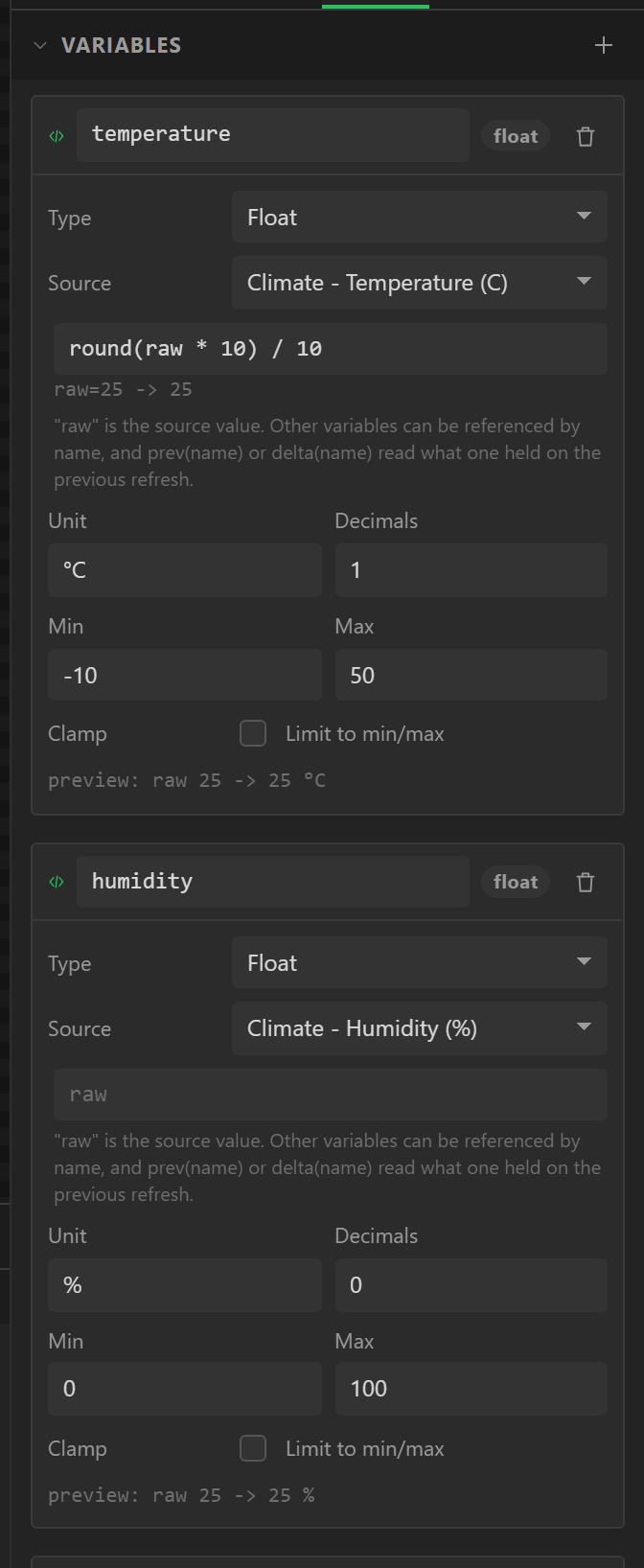
The source menu is grouped: every readable channel of every device on the Devices tab, every
analog input, every digital input, then Constant, and (set by events only) for
a variable written by actions and bindings rather than read from hardware - or by
your own code, through var_<name>_set(). A design with a WiFi
Setup widget has a Network group, one with audio a group for the player, and on an ESP32
there is a Clock group: the time of day, a figure at
a time, with a Time zone field under the source - left at the clock's it is the first Clock
widget's zone. The menu offers a number what is a number and a Text variable what is text.
Constants
A constant is held at its value every refresh. It is the setpoint case - a target a chart can draw as a line, a threshold an automation compares against - and, with a formula over it, the way to express a value computed purely from other variables.
Text variables
A Text variable carries words rather than a number: a track title, an SSID, an IP address.
It becomes a fixed char[] on the device - a length you set, defaulting to 48 - because
a board with 320 KB and no PSRAM should not be fragmenting its heap to hold a song title.
One rule keeps it simple: text is a carrier, not an operand. A Text variable has no formula, no unit, no range, and it cannot appear inside another variable’s formula. Arithmetic needs a number, and guessing what “Ready” means as one would be worse than refusing.
It can drive a label’s or a textarea’s Text and nothing else. Nothing numeric reads text yet, so a Text variable is written by events and bindings, or read - its Source menu lists what is text - from the network, the player or the clock: the time, the date, the name of the day.
Settings
The Settings section of the Data tab is what the device remembers across a reboot: a volume, a brightness, a calibration offset, the network it joined. Each entry has a key, a type, a default and two switches.
| Field | Meaning |
|---|---|
| Key | A dotted name such as radio.volume. It becomes the accessor name in the generated lw_config.h. |
| Type | Text, Integer, Float or Boolean. |
| Default | What it holds before anything has been stored. |
| Secret | A password or a token. See below. |
| Save automatically | On, a change is written by itself shortly after. Off, it waits for a Save settings action. |
| Written by | Not a field - the panel works out what writes each entry and tells you. It is the thing you want to know when something did not stick. |
A variable can become a setting without declaring one by hand: tick Save to settings on it and the entry appears, read-only, under “From variables”. That is the calibration case - an ADC offset you tune at runtime and want back after a power cut.
Automatic, or on demand
Automatic is right for a volume or a brightness: no Save button anywhere in sight. Turning it off is the deliberate choice for a calibration, because then a bad one can be abandoned by simply not saving it. Both kinds coexist - the automatic ones are written on a debounce, and Save settings writes everything.
The debounce matters: storage has a finite number of erase cycles, and a volume slider dragged across its range would otherwise write once per pixel.
Secrets
An entry marked secret is a password or a token, and three things follow:
- Nothing reads it back. No accessor returns it as a string, so no label can show it.
- It has no value in your design. Projects are saved, synced and published as copies - a password typed into one would travel with it. The panel shows “Set on device” instead of a field.
- It can only be written from a widget. A Set setting action targeting a secret offers one source: a textarea somebody typed into on the device. The fixed-value modes are not offered, and neither is “from a variable”, which would otherwise launder a design-time value in.
Where it is kept
In NVS, the ESP32’s own key-value store. It lives in its own flash partition, so an ordinary firmware upload does not touch it - settings survive reflashing. What it does not survive is “Erase All Flash”, a changed partition table, or moving to another board.
For those, the export also writes a portable form: plain
key=value text that can be saved to the filesystem, edited on a PC and fed back in.
Secrets are never exported - the file names the keys it left out rather than writing
them.
NVS is not encrypted. Anybody with the board and a serial cable can read it back. That is normal for this class of device, and worth knowing rather than assuming otherwise.
Lists
A variable of type List holds many values instead of one. It holds numbers, on/off values or text - or objects, each with the fields you give the list. You define the shape once, then type the items in on the Data tab: a radio’s stations are a list of objects with Name, URL and Genre fields.
| Setting | What it does |
|---|---|
| Holds | Integers, decimals, on/off values, text, or objects. Changing it keeps each item’s first value where it can. |
| Fields | Objects only: a name and a type for each - text, integer, decimal or on/off. Up to 16. The name becomes a C struct member, so it is kept to letters, digits and underscores. |
| Items | What the list starts with. Up to 256, reordered with the arrows. |
| Room for | How many items the firmware has space for - at least as many as it starts with, and eight more unless you say otherwise. |
The items are compiled in, but the list is not frozen. It is an ordinary array in
lw_data.c with a live count, and your own code can add to it at run time:
// A station from your own code - a web page, an SD card, a button.
var_Stations_add({ "Tay FM", "http://stream-mz.hellorayo.co.uk/tayfm.mp3?...", "Hits" });
var_<Name>_add() returns the new item’s index, or -1 when the list is
full, and var_<Name>_remove(i) takes one out. Everything that reads a list
reads its count as it is, so an item added this way is one like any other: an
Internet Radio shows it and the player can play it. Text
fields are const char *, so point an added one at text that outlives it - a literal,
a static buffer, or memory you never free.
A list is data, not a reading: it has no source, no formula and no setting to save it in, and a formula cannot name one. Lists are written by the Arduino export; on the MicroPython and ESPHome targets the type is offered greyed, with the reason.
The chosen item
One item of a list can be its chosen item. A Data list chooses the item of the row that is tapped, and a Choose list item action moves to the next one, the one before, the first, the last or none. A board starts with none chosen. What is chosen is the list’s, not a widget’s: every screen that shows the list agrees about it, which is what lets one screen list things and another say the one that was picked.
Two things read it. An Item text shows one field of it, at whatever length. And a variable can read it: under Source, each list offers Chosen item of <list> - every field, which item it is (0 for the first, -1 for none) and how many items the list holds. A figure read this way is a number like any other, so it takes a formula and drives a bar or an arc; with nothing chosen it reads 0, and a text reads as no text. A Text variable keeps as much of a field as its Length; the Problems tab says when an item typed into the list is longer, and that an Item text would show all of it.
Your own code has the same things by name. For a list called Topics:
var_Topics_selected          // which item is chosen: 0 is the first, -1 none
var_Topics_select(2);        // choose the third
var_Topics_step(1, true);    // the next one, going round at the end
var_Topics[1].Title = "New"; // change an item where it stands...
var_Topics_changed();        // ...and say so, and the rows on screen follow
These are written only for a list something shows, chooses from or reads the chosen item of; a list that is just kept - a radio’s stations - is written exactly as it always was.
Web data
Values the board reads off the internet - the weather, a price, a printer's progress, the state of something at home - and requests it sends. Free on every plan. The board asks the service itself, over its own WiFi, with your key: nothing of ours is in between. It is in the Arduino export, on an ESP32, and the design needs a WiFi Setup widget to join a network with. It is in the MicroPython export too, where the board joins the network named in a file you fill in and a source cannot fill a list: Wi-Fi and web data on MicroPython.
The ESPHome export does it too, with ESPHome’s own http_request. Four
things differ there: the screen stands still for the second or two a request takes, an https
certificate is checked, a key goes in your secrets.yaml rather than in the file, and
a source that fills a list is refused. Wi-Fi comes from the YAML, with no WiFi Setup widget.
ESPHome: web data has the detail.
The Web data section of the Data tab lists the sources. Each has:
| Field | Meaning |
|---|---|
| Address | Where it asks, beginning http:// or https://. A variable's name in braces - {city} - puts its value in, made safe for an address; {key} is the key below. |
| Does | Ask for it (GET), or Send something (POST), which adds what kind of thing is sent - JSON, a form or plain text - and a Body, with variables in braces the same way. |
| Asked | By itself, every so often, with the number of seconds between asks (ten at the least; a service counts them), or Only when something asks. |
| Key | For a service that gives you one. It is typed masked, and goes wherever {key} is written. |
| Headers | For a service that wants its key in a header: Authorization and Bearer {key}. |
| The answer | A sample of what the address answers with, pasted in. Values are picked from it, each value shows what it finds in it, and the preview reads from it. It is never exported. |
| Values | What is taken out of the answer: a name, a path, and a type - Number, Whole number, On or off, or Text. |
The designer never asks an address itself. Ask it in a browser or with curl,
copy what comes back, and paste it into The answer. Everything in it is then listed under
the values, with a box to search it: press a line and it becomes a value, named from the path and
typed from what was there.
Paths
A path says where in the answer a value is. Names are joined by dots and an item of a list is
its number in square brackets, counting from 0: main.temp,
weather[0].description, list[7].main.temp. A name with a dot or a space
in it is written ["like this"]. An empty path is the answer itself.
An answer that is not JSON at all - a device that says 21.5 C or OK -
is read whole: give the source one value, with an empty path, as Text.
A value that is not where its path looks keeps what it had, and the source's Last
problem names the path. A number in quotes is read as a number, and true,
on, yes and 1 are all on.
Reading it
A value reaches a widget through a variable, as a sensor's reading does. Variable beside a value makes one, and every source is a group in a variable's Source menu. A source also says five things of itself, each of which a variable can read: whether it answered, its HTTP status, the seconds since a good answer - for "updated 3 min ago", or for greying a reading that has gone stale - whether it is asking now, and its last problem in words.
The answer is read as it arrives and never held whole, so its size does not matter: a forecast, or a home server's whole list of states. Text is kept at whatever length it comes; a Text variable then keeps its own Length of it, and the Problems tab says when the pasted answer holds more than that.
Asking and sending
The Web request action asks a source now: a Refresh button for one that is asked by itself, and the only thing that ever asks one that is not. A source that sends, asked only when something asks, is how a button posts a message to a chat or a command to a server. Nothing waits for the answer: the screen keeps running, and the values change when it comes.
Rows: an answer that is a list
Many answers are a list of things - articles, forecasts, devices, files - and reading forty of those with forty paths is not the way. A source can instead say where the list is in the answer and which of the design’s lists its items become. Each good answer then replaces that list, an item for each row, and everything that reads a list reads it: a Data list shows the rows, an Item text says the one that was tapped, and neither knows the rows came off the internet. That is a list of topics and its detail screen, from an API.
Under Rows on a source, with an answer pasted in, each list found in it is offered: A list from … makes a list on the Data tab with a field for each plain value of an item - its own members first, then those of a group inside it such as an author’s name, eight at most, typed as every item in the answer agrees - and fills it from there. Or choose a list the design already has, and its fields are found in an item by name where the answer has a member called the same.
| Setting | What it does |
|---|---|
| Fills | The list whose items the rows become. One list is one source’s rows. |
| Rows are at | The path to the list in the answer: list, data.items, sets[1].values. Left empty, the answer itself is the list. |
| Each field | The path to it inside one item: title, user.name, weather[0].description. A field with no path is not read and is left blank in every row. A list of plain values has one field, the item itself. |
Each field is read as its own type, the way a value is: a number in
quotes is a number, "on" is on, and a row with nothing where a path looks leaves that
field blank - 0, off, no text. Text is kept at whatever length it comes. The list keeps as many
rows as it has room for - its own Room for setting - and the rest of a longer answer
is read past and dropped, so a board never holds more than it was told to. An answer with no list
where the rows should be leaves the list as it was, and the source’s last problem says so.
A list filled this way needs no items typed into it: the board shows it empty until the first answer, and the designer draws it - and previews it - from the answer pasted in. Items you do type are what it shows until then. The chosen item stays the chosen item across a refill while there is still a row at its place.
Sources ready filled in
A source is free and you can write any one yourself. Ready-made, at the top of the Web data section, adds one that is written already - its address, a believable answer pasted in, the values worth reading and variables for the ones you will want first. You add your key. A preset is part of Pro where code is generated; a design with one in it previews freely, and the export dialog says so before anything is asked for.
| Preset | What it reads |
|---|---|
| OpenWeatherMap: the weather now | Temperature, what it feels like, the day's low and high, humidity, pressure, the description and the sky's icon code, wind speed and direction, cloud cover, the place's name, sunrise, sunset and when it was measured. Asked every ten minutes. |
| OpenWeatherMap: the next five days | The next three hours, and the same hour on each of the five days after: temperature, icon code, description, chance of rain and the time it is for. Asked every half hour. |
| Home Assistant: a sensor | One entity's state as a number, its unit and its name, through Home Assistant's own REST API. The key is a long-lived access token from your profile page there, sent in a header. Brings a Sensor tile. |
| Home Assistant: a switch or a light | Whether an entity is on, as on or off and as the word, and its name. |
| Home Assistant: switch something over | A request that turns an entity on if it is off and off if it is on. It is only sent when a Web request action asks: put that on a button. |
| OctoPrint: the print | The state, the file, how far it has got as a percentage, and the seconds spent and left. The key is an application key from OctoPrint's settings. Brings a Print monitor. |
| OctoPrint: temperatures | The nozzle and the bed, what each is set to, and whether it is printing. OctoPrint answers 409 while no printer is connected, and the source's last problem says so. |
| Klipper (Moonraker): the print | The state, the file, progress from 0 to 1, time spent, and the nozzle and bed with what each is set to. Moonraker trusts its own network unless told otherwise, so most need no key. Brings a Print monitor. |
| YouTube: a channel's numbers | Subscribers, views, videos and the channel's name, from the YouTube Data API, for the channel id in a variable called channel. Each ask is one unit of the 10,000 a key has a day; it asks every fifteen minutes. Brings a Subscriber counter. |
| OpenWeatherMap: the forecast, as a list | The next two days as sixteen rows of a list - when, the temperature, the sky, its icon code and the chance of rain - and the place. Brings a Forecast list. |
| DEV Community: articles on a subject | The newest twelve articles on dev.to with the tag in a variable called tag, as rows: title, summary, author, date, reactions and minutes to read. Public: no key. Brings a list and its detail screen. |
MET Norway: weather with no key
MET Norway: the weather now, and coming asks the Norwegian Meteorological Institute's forecast service (api.met.no) for a place anywhere in the world. It needs no key and no account. It reads the temperature, humidity, wind speed and direction, pressure and cloud cover for this hour; the sky and the rain for the next hour, the next six hours and the next twelve; the temperature and sky six hours on; and the same hour tomorrow. MET Norway: the next 24 hours, as a list reads the same answer as twenty-four rows and brings a Data list of them.
- The place is two Text variables the preset makes,
latitudeandlongitude, set to Oslo until you change them. Use at most four decimals, as their terms ask:51.5074,-0.1278. - It says who is asking. Their terms ask every request to carry a
User-Agentheader naming the application and where its makers can be reached, and say a request without one may be blocked. The preset sends one that names LCD Wizard. If you publish or sell what you build, put your own project's name and address there, under Headers on the source. The Problems tab says so if the header goes missing. - It asks every half hour, which is how often the forecast changes. Their terms ask that nobody asks again sooner, and the Problems tab warns of anything quicker than ten minutes.
- The sky is a code, such as
partlycloudy_nightorlightrainshowers_day. The Weather card turns it into an icon and into words (“Partly cloudy”, “Light rain showers”). A label bound to it shows the code as it comes. - Say whose data it is. The data is MET Norway's, under the CC BY 4.0 licence, which asks for a credit wherever it is shown. The preset's card has a line for it, Data: MET Norway, and the export's README says it too.
- The answer is large - about 38 KB - and is read as it arrives, keeping only the values you asked for, so its size costs no memory. It is always https.
Three presets are lists. OpenWeatherMap: the forecast, as a list reads the next
two days as sixteen rows - when, the temperature, the sky, its icon code and the chance of rain -
and brings a Data list of them. DEV Community: articles on a subject reads the newest
twelve articles on dev.to with the tag in a variable called tag, with no key at all,
and brings two screens: a Data list of the titles, and an Article screen that says
the one that was tapped - its title, who wrote it and when, and its summary - with Back and Next
buttons already wired. It is the whole of a list and its detail to take apart.
A preset may bring a card. Add its card, on the source, puts a panel on the screen
you are on: labels and a bar, each bound to one of the source's values. They are ordinary widgets -
nothing about them is fixed - so move them, restyle them, delete the ones you do not want. The
presets for something on your own network ask an example address: change it to your server's, in
figures. A board cannot look up a name ending .local, and the Problems tab says so.
The OpenWeatherMap presets ask about the place in a Text variable called city, which
the preset makes if the design has none - change it, or let a setting or a screen keyboard change
it, and the next ask is about somewhere else. Both are on OpenWeatherMap's free plan at the time of
writing; the key comes from your account with them, and what they allow is theirs to change. The
Weather card shows either, or MET Norway's. Every preset's address and field
names were read on its service's own documentation; a service that renames a field is the one
thing that breaks one, and the source's last problem then names the value it could not find.
Keys, and what leaves with a design
A key is kept in the design and written into the firmware, because the board is what uses it.
When a design is published to the gallery the copy that is kept has its
keys taken out: the Key of every source, the value of every header, anything in an address that
looks like one, and the pasted answer. Whoever opens a copy types their own. Write
{key} in the address, not the key itself; the Problems tab points out one that has
been typed straight in.
Over https the answer is private on its way, and the board does not check who is
answering: no certificate is verified. Treat what comes back accordingly.
MQTT
Web data asks; MQTT is told. A board connected to an MQTT broker hears a reading the moment something publishes it, and says its own the same way. It is how the sensors, switches and automations of a home talk to each other - Mosquitto, Zigbee2MQTT, Home Assistant - and the MQTT section of the Data tab connects a design to one. The connection and everything on it are free on every plan; announcing variables to Home Assistant, below, is Pro. Arduino export, on an ESP32: it uses the MQTT client the ESP32 core is built with, so there is no library to install, and the client comes back after a dropped connection by itself.
The ESPHome export does it too, with ESPHome’s own mqtt: component:
the topics, what the connection says of itself and the Publish to MQTT action. The password goes
in your secrets.yaml, TLS needs the broker’s certificate pasted in, and ESPHome
keeps its own habits, such as restarting after 15 minutes without a broker. Announcing variables
to Home Assistant is left out there, because ESPHome announces its own entities.
ESPHome: MQTT has the detail. A variable in an ESPHome
project can also read an entity of Home Assistant directly.
| Setting | What it does |
|---|---|
| Broker / Port | Its address - 192.168.1.10, or a name the internet knows - and its port: 1883 as a rule, 8883 with TLS. A board cannot look up a name ending .local. |
| TLS | Private on its way, and the broker is checked: its certificate must be signed by an authority the board knows, which a hosted broker’s is. For a broker with a certificate of its own making, paste that certificate under Its certificate and it is checked against that instead. There is no "do not check" - the client the board uses has none. |
| User / Password | If the broker asks. The password is kept in the design and written into the firmware; a copy published to the gallery has it taken out. |
| Client id | What the board calls itself. Left empty it is lcdwizard_ and the end of the board’s own address, so two boards running one design do not throw each other off. |
| Status topic | The board says online there when it connects, retained, and the broker says offline for it when it drops without a goodbye. |
Listens to
Each topic it listens to is a value: the last thing published there, as a number, on or
off, or text. A + stands for any one level and a # at the end for
everything below - home/+/temperature, zigbee2mqtt/#. A payload that is
JSON is read with a path, exactly as a web value is:
temperature, state.text. On or off takes ON,
true, 1 and their opposites; a number takes a figure with nothing else
beside it; and a payload that is neither leaves the value as it was.
The designer is connected to no broker - a browser cannot reach one on your own network - so each topic takes a payload typed in, which is what it reads on the canvas and in preview. + Variable beside a topic makes the variable that reads it, to bind a widget to; the connection has two values of its own, Connected to the broker and Messages heard. On the board a value keeps what it last heard, and reads 0, off or no text until it has heard anything - give the publisher a retained message and that is at once.
Says
The Publish to MQTT action says a payload on a topic, with a variable’s name in braces to put its value in. On a button it is a command; in an automation that runs when a variable changes it says that variable every time it does. It never waits: the message goes into the client’s outbox and is sent from a task of its own.
Home Assistant
Announce variables to Home Assistant and the board appears there as a device by itself, through MQTT discovery - no YAML is written. Each announced variable is one entity:
| As a | For a variable that is | In Home Assistant |
|---|---|---|
| Sensor | a number or text | A reading, with its unit and device class, and its history kept. |
| Binary sensor | on or off | Shown, not changed from there. |
| Switch | on or off | Shown, and switched from there: the variable follows. |
| Number | a number | Set from there between a least and a most, by a step. |
| Text | text | Set from there. |
The board says each entity’s state when it changes, retained, and says everything again
when Home Assistant restarts. What Home Assistant sets arrives in the variable, so a slider bound
to it moves and an automation watching it runs; a variable that reads a source is
overwritten on the next pass, and the Problems tab says to announce that one as a sensor. Its
topics are under lcdwizard/<the board>/, where nothing else is. A second board
running the same design is a second device.
From your own code, lw_mqtt.h has mqtt_publish(topic, payload, retain),
mqtt_connected() and an accessor for each topic - mqtt_temperature() and
mqtt_temperature_age(), the seconds since it was last heard.
Network data
Web data asks an address over HTTP, and MQTT is told by a broker. Network data is the layer under both, for whatever speaks neither: a program on a PC, a machine on a bench, another board. JSON arrives over a plain connection, and the board reads it. It is a section of the Data tab, free on every plan, in the Arduino export on an ESP32.
A source is one of four things, with a port:
| It is a | What it does |
|---|---|
| UDP server | Listens on its port, and takes a message from anything on the network that sends one there. A broadcast is heard too, so neither end needs the other's address. |
| UDP client | Sends what you give it to an address and port, every so many seconds, and takes what comes back. With no address it sends to everything on the network and takes an answer from anybody. |
| TCP server | Listens on its port. Something connects and sends messages down the connection, one after another. Whoever connected last is the one that is read. |
| TCP client | Connects to an address and port, says its piece if you gave it one, and takes the messages sent down the connection. It connects again by itself when the connection drops. |
Schemas
What a message holds is said by a schema: a list of named fields, each a number, a whole number, on or off, or text - or a group, which is another schema. That is how a group inside a group is said, and how two groups of the same shape are said once.
You do not have to write one. Paste an example of a message, or a JSON Schema, into the source, and its schemas are made from it, with a variable for every value, named after its place in the message:
{"plan": "Max", "session": {"percent": 45, "resets": "2h 49m"},
                "week":    {"percent": 38, "resets": "4d 23h"}}
gives a schema for the message, one schema for session and week since they are the same shape, and the variables plan, session_percent, session_resets, week_percent and week_resets. Bind a widget to any of them as to any variable. Paste again when the message changes: what was bound stays bound, a new value gets a variable, and one undo takes the whole paste back. From a JSON Schema, properties, $ref into $defs and allOf are followed. What cannot be read - a list, or a value that "could be one of these" - is left out, and the panel names it.
The example is kept in the design to show values from and to preview with, and is never exported. The panel also shows a message in the schema's shape, to copy into whatever sends.
On the board
- A message need not hold every value. What it leaves out stays as it was.
- A UDP message is one packet: 1,472 bytes at the most. On a TCP connection a message may be 16 KB, and ends where its outermost { } closes, however it is laid out; anything that is not a group is a line.
- Each source says of itself whether it is open, whether it has heard anything, how many seconds ago, how many messages, who sent the last one, and what is wrong - each a value a variable can read. "Seconds since a message" is how a figure is greyed when it has gone stale.
- There is no password. Anything on the same network can send to a port the board listens on.
- A board does not look up a name ending .local: give a client its address in figures.
It compiles for the ESP32, the S3 and the C6, and its reading of a message is checked against a C compiler on a PC. It has not yet run on a board.
What the Web server reports
On the Data tab, under Web server: Address, Is being served, Files kept, Space left (KB), Files received, Last file received, Routes asked for, Last route asked for and, with a Firmware update, An update is arriving and Update progress (%). Is being served is the one to show while a design switches Wi-Fi with the Wi-Fi on or off action: the server follows Wi-Fi, so it is off while Wi-Fi is off and on again once the board has an address. The log download page adds no value of its own.
Formulas
A formula converts the raw reading. It is parsed, not evaluated: the editor shows the result against a sample value as you type, names the exact error if there is one, and the generator writes the same expression tree out as C. A malformed formula is reported before export, never emitted as broken code.
raw * 9 / 5 + 32
map(raw, 0, 4095, 0, 100)
constrain(round(raw / 10), 0, 99)
(temp_in - temp_out) * 1.8
delta(pressure) * 60
raw is the source value. Any other variable can be referenced by name. The
operators are + - * / % and parentheses, with comparisons < <= > >= ==
!= and && || ! for Boolean results.
| Function | Arguments | Meaning |
|---|---|---|
| abs, round, floor, ceil, sqrt, log, exp, sin, cos, tan | 1 | The usual, as the float C versions. sin, cos and tan take an angle in radians. |
| asin, acos, atan | 1 | The inverses, giving an angle in radians: asin and acos from -1 to 1 only, and anything outside that is not a number (shown as 0 in Preview). |
| atan2 | 2 | atan2(y, x) - the angle of the point (x, y) in radians, from -pi to pi, right in every quarter and when x is 0. |
| hypot | 2 | hypot(x, y) - the square root of x*x + y*y. |
| degrees, radians | 1 | degrees(r) turns radians into degrees, radians(d) degrees into radians. |
| pow | 2 | x to the power y. |
| min, max | 2 | The smaller or larger. |
| map | 5 | map(x, in_min, in_max, out_min, out_max) - Arduino's map, in floating point. |
| constrain, clamp | 3 | constrain(x, lo, hi). |
| random | 2 | random(lo, hi) - a whole number from lo to hi, both ends included. A new one every time the formula is worked out; see below. |
| prev | 1 name | The named variable on the previous refresh. |
| delta | 1 name | Its change since the previous refresh. |
prev(name) and delta(name) take a variable name rather than a value:
what it held on the previous refresh, and how far it moved since. They are how a rate of change
is expressed without an automation. They cannot be applied to raw, and cannot be
used in an analog input's own formula, which runs inside hw_poll() before variables
exist.
A tilt angle from an accelerometer
An IMU's accelerometer reads gravity, in g, on its three axes. Make a variable for each
axis (ax, ay, az, each with the IMU's Accel X, Y or Z as its
source), then a variable for each angle whose source is Constant or formula, with
these formulas:
degrees(atan2(ax, sqrt(ay*ay + az*az)))    pitch: -90 to 90
degrees(atan2(ay, az))                     roll: -180 to 180
degrees(atan2(hypot(ax, ay), az))          tilt from level: 0 flat, 90 on its side
Lying flat (0, 0, 1 g) all three are 0; tipped 30 degrees nose up (0.5, 0, 0.87 g) the pitch
is 30. They stay right when the board is shaken a little past 1 g, where
asin(ax) would give no number at all. Which way is positive depends on how the chip is
mounted: put a minus sign in front of an axis to turn it round. A bubble level is a widget
bound to the pitch and another to the roll.
A random number
random(1, 6) is a dice: a whole number from 1 to 6, and both 1 and 6 can come up.
The two ends may be given in either order, each is brought to the nearest whole number, and
they may be negative. Numbers up to sixteen million either way are exact.
Where to put it. A variable's own formula and a binding's formula are worked out on
every refresh, about ten times a second, so random() there gives a new number ten
times a second, and the Problems tab warns of it. For one new number when something happens,
add a Set variable action to the event or the automation, choose A formula, and
write random(1, 6) there: that formula is worked out once each time the action
runs. The variable then keeps the number until the next time.
On the board the numbers come from a small generator in lw_math.h whose every
result is multiplied by the millisecond clock and scrambled, so when a button is pressed or
the board is shaken decides what comes out; on an ESP32 it starts from the chip's hardware
generator as well. It is for dice, shuffles and picking something to show, not for passwords or
keys. In Preview the browser's own generator stands in: the range is the same, the numbers are
not. All three exports have it.
Bindings
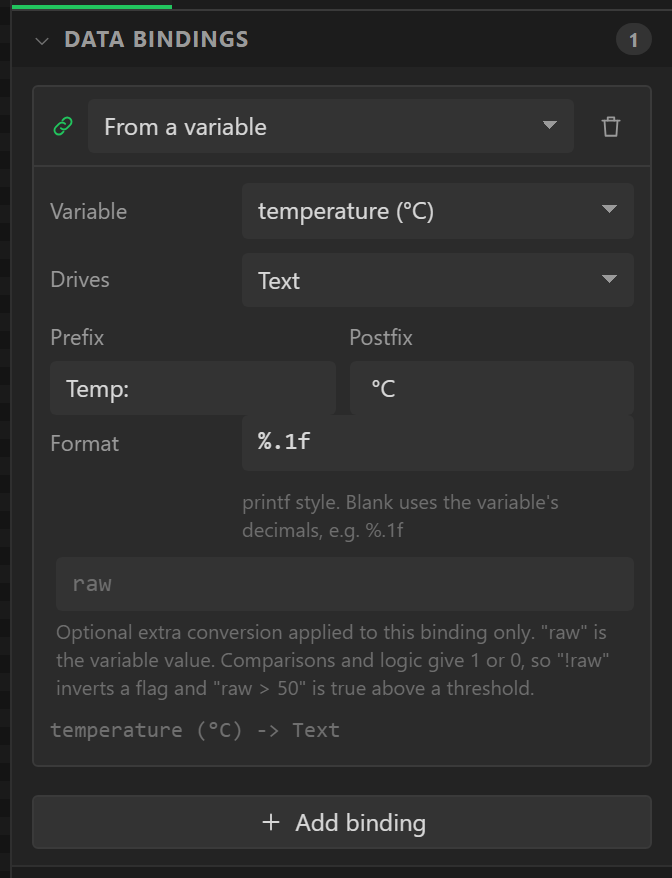
Select a widget and scroll the Inspector to Data bindings. A binding is either From a variable or From another control (the value of a slider driving a label directly, with no variable in between). Fields:
| Field | Meaning |
|---|---|
| Variable / Control | The source - a variable, or another widget and its property. |
| Drives | The property on this widget: Text, Value, Checked, Selected index, Hidden, Disabled, Background colour, Text colour, Opacity, Push onto chart, Hue, Saturation. |
| Series | For Push onto chart: which of the chart's series receives the value. |
| Direction | Variable → widget, Widget → variable, or Both ways. Offered on controls only. |
| Prefix / Format / Postfix | For Text: a printf format such as %.1f, wrapped in fixed text. |
| Formula | A binding-level formula applied to the value on its way into the widget. |
Which properties are offered depends on the widget - Value and Range end (max) for a slider, bar or arc, the second of which is where its range stops, its start as set; Checked for a switch or checkbox; Selected index for a dropdown or roller; Text for a label or button; Push onto chart for a chart; Hue and Saturation for a colorwheel; Rotation, in degrees, for an image - which is how a compass card or a hand-drawn needle follows a value; Value for a Notification badge, which is its count, and Text for a QR code, which is what it says; Hidden, colours and opacity for anything.
X position, Y position, Width and Height are offered on every widget (all but a map
marker's place, which its map sets, and a roller's height, which its visible rows set). They are
pixels, the same as the widget's own X, Y, Width and Height: counted from the inside of its parent
and from its Align. So a widget can be moved and sized by a value - a sprite steered by a
Joystick, a bar that grows, a marker that slides along a scale.
The usual way is a variable that an automation works out, such as
clamp(ShipX + JoyX * Speed, 0, 256) every 20 ms, with the widget's X bound to it:
the clamp keeps it inside its parent. A widget a Flex or Grid layout places is put
where the layout wants it, so a bound X or Y there moves nothing (the Problems tab says so); tick
Ignore layout on it to let the binding move it. ESPHome carries all four; Rotation is
Arduino, ESP-IDF and MicroPython only.
Disabled is offered on what a finger works - a button, slider, arc, switch, checkbox, dropdown, roller, spinbox or text area. While the value is true the widget is in LVGL's disabled state: greyed as the theme has it (or as its own Disabled state is styled) and deaf to a touch. It is how one control waits for another - a Play button bound to "Recording", a Record button bound to "Playing" - with no event and no code.
Direction
A binding on a control - slider, arc, switch, checkbox, dropdown, roller, spinbox, colorwheel, textarea - can run Variable → widget, Widget → variable or Both ways. A two-way binding is a setpoint: the firmware shows the variable, and touching the widget writes it back, where automations and other bindings see it on the next refresh.
One consequence to know about: a read-only binding overwrites what a finger did every
refresh, because bindings_apply() runs unconditionally. A slider that should stay
where the user put it wants Both ways. The preview behaves
identically, so you will see it before the device does.
Text formatting
For a Text binding the value is formatted with a printf format (%.1f by default
for a Float, %d for an Integer) between a prefix and a postfix:
Temp: + %.1f + °C. A Boolean bound to Text shows
1 or 0 unless a binding formula turns it into something else.
A picture from a web address
An Image has one more thing a binding can drive: Picture from a web address. Bind it to text that is an address - an album cover's out of a web answer, a weather icon's - and the board fetches what is there, reads it and shows it in the Image's box, in place of the Image's own picture. When the text changes, the new picture is fetched. Arduino export, on an ESP32; it is free.
| Field | Meaning |
|---|---|
| Variable / Control | Where the address comes from: a Text variable, or another control's text. A number is refused: an address is text. |
| How it fits | All of it, as large as fits (what is behind shows where it does not reach an edge), Fills the box, edges cut, Stretched to the box, or Its own size, which is the sharpest for a picture made for the size it is shown at. |
| Largest file | In KB. A larger file is refused, and the board says so. The whole file is held while it is read, so a board with no PSRAM starts with a small limit. |
| Before it / After it | For a value that is only part of an address: an icon's code 10d between https://openweathermap.org/img/wn/ and @2x.png. |
What to know before relying on it:
- PNG and JPEG are read. A progressive JPEG is read at an eighth of its detail, which is all its reader takes from one. GIF, WebP, BMP and SVG are not read. A picture more than 4096 pixels on a side is refused.
- The Image's own picture is the placeholder. It shows until a picture has arrived, and
again when one cannot be had - no network, an address that gives a page, a file over the limit, no
room in memory. Why is said on the serial port, once, in words, and
webimg_error(ui_YourImage)hands the same sentence to code of your own. An empty address is the Image's own picture and no error. - It costs memory. A fetched picture is made the size of the Image's box: two bytes a pixel, three where it is see-through or does not fill the box - 115 KB or 173 KB for 240 × 240. While the next one is fetched the file is held as well. On a board with PSRAM that is where it all goes. On a board without, it comes out of the chip's own memory, which has perhaps 100 KB to spare once WiFi is on: keep the Image and the limit small, and expect the firmware to say "not enough memory" where they are not. The Errors tab gives the figures for your design.
- The address is used whole when it comes from web data, MQTT or a network message, whatever the variable's Length is. A Text variable nothing fills keeps only its Length, so give one that is to hold an address room for it - up to 255.
- https is not verified, as with web data: the picture is private on its way and not proved to be from who the address says.
- The designer fetches nothing. The canvas, Preview and a gallery picture show the Image's own picture; the fetched one is the board's.
- It needs one library, JPEGDEC, which
LIBRARIES.mdin the export lists with its version. The MicroPython and ESPHome exports do not write it, and say so.
The refresh loop
app_poll() runs every pass through loop(). Every 100 ms it calls
vars_update(), which evaluates each variable's formula over the current cached reading
(saving the previous value first, so prev() and delta() work), then
bindings_apply(), which pushes every variable into every widget bound to it, and then
the automation checks. Hardware is read separately by
hw_poll() at each device's own interval, so the 100 ms tick is the rate at which
the screen updates, not the rate sensors are hammered.
Writing variables from events
The Set variable action, on a widget event or an automation, writes a variable in one of five ways: a fixed value, a formula, an amount added to it, a toggle for a Boolean, or the value of a widget. It marks the variable so bindings pick it up on the next refresh. Between a two-way binding and this action, most control logic needs no hand-written code at all.
Validation
The validator errors on two variables with one name, a formula that does not parse, a formula referencing a name that does not exist, a variable pointing at a peripheral that was removed, a binding with no control or variable selected, a binding to a variable that was removed, a chart binding onto a series that does not exist, and a widget bound to itself. Each message names the widget or variable.