Joining a network
One widget that scans, asks for a password on the panel, and remembers it.
Getting an ESP32 onto WiFi is the same work every time: scan without freezing the screen, show what was found, take a password, say something useful when it fails, and keep the answer so the next boot is silent. WiFi Setup is that work as a single widget. Drop it on a screen and the generator writes the whole flow.
It is on the palette for the Espressif chips only - ESP32, S2, S3 and C3. On an STM32 or an
RP2040 the tile is greyed with the reason, because the code behind it is the Arduino
WiFi library.
The flow
Search, select, enter pass, verify. Four states, and the password is typed at exactly one of them - on the device, by the person holding it.
| State | On screen | Leaves by |
|---|---|---|
| Search | "Searching…", then the list | a scan finishing, or Search again |
| Select | Networks strongest first, with a lock where one is needed | picking one |
| Enter pass | A masked field and a keyboard | the keyboard's tick, or its cross |
| Verify | "Joining…", then joined, or why not | success, or back to the list |
An open network skips the middle step: there is nothing to type.
Settings
| Setting | Default | What it does |
|---|---|---|
| Title | Select network | The heading above the list. |
| Go to when joined | (none) | The screen to move to once it is on the network. Only fires while this screen is the one on show, so a background reconnect does not pull somebody off whatever they were reading. |
| Go to on Back | (none) | Puts a Back button on the list. Worth setting: without it the only way off this screen is to join something, which strands anybody who opened it by accident. |
| Reconnect on boot | on | Rejoins the stored network at startup without asking. |
| Join timeout | 20 s | How long to wait before giving up and saying so. |
| Show Forget | on | A button that clears the stored network and starts a fresh scan. |
| Access point | Off | Off, when it cannot join, or always on. See below. |
Where the password goes
The widget writes two settings, and your design has to
declare them: wifi.ssid and wifi.pass. The second must be marked
secret, and the designer says so if it is not.
A secret is different from an ordinary setting in three ways, and all three exist to make one rule structural rather than a matter of care:
- Nothing reads it back. The generated
lw_config.hhas no accessor that returns a secret as a string - only one that fills a buffer for the connection code and one that says whether there is a value at all. A label cannot show what it cannot obtain. - It is never in your design. A secret carries no default, so it does not travel with a copy, a published project or an export. The Settings panel shows "Set on device" instead of a value.
- It is never exported. The settings file names the keys it left out rather than writing them. Knowing a key exists is not knowing its value.
There is no field anywhere in the designer for typing a station password, and no reveal
control on the device - LVGL normally shows each character for a second and a half as it is
typed, and the generated lv_conf.h turns that off.
Access point mode
The board can be its own network, either as a fallback when it cannot join anything or all the time. Unlike a station password, the access point's is configured in the design - it has to be, because an access point publishes the password people need in order to reach it. There is no earlier moment at which somebody could have entered one.
| Setting | What it does |
|---|---|
| AP name | What the network is called. |
| AP password | Empty leaves it open. Otherwise eight characters minimum: softAP() given a shorter one returns success and brings the network up open without saying so, which is why the designer refuses that range rather than warning about it. |
| Do not broadcast | The network is there but does not appear in a scan. You join it by typing the name. |
Set up from a phone
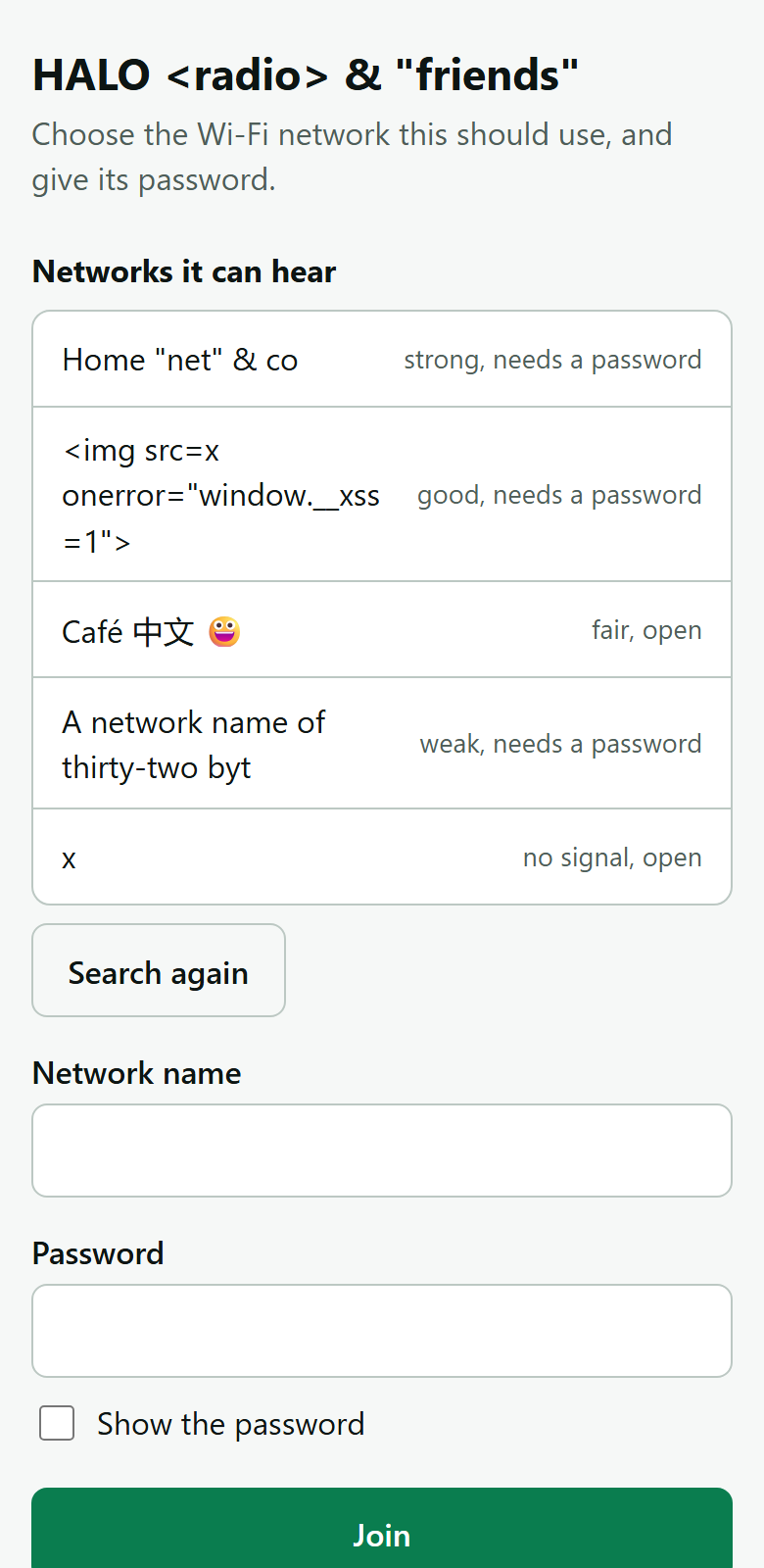
A password cannot be typed on a screen an inch across. WiFi by phone is the other way in: the board starts a network of its own, a phone joins it, and the phone is shown a page - the networks the board can hear, and a box for the password. The board keeps what is chosen and joins. Nothing is typed on the panel at all.
It is in the palette under Ready-made, for the Arduino export on the Espressif chips with Wi-Fi, and is free on every plan - the widget, its action, and the QR code that shows its join code. A design may have it instead of WiFi Setup, or beside it - the two keep the network in the same two settings.
What somebody does
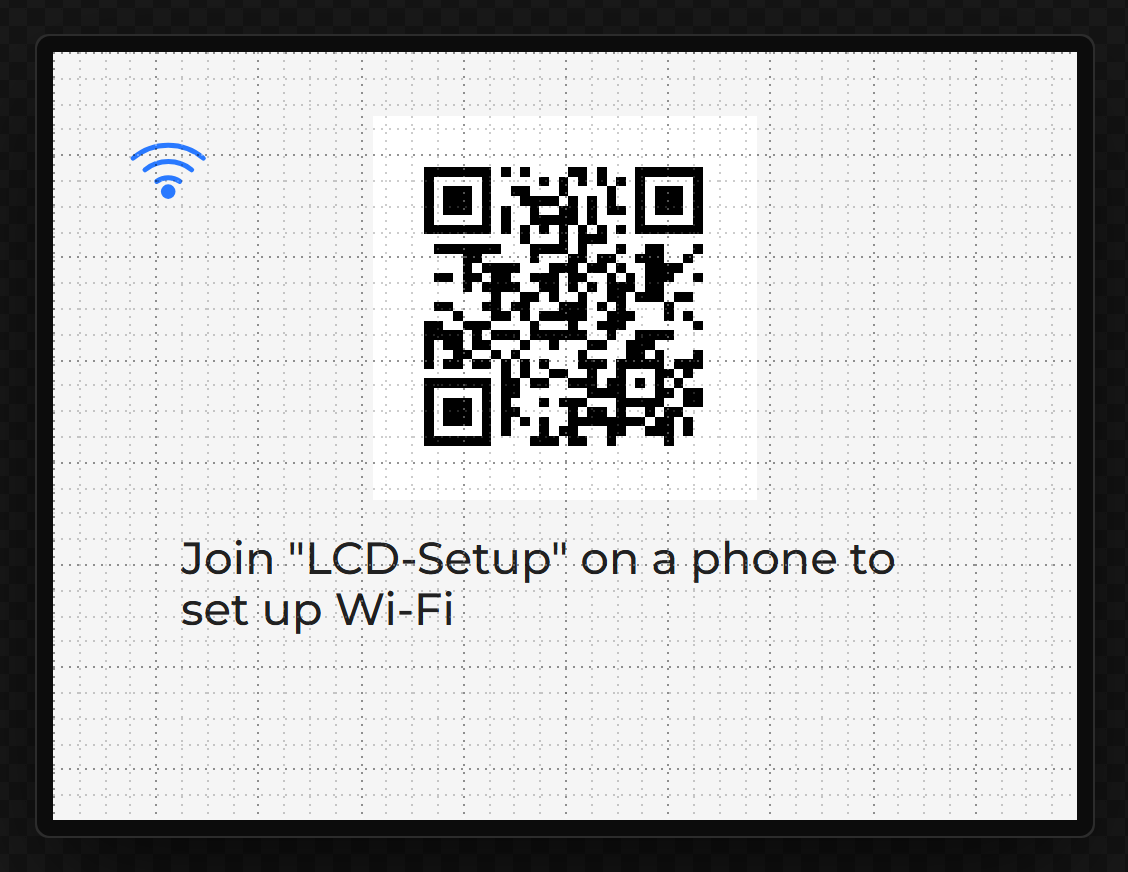
- Points a phone’s camera at the code on the panel - or joins the board’s network by its name. The code carries the network’s password, when it has one.
- The phone opens the page by itself, as it does for a hotel’s network. Where a phone does not, the line on the panel gives the address to open.
- Picks a network from the list, or types its name; gives its password; presses Join.
- The page says what became of it - joined, and the address the board was given, or why not - and the board’s own network then closes.
Putting it in a design
- Drag WiFi by phone onto a screen. It is an icon: the Wi-Fi mark, in the colour of what setting up is doing.
- In its Inspector, press Add the QR code and Add the line that says. The first puts the code a phone scans on the screen; the second a label that says what to do next. Both are ordinary widgets, bound to two of the values below, and yours to move and restyle.
- Give the board’s network a name and - better - a password of eight characters or more.
That is all a first set-up needs: with no network to join, the board offers the page by itself.
| Setting | Default | What it does |
|---|---|---|
| Network name | LCD-Setup | The name of the board’s own network. 32 bytes at most, which is Wi-Fi’s limit. |
| Its password | none | Empty leaves the board’s network open, so anybody near can join it and choose the network the board joins. Eight characters or more otherwise. |
| Offers the page | While it has no network | While it has no network: when there is nothing to join, or the network it knows cannot be joined; gone about twenty seconds after it is on one. All the time: always there, beside the network it has joined. Only when an action opens it. |
| Page heading | Wi-Fi setup | What the page says at its top. The name of the thing being set up reads best. |
| Reconnect on boot | On | Joins the network it was given at start-up. |
| Join timeout | 20 s | How long a try is given. |
| Size, and a colour for each state | 32 px | Not connected, waiting for a phone (it flashes), a phone is connected, joining, on a network, could not join. |
What it has to show
The widget draws a mark and nothing else. What there is to read is values, on the Data tab under Network:
| Value | Type | Notes |
|---|---|---|
| The code a phone scans | Text | For a QR code: a phone’s camera reads it and joins the board’s network, password and all. |
| What to do next | Text | A sentence for a label: which network to join on a phone, that it is joining, the network it is on, or why it could not join. |
| What it is doing, as a number | Integer | 0 not connected, 1 waiting for a phone, 2 a phone is connected, 3 joining, 4 on a network, 5 could not join. |
| Phones on its network | Integer | How many are joined to the board’s own network at the moment. |
The access point’s name and address, and every value in the table further down, are there as well.
Opening it again
The action WiFi by phone does one of three things, from a button, a long press or anything else that fires an event: Open the page brings the board’s network and the page up now, whether or not it is on a network, until a network has been chosen; Close the page stops it; Forget the network it joined drops the network from the board’s settings, and the page then comes up for another.
Worth knowing
- Only a phone on the board’s own network is answered. The page is not there for the network the board has joined.
- The password is kept as WiFi Setup keeps it: in the board’s settings, as a secret nothing reads back. It is not in the design.
- A router that was slow to come up is tried again. While the board is waiting for a phone it tries the network it knows once a minute, so a power cut does not leave it waiting for somebody.
- One radio does both jobs. While the board tries a network its own may stall for a few seconds; the page waits and then says what happened.
- Beside a Web server the page has port 80, because that is where a phone looks, and the Web server is moved to port 8080 when the second of the two is dropped.
- How far it has been tested: it compiles for the ESP32, the S3 and the C6, the page has been driven in a browser against a stand-in for the board, and the code that reads what the page sends is held to known answers. It has run on an ESP32-S3 board, set up from a phone; not yet on an original ESP32 or a C6.
The page’s own look (Pro)
WiFi by phone is free, and the page it shows is the one it always was. Part of Pro is making that page yours: switch Own look (Pro) on in the widget’s settings. It is the one setting for the page every phone sees on the board’s network - the WiFi by phone page is the only sign-in page the Arduino export serves, and the phone’s own “sign in to this network” sheet opens it. Arduino export.
| Setting | Default | What it does |
|---|---|---|
| Page heading | Wi-Fi setup | The page’s heading and title. |
| Logo, Logo height | none, 64 px | A picture from the design, sent to the phone as the file it was added as (PNG, JPEG, GIF, WebP or SVG). Keep it under 24 KB: it is compiled into the firmware. |
| Background, Text, Buttons and accent | #F6F8F7, #0D1513, #0A7D4F | The three colours of the page. |
| Stylesheet | portal.css | A file in the export’s data/ folder (the flash filesystem), linked after the page’s own styles so its rules win. Empty for none. A starter is in the export; upload the data/ folder for it. |
Everything comes from the board: a phone on its network has no internet, so no fonts or pictures from elsewhere. From code: lw_portalbrand.cpp has
portal_brand_configure(portal_brand_t *b), run the first time a phone asks for the page, with b->title, b->bg, b->ink, b->accent (as #rrggbb),
b->css_file, b->logo, b->logo_len, b->logo_type and b->logo_height. What it sets wins over the designer. The export writes the file afresh: keep your copy.
The board’s name service and the 80 / 8080 arrangement beside a Web server are untouched. Compiled; not yet run on a board.
Wi-Fi switched by the design
Two actions, free as Wi-Fi is, for a design with a WiFi Setup or WiFi by phone (Events). Wi-Fi on or off takes the radio off the air - no network, no access point - and brings it back, rejoining the stored network; it is on at every power-up. Set Wi-Fi network takes a name and a password from a text area, a variable or a setting, stores them where the panel and the phone page store theirs (so a restart joins them) and joins now, switching Wi-Fi on if it was off. The password is never printed, never in the README and never in the design: a variable it is read from must start empty. A Web server in the design starts and stops with Wi-Fi. Arduino export; the MicroPython, ESPHome and ESP-IDF exports say so and do not write them. On an ESP32-P4 whose Wi-Fi is its co-processor’s, switching off is not written yet.
Joining by WPS: the router’s button
One more way in, with nothing typed, for a design with a WiFi Setup or WiFi by phone (Events). Join Wi-Fi by WPS on a button starts it; then press the router’s WPS button within two minutes. The network the router hands over is stored where the panel and the phone page store theirs, so a restart joins it again and Forget forgets it. If no router answers, or WPS fails, the board says so and joins the network it had stored before. Add a WPS button in a WiFi widget’s Inspector adds the button and a label that says what WPS is doing. Push-button mode only. Arduino and ESP-IDF exports; the MicroPython and ESPHome exports say they have no WPS and do not write it. Not on an ESP32-P4 whose Wi-Fi is an ESP32-C6 beside it: ESP-Hosted has no way to start WPS there, and the export refuses. Compiled; not yet run on a board.
What a design can read
The network is a set of variable sources, so an IP address goes on a label through an ordinary binding.
| Value | Type | Notes |
|---|---|---|
| IP address | Text | Empty until it has joined. |
| Network name | Text | What it is joined to. |
| Signal strength | Integer, dBm | About -50 is excellent, -85 barely usable. -100 means not joined. |
| Signal bars | Integer | 0 to 4, for an indicator of strength. |
| Signal strength, 0 to 100 | Integer | The same strength as a share, for a bar: -90 dBm and below is 0, -40 and above is 100. |
| Link quality, 0 to 100 | Integer | Whether anything is getting through, not how loud the router is. 0 until it has joined. |
| Link quality bars | Integer | The same as 0 to 4. This is the one for a Wi-Fi indicator: it falls when packets are being lost, where Signal bars would not. |
| Connected | Boolean | |
| Last problem | Text | Why the last attempt failed. Worth putting on screen. |
| Access point running / name / address | Boolean, Text, Text | Offered only when the widget runs an access point. |
| WPS: what it is doing, and as a number | Text, Integer | Offered only with Join Wi-Fi by WPS in the design. 0 not started, 1 waiting for the router’s button, 2 joining the network it gave, 3 joined, 4 failed, 5 timed out. |
The text ones need a Text variable.
Quality is not strength
A strong signal says the router is loud. It does not say that anything is getting through: a busy channel, a router that has stopped passing traffic or a neighbour's network on top of yours all leave the bars full and the connection useless. So Link quality is measured. In a design that reads it, the board asks its router once a second - a ping, sixteen bytes - and the figure is the share of the last eight seconds' checks that were answered, marked down as the signal weakens: by nothing at -50 dBm, by three quarters at -90. Four bars is 75 and above, three is 50, two is 25, one is anything above nought.
Two things to know. A router can be set to answer no ping at all; until a router has answered one, the figure goes by the signal alone, so such a network reads as its strength and no worse. And the check is to the router, not to the internet: a router that has lost its own line still answers. A design that never reads either value does not ask, and its firmware is what it was.
Wi-Fi on an ESP32-P4
The ESP32-P4 has no radio. The boards that give it Wi-Fi carry a second chip beside it - an ESP32-C6 - wired to the P4's SDIO lines and running Espressif's ESP-Hosted firmware, which makes the C6's radio the P4's. In the designer that chip is a device: Hardware > Devices, under Network, Wi-Fi co-processor. With it in the design every Wi-Fi feature works on the P4 as on any ESP32 - the WiFi Setup and WiFi by phone widgets, web data, MQTT, network data, the Web server and Firmware update, a Clock's time server, the Internet Radio, the AI Assistant and the link-quality values. Without it they are greyed, and say how to add it. For the Arduino export, with nothing to install, because ESP-Hosted is part of the ESP32 core; and for the ESP-IDF export, which takes ESP-Hosted and esp_wifi_remote from Espressif's component registry at the releases that core carries (2.12.11 and 1.6.3), so the C6 runs the same firmware for either.
The P4 board presets that have a C6 bring the device with them, on the board's own pins - every P4 preset here has one: Waveshare's ESP32-P4-WIFI6-Touch-LCD 10.1, 7B and 3.5, their ESP32-P4-NANO with each of its three DSI-TOUCH-A screens, VIEWE's 7" SmartDisplay, Elecrow's CrowPanel Advanced and Guition's JC1060P470C, which has the cable as well. For a board of your own, set its six SDIO lines (CLK, CMD, D0-D3) and the P4 pin that resets the C6 (its EN); they start where Espressif's own P4 board has them: CLK 18, CMD 19, D0-D3 14-17, reset 54. The link to the C6 is brought up in a task of its own on core 0 when the board starts, so the screens never wait for it; Wi-Fi starts once it is up. It runs at the ESP32 core's 40 MHz, which the export cannot lower: the core sets the link up itself and takes only its pins from a sketch.
The C6 has to run ESP-Hosted of the release the ESP32 core expects - the same first two figures: 2.12 for core 3.3.11, which the export's PlatformIO build uses (2.12.11), and for 3.3.12 (2.12.13). A board leaves the factory with whatever its maker put on the C6. The board says both versions on the serial port at start, and a variable can read whether they match (the device's Its firmware matches this build). If they do not, Update my C6 on the board's page writes the core's release to the C6 from the browser, with no Wi-Fi and no password (how, and why). Or the core's own example updates the C6 over the same link: File > Examples > ESP_HostedOTA in the Arduino IDE, with your network's name and password. The export's README has the steps, with this board's pins filled in. A C6 too old or too different for that is flashed directly, through the pads its board brings out for it, as the board's maker says. A C6 that does not answer says so on the screen of a WiFi Setup: The Wi-Fi co-processor is not answering. The link is tried once, at start.
In the ESP-IDF export the C6's seven lines are written into sdkconfig.defaults
(CONFIG_ESP_HOSTED_*), which ESP-Hosted reads before the program starts, and the
link's 40 MHz is a setting there that can be lowered if the link drops or a panel shows streaks
while Wi-Fi is busy. ESP-Hosted has the P4's SD interface slot 1, so an SD card on that interface
is on slot 0's own pins - CLK 43, CMD 44, D0-D3 39-42, where Waveshare's boards have it - and the
designer says so of a card anywhere else. The serial port says what the C6 answered, or that it
did not, as on Arduino; its README says how to update the C6 with ESP-Hosted's own example.
Not through the co-processor here: ESP-NOW, so the Two-way radio is not on a P4, and Bluetooth, which the core can reach through the same chip and this export does not drive there yet. MicroPython and ESPHome do not build for the P4 yet. Nothing here has run on a board.
Wired Ethernet
A board can join a network over a cable instead, or as well. It is a device, not a widget: Hardware > Devices, under Network. For the Arduino export; there is nothing to install, because ESP-IDF's Ethernet driver is part of the ESP32 core. The address comes from the network (DHCP). The driver's own task runs on core 0, beside the network's tasks, so the screens keep the other core to themselves.
| Part | Chips | Wiring |
|---|---|---|
| Ethernet over SPI - a W5500 module, a DM9051 or a KSZ8851SNL | Every ESP32: the original, S2, S3, C3, C5, C6 and P4 | SCK, MOSI and MISO on an SPI bus of the design, CS on a pin of its own, and INT and RST. Each works without INT, and is then asked for news every 10 ms. Not on the panel's SPI pins: the panel's library does not share them. An SD card can share its bus. |
| Ethernet PHY on RMII - a LAN8720, IP101, RTL8201, DP83848, KSZ8041 or KSZ8081 | The original ESP32 and the ESP32-P4 only: they have the Ethernet controller | MDC, MDIO and the PHY's reset are yours to set. The data lines are fixed: GPIO 19, 21, 22, 25, 26 and 27 on an ESP32, with the 50 MHz clock on GPIO 0 (in, or out) or 16 or 17 (out); GPIO 28, 29, 30, 34, 35 and 49 on a P4, with the clock in on GPIO 50. The device card lists them, and the designer refuses anything else on them - the ESP32's DAC included. |
A board preset whose board has an Ethernet socket brings the port with it, already on its pins. Guition's JC1060P470C is the first: an IP101 on the ESP32-P4's own Ethernet pins.
Everything that uses the network works over the cable as it does over Wi-Fi: web data, MQTT, the Web server and Firmware update, a Clock's time server, network data, pictures from a web address, a camera's stream, a radio's playlist and a microphone's send. An ESP32-P4 has no Wi-Fi of its own, so with a cable it gains the Clock, the Weather card, the Web server and the Firmware update. What it says of itself is a set of variable sources, under Ethernet: connected, the IP address, cable connected, the link speed, full duplex, the MAC address and a sentence saying what it is doing. The device card makes a variable for any of them in one press.
Wi-Fi and Ethernet can both be in a design. With both connected the board sends over Wi-Fi: that is ESP-IDF's own order. Two things choose a network of their own, and the setting appears only in a design with both:
- Answer on, on a Web server (and a Firmware update, which is the same server): Wi-Fi
only, Ethernet only, or Wi-Fi and Ethernet. It starts as Wi-Fi only: pages, uploads and new builds
are the heavy traffic, and an Ethernet chip on SPI carries every byte of them across its SPI bus,
where Wi-Fi is the chip’s own radio. The server still listens on every address - that is
how ESP-IDF's server is made - and a connection made to the board's address on the other network
is closed before anything is read from it. The address on the card is the chosen network's. A
name on the network (
kitchen.local) is answered on both; a browser that follows it on the wrong one is turned away. - Reached through, on a Modbus TCP device: Ethernet, Wi-Fi, or whichever is connected. It starts as Ethernet: a cable is the steadier way to a machine, and a few registers a second are little for the bus to carry. Chosen, it connects only through that one, and waits while that one has no address.
One Ethernet port at most. Not yet: a fixed address, MicroPython, ESPHome (which has an Ethernet component of its own, in place of its Wi-Fi block). Nothing here has run on a board yet.
Two things the hardware does
Scanning drops an existing connection. On the ESP32 the radio cannot do both, so the widget only ever scans from the picker, never behind a working link - and when you open the picker while already joined, it remembers what you were on and rejoins it if you leave without picking anything. Search again from a working link therefore costs you a few seconds offline, not the network. Forget is the one thing that clears that memory, which is what makes it different from Back.
ADC2 does not work while WiFi is on. On the classic ESP32 that is GPIO 0, 2, 4, 12-15 and 25-27. An analog input on one of those reads garbage once the radio comes up, so the designer refuses the combination and points you at ADC1 - GPIO 32 to 39.
When it fails
Three different things go wrong and each says so, because "failed" on its own sends people to reset a router when they mistyped a key:
- That network is not in range - the SSID was not found.
- Wrong password - the access point refused the key.
- Timed out - nothing answered inside the join timeout.
In the preview
A browser cannot scan, so preview shows a plausible list and walks the real flow - pick, type, join, succeed, fail - with the same masking and the same failure text. It is the one part of the designer that is a simulation rather than the thing itself, and it is there so the layout and the failure screen get looked at before anything is flashed.