Export
Every file the generator writes, what it is for, and the one you are meant to edit.
Export is where the project becomes a folder of source. It happens on the server - the generator and its hardware tables are not part of the designer - and it is the one thing in the application that is metered. Export > Export UI code, the Export button in the toolbar, or Ctrl+E opens the dialog.
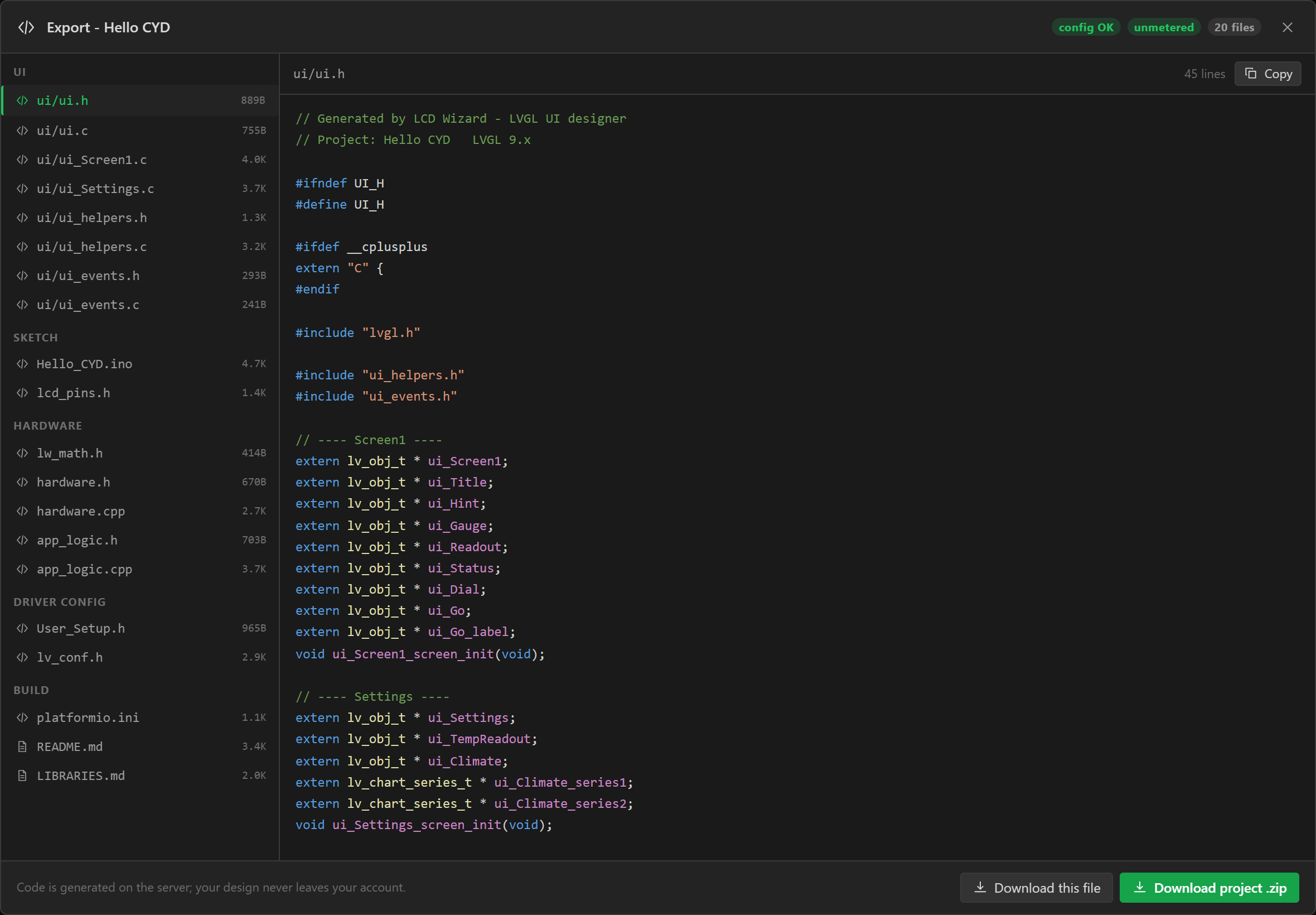
The dialog
- Choose the target on the tabs across the top: Arduino (C++), the project this page describes, or MicroPython for lvgl_micropython on an ESP32 - see MicroPython export. The choice is saved with the project.
- The project is validated for that target. Errors are listed and block the build; warnings are listed and do not. No configuration errors means you can go ahead.
- Generate code sends the project, and the decoded pixels of any image assets, to the server. If you are not signed in and have used the guest allowance you are asked to sign in here, and the build continues once you are. An unconfirmed email address is refused with a Resend the link button.
- The file list appears on the left, grouped; click one to read it on the right, copy it, or download it alone. Download project .zip takes the whole folder. The zip is part of the same generation, not a second one.
The Your plan box in the dialog shows what you have used this period and where the allowance stands - Accounts and limits.
A design with Pro components
Some ready-made pieces are part of Pro: the Show toast action, an event that asks first, and the Notification badge, QR code and Weather card widgets, and a web data source made from a preset, with more to come. Anybody can add them to a design and try them in preview. Generating code for a design that uses one needs Pro, and the export dialog says so before anything is asked for: which pieces they are and what in the design uses them, what Pro costs and includes, and a button that buys it. Pro is paid once. Take the pieces out and the design generates on your plan as it is. A build that is refused costs nothing.
Export settings
| Section | Setting | Meaning |
|---|---|---|
| Project | Name | The project name; the folder and the .ino are named from it. |
| Project | Code prefix | The prefix on generated identifiers and files, ui by default: ui_init, ui_Screen1. |
| Project | LVGL version | 9.x or 8.3.x. |
| Rendering | Buffer height | The partial draw buffer in lines. 40 by default; lower it on a small MCU or a large panel. |
| Rendering | Double buffer | Two buffers, so LVGL renders one while the other flushes. |
| Rendering | Buffer in PSRAM | Allocate the buffers in external RAM. Only offered where the MCU has it. |
| Files to generate | Arduino sketch and pin header · Graphics driver configuration · lv_conf.h · platformio.ini | Untick what you already have - for instance when dropping the src/ui/ folder into an existing sketch. |
Every file
| File | What it is |
|---|---|
<Name>.ino | The sketch: the panel, the backlight, LVGL's display and flush callback, setup() and loop(). |
lcd_pins.h | Every pin and timing value as a #define, with the board and panel named at the top. |
touch.h / .cpp | The touch panel, when there is one: the controller's reset, bus recovery and reads, turning a touch into screen coordinates, the on-board calibration of a resistive panel, and the LVGL input device. The sketch calls touch_hw_init(), touch_calibration_begin() and touch_lvgl_init(). |
User_Setup.h | TFT_eSPI configuration - copy over the library's own. The same defines are in platformio.ini, so PlatformIO needs no copy. |
LGFX_Config.hpp | The LovyanGFX device class, included by the sketch. (One of these two, depending on the library.) |
lv_conf.h | LVGL configuration: colour depth, the Montserrat sizes you use (and LV_USE_FONT_COMPRESSED when a library font is used), the widgets you use, memory size. |
platformio.ini | Board, framework, lib_deps, build flags, and on an ESP32 the flash size, PSRAM kind and partition table. |
partitions.csv | ESP32 only. How the flash is divided between the firmware and the filesystem - the Partitions setting on the Board tab. PlatformIO reads it through platformio.ini; the Arduino IDE uses it because it sits beside the sketch. |
README.md | The target, a wiring table, and - for a design with any - a Devices section: each bus, each device with its pins, what is particular to it on that board, every value it gives and the call that reads it, each I/O expander’s lines, the analog inputs and the digital I/O. Then the file list, build steps for both IDEs, configuration notes, a troubleshooting table, and a link to your board's page with badge markdown for crediting the design. |
LIBRARIES.md | Every library, with search names and links. |
hardware.h / .cpp | Buses, peripherals, extenders, analog and digital I/O; hw_init() and hw_poll(). |
app_logic.h / .cpp | Variables, bindings and automations; app_init(), app_poll(), vars_update(), bindings_apply(). |
lw_math.h | The helpers formulas compile to: _lw_mapf, _lw_clampf. |
src/ui/ui_fs.h / .cpp | Registers the board filesystem with LVGL as a drive letter. |
data/*.bin, data/README.md | Image assets in LVGL binary format, and how to upload them. |
data/touch_cal.txt | The resistive touch calibration file, holding the starting values (touch_cal_ran=0, swap_xy, the raw range). The board keeps it up to date; uploading it is optional. |
src/ui/ui.h / ui.c | Declarations of every object, ui_init(), the theme. |
src/ui/ui_<Screen>.c | One per screen: creates its widgets, styles, events. |
src/ui/ui_helpers.h / .c | The helpers generated event code calls - screen change, flag and property setters, animations - and the declarations of any library fonts and icon fonts, with a UI_ICON_... name for every icon. |
src/ui/fonts/ui_font_<name>_<size>.c | One per library font and size the design uses, converted for LVGL, falling back to the nearest Montserrat size the design uses for characters it lacks. |
src/ui/fonts/ui_font_icons_<size>.c | One per size the design draws icons at, holding just the icons used at that size. ui_helpers.h declares them and names each icon as UI_ICON_<NAME>. The icons are public domain and need no licence file. |
src/ui/fonts/LICENSES.md | The SIL Open Font License and credit for each of those fonts. Keep it with them. |
src/ui/ui_backlight.h / .cpp | What a Set backlight action calls: sets the level through the sketch's backlight_set(), and keeps every slider, arc, bar, switch or checkbox the level is read from showing it. |
src/ui/lw_messages.h / .c | A design that shows a toast or asks first: the message and the question, drawn over whatever screen is showing. ui_toast() is yours to call too. |
src/ui/lw_parts.h / .c | A design with a Notification badge, a QR code or a Clock: the mark and its count, the code and what it says, the label that keeps the time. ui_badge_set() and ui_qr_set() are yours to call too. |
lw_web.h / .cpp | A design with web data: a task that asks each source, the reader that takes the values out of the answers, and an accessor for each. web_<source>_ask() and the values are yours to call too. It holds the keys you typed. |
lw_clock.h / .cpp | A design with a Clock, or a variable that reads the time: the time asked of a time server, and worked out for each zone the design shows. clock_now() is yours to call too. |
src/ui/ui_events.h / .c | Stubs for Call function actions, for you to fill in. Written fresh by every export: keep your own copy. |
hardware.*, app_logic.*, lw_math.h,
ui_fs.cpp, src/ui/fonts/, ui_backlight.* (a Set backlight action on a board with a
backlight, or an AMOLED panel that dims itself) and data/touch_cal.txt (a resistive touch panel that calibrates on the
board) are written only when the project uses them. The screen files are one per
screen, named from the screen's name.
What is yours and what is regenerated
Every file in the zip is written fresh on every export, src/ui/ui_events.c
included. That file holds the stubs for your Call function actions, and unzipping a new
export over your folder replaces a copy you have edited with empty stubs. So either keep your own
copy of it and copy it back after each export, or put your code in a file of your own beside the
sketch, which no export contains, and tick Do not export to code on the events whose
functions are there - see Your own code. Edits to any other generated file are lost on the next export; if you find
yourself hand-editing lcd_pins.h, change the pin in the designer instead.
Inside the sketch
setup() starts serial at 115200, initialises the panel through the chosen library
(with any board-specific power-enable first), then starts the backlight at its default level -
after the panel, because TFT_eSPI's begin() takes a PWM backlight pin back otherwise.
It brings up the touch controller with touch_hw_init(): an I2C one is reset, its bus freed if it is stuck and its
address probed; an XPT2046 is put into a known mode and checked; either way serial says whether it
answered. It initialises LVGL with a partial draw buffer, runs the touch calibration on a
resistive panel when it is due (touch_calibration_begin(), see Calibrating on the
board), registers the display and the touch input device (touch_lvgl_init()), calls
ui_fs_init() if there are filesystem assets, then ui_init() and
app_init(), and prints UI ready. loop() is
app_poll(), lv_timer_handler() and a five-millisecond delay; the
touch read, called by LVGL, resets an I2C controller that stops answering, and re-arms an XPT2046's pen interrupt.
All of the touch code is in touch.cpp, so the sketch itself is only the panel,
LVGL and the two Arduino entry points - about 120 lines for a CYD.
backlight_set(percent) and backlight_get() are defined in the sketch for
your own code too - PWM on ESP32 (LEDC), RP2040 and STM32 (analogWrite), or
lcd.setBrightness() on LovyanGFX.
lcd_pins.h is included by the sketch and by the driver config, so every pin and
timing number exists in exactly one place.
LVGL version
The project targets LVGL 9.x or 8.3.x, chosen on the Theme tab or in the export
settings. The generator
switches API names (lv_img_* / lv_image_*, lv_obj_clear_flag
/ lv_obj_remove_flag), the display and input registration calls, the theme call, the
chart tick API and the binary image header to match. platformio.ini pins
lvgl/lvgl@9.4.0 or @8.3.11 accordingly - an exact release, not a range,
because the code is written and compiled against that one. The two are not source
compatible: switch version in the designer and re-export rather than patching by hand.
In the Arduino IDE, install that same release from the Library Manager;
LIBRARIES.md in the export names it. An LVGL 9 project exported since October 2026
is written for 9.4.0 and will not build against an older LVGL 9 - a scale's coloured sections
are set with calls 9.2 does not have - so update the library when you re-export. A project you
exported earlier keeps its own pin and builds as it did.
Libraries
LIBRARIES.md lists every library the project needs - the Library Manager search
string, the author, the upstream link, and which part of the design needs it - with a separate
section for what is bundled with the board core, and copy-paste blocks for
arduino-cli lib install and lib_deps. It is built from the same
collector that writes platformio.ini, so the two cannot disagree. A touch controller
that the sketch reads itself is listed as needing no library.
Download project .zip from the Export menu
Separate from the code export: Export > Download project .zip bundles the project's JSON and its image assets for archiving or moving between machines. It costs nothing and needs no account.