Troubleshooting
A symptom, its usual cause, and where the fix is.
Most problems fall into one of four places: the board does not show the screen, the screen is wrong, the build does not compile, or the designer is telling you something. Each has a short list of usual causes.
Test my board first
When a board shows nothing, or is new to you, find out whether the fault is in the board or in the design before anything else. Test my board, on the Board tab of Hardware and in the Help menu, opens a test project made for the board the design is on and for its export. One screen at a time, it shows whether the glass, the colours, the touch, the backlight and each of the board's parts work. Generate it and flash it like any design: LCD Wizard builds no firmware itself.
On a board preset the test is made from the preset as it ships, so nothing changed in your design can be what goes wrong. On Custom / breadboard wiring, or a board saved under My boards, it is made from the design's own wiring, since there is nothing else to go by. Your design is not lost: the dialog says where it goes first, and when it is not saved to your account it is kept in the browser (Kept copy on the title bar downloads it).
The test holds nothing that is part of Pro, so it generates on any plan and with no account. The README that comes with its code says what each screen should show on that board. In outline:
| Screen | What it shows | What a fault looks like |
|---|---|---|
| Glass | A white frame just inside the edge of the glass, TOP and the two sides labelled, five colour squares named underneath, and which export and test is running. | The frame cut off on one side: the picture is shifted. Upside down or on its side: Rotation. Red and blue swapped: Colour order. A negative picture: Invert colours. All on the Display tab. |
| Touch | Keys that say which one was tapped. On a large panel, two more in the corners and one to hold down. | Nothing: the touch controller is not answering. The wrong key: Swap X/Y, Invert X or Invert Y on the Touch tab. More than one lift for one hold: the touch read lets go of a finger that is still there. |
| Controls | A ring, a slider, a switch and a counter. | A control that does not follow the finger: the touch again. |
| Light | The backlight on a ring, or a note that this board's light only switches. | Nothing dims: the backlight pin, or its active level, on the Display tab. |
| Scroll | A box and a list, each longer than it shows, to drag. | Nothing moves: drags are not arriving from the touch. |
| Sensors | A line for each part the board has: the IMU, a clock chip, the battery, an SD card, RS485, CAN, the buttons. | A part that reads 0 and never changes is not answering. |
| Data | A chart, fed by the IMU where there is one, and a count of seconds. | The count stops or runs slow: the screen is not being refreshed. |
| Assets | A picture compiled in, one read from the filesystem, icons and a second typeface. | No second picture: the filesystem image was not uploaded. A solid corner on a picture: its transparency was lost. |
| Animation | A spinner, and a block that moves and fades. | Anything else on the screen moving meanwhile: the panel's timing. |
| Audio | Where the board has a speaker and a microphone: the level, a recording played back, and the volume. | The bar never moves: the microphone. Nothing plays: the speaker or the volume. |
Swipe left and right between the screens, or press > at the bottom of each. Whatever the export cannot do, and what is part of Pro (the Animation and Timer widgets, the QR code, Bluetooth), is left out of the test, and the dialog and the README both list it. If the test works and your design does not, the difference is in your design, and the tables below are where to look. If the test stays dark too, send what you see with Report a problem and say which screen and which test it was: the first screen names both.
Some while after you generate code for a board that nobody has yet said works with that export, the designer asks Did your screen light up? in the corner of the canvas, or at the top of the export dialog the next time you open it. A yes marks the board as working with that export for everybody, and a no tells us of the fault the same day and offers Test my board and Report a problem on the spot. Answering is up to you: Not flashed yet asks again later, and closing the card means it does not ask about that board again.
On the board
| Symptom | Usual cause |
|---|---|
| Nothing on serial | Wrong COM port or baud (it is 115200); a charge-only cable; USB CDC On Boot not enabled on an S3 or C3 with native USB. |
White or black screen, UI ready printed | Backlight pin or its active level is wrong; or the panel is not initialised - wrong controller, bus or library driver on the Display tab. |
| White screen, nothing printed after the name | The panel init is hanging: SPI pins wrong, or a reset line not wired. |
draw buffer allocation failed | Lower Buffer height in the export settings. On an S3 with PSRAM, enable it in the IDE and tick Buffer in PSRAM. |
| Reboot loop as the UI starts | The same memory problem; or PSRAM enabled in the project but not in the IDE - on an ESP32 board with PSRAM, LVGL's memory pool is allocated there, so it stops at lv_init(); or an RGB panel without PSRAM. |
PSRAM ID read error or wrong PSRAM line mode at boot | The build is for the other kind of PSRAM. On an ESP32-S3, R2 and R4 modules are quad and R8 and R16 octal: set PSRAM on the Board tab to match the module code and export again, and in the Arduino IDE choose QSPI PSRAM or OPI PSRAM to match. |
| Colours inverted | Toggle Invert on the Display tab. |
| Red and blue swapped | Switch the colour order between RGB and BGR. |
| Mirrored or rotated image | Change Rotation, then fix the touch axes if they no longer match. |
| Touch does nothing | Wrong I2C address; the controller shares a bus that is not marked as shared; its reset line not wired (CST816S); INT pin wrong. Serial says at boot whether it answered - touch: ... answering or nothing answering, and for an XPT2046 whether it reads anything at all. |
| Touch stops working and only a power cycle brings it back | Fixed in exports from 14 September 2026 - export again. An XPT2046 could be left with its pen interrupt switched off, which it keeps through a reboot; the firmware now always switches it back on, at boot too. An I2C controller that stops answering is reset on every boot and again at run time, and serial says touch: controller stopped answering - resetting it. If that repeats, check its RESET wiring and power. |
| Touch offset or mirrored | Capacitive: Swap X/Y, Invert X, Invert Y on the Touch tab. Resistive: calibrate again - hold a finger on the screen for a second while powering on - since the calibration measures the swap and the direction of each axis from your taps. The success screen says what it found. |
| Touch works on part of the screen | Resistive: an old calibration, or one with calibration switched off and a raw range that is too narrow - calibrate again. Capacitive: the touch resolution does not match the display rotation. |
| A resistive touch is off, or the corner crosses appear at every boot | Recalibrate by holding a finger on the screen for a second while powering on. The crosses are meant to appear after every new firmware upload. If they appear at every boot, nothing is being saved: the screen says Calibration failed (and why) or Calibrated, not saved. Not saved means the filesystem did not mount - serial says touch cal: the LittleFS filesystem did not mount - so check the partition scheme has a spiffs partition. Serial also prints why calibration ran, the raw x and y of every tap, both axis fits and where each tap lands. |
| Calibration failed: the touch readings did not follow the crosses | Neither pairing of the controller's channels with the screen's axes moved with your taps - the readings are not reaching the board. Check the touch CS, MISO, MOSI, SCK and IRQ pins; serial prints the raw values of each tap. |
| Calibration failed: a tap was n px off its cross | One tap missed its cross by more than 30 pixels. Touch the centre of each cross, firmly, and hold briefly - tap to try again. |
| Touch stops working and only a power cycle brings it back | Export again. An XPT2046 could be left with its pen interrupt switched off, which it keeps through a reboot; current exports always switch it back on, at boot too. An I2C controller that stops answering is reset on every boot and again at run time, and serial says touch: controller stopped answering - resetting it. If that line repeats, check the controller's RESET wiring and power. |
touch: nothing answering at 0x.. at boot | The touch controller did not acknowledge its address after being reset: SDA, SCL, the I2C address on the Touch tab, or its RESET line. A GT911 picks its address from INT during reset, so wire INT or match the address it chose. |
touch: XPT2046 not answering at boot | Every reading is 0 or 4095, which is what nothing on MISO looks like: check the touch CS, MISO and SCK pins, and that touch is on the bus the Touch tab says. |
| Touch comes and goes on a CST816S or CST820 | Asleep, it stops answering until touched. Current exports tell it not to sleep; export again. |
| The backlight does not dim | Set backlight needs PWM dimming on (Display tab) and the backlight on a GPIO - on an I/O expander it only switches on and off. On a TFT_eSPI board, an export from before 14 September 2026 started the backlight before the panel, and TFT_eSPI then took the pin back: export again. The validator warns about both cases. |
| An ESP32-S3 with TFT_eSPI resets over and over and never draws | An export from before 8 October 2026 left TFT_eSPI on its own choice of SPI port, which Arduino core 3 gives no registers to: the first write to the panel is a crash (Guru Meditation, StoreProhibited, in a loop on the serial monitor). The export now sets USE_HSPI_PORT on every ESP32-S3: export again. In an older project, adding #define USE_HSPI_PORT to User_Setup.h (and -DUSE_HSPI_PORT to platformio.ini) is the same fix. |
| The screen went dark and stays dark | A Set backlight action took it to 0 % - a fixed level of 0, or a slider or Dimmer button with Never below set to 0. The level is not saved, so a reboot brings back the Default %. Leave Never below above 0 unless off is intended. |
| A brightness slider does not match the screen | It shows the level when its screen is built and follows every later change, so it only disagrees if it is not the action's Source widget. Choose the action on the slider itself and the source is set for you. |
| Random pixels, tearing, flicker | SPI clock too high for the panel or the wiring - lower it; shorten wires. RGB: PSRAM speed, pixel clock. |
| Images are empty boxes | The filesystem was not uploaded (pio run -t uploadfs or the IDE plugin); or the wrong filesystem type; or the partition scheme has no room. ui_fs_init() names each missing file on serial. |
| A sensor never changes | Reported absent at boot: address, bus, pull-ups, power. The Devices tab address must match the part's strapping. |
| A readout lags or jumps | The device's poll interval is long, or an analog input's smoothing is high. Both are on the Hardware tab. |
| A slider snaps back when touched | Its binding is Variable → widget only. Set the Direction to Both ways. |
| Text in a library font is blank on the board | LV_USE_FONT_COMPRESSED is 0 in the lv_conf.h LVGL is actually using. The export sets it to 1; an Arduino IDE setup with an older lv_conf.h beside the lvgl folder keeps the old one - copy the new file over it. |
| An imported font is refused: "not under a free licence" | The font's own licence text restricts embedding or sharing - true of the fonts that come with Windows and macOS and of most "free for personal use" fonts. Only free fonts can be imported; find an SIL Open Font License alternative on Google Fonts. |
| Export fails: an imported font "does not name its licence" | The file carries no licence, so the export needs your declaration. On the Fonts tab choose its free licence and tick the confirmation. |
| WOFF2 fonts cannot be converted | LVGL's converter reads TTF, OTF and WOFF. Every font download that offers WOFF2 also has a TTF - import that. |
| Export fails: an imported font "could not be converted" | The file is damaged, is not really a font, or has none of the characters asked for. Try the TTF from the original download, or change the character set on the Fonts tab. |
| An icon is missing on the board, or a label shows nothing | An icon exists on the device only in the icon font for the size the design uses it at. In your own code, use a UI_ICON_... name from ui_helpers.h with a ui_font_icons_<size> the same design uses - any other icon or size draws nothing. |
| "X" shows the icon "name", which the icon library does not have | The design names an icon that is not in the library - usually a project from somewhere else. It draws nothing; pick another in the widget's Icon setting. |
| There is no icon called "name", so the item shows as written | A List item starts with a name in colons that is not an icon. Check the spelling on the Icons tab - names are lower case with hyphens, such as :arrow-left:. |
| Some characters look different from the rest of the line | The widget's font does not have them - a % in a seven-segment face, an accented letter in any library font - so they come from the Montserrat fallback. The validator lists them; change the text or the font. |
Text shows ? boxes | A character outside Montserrat's built-in range (it covers Latin, not CJK), or a font size not enabled - re-export after changing the font. |
| RS485: nothing answers, and Failed requests climbs | The speed and format have to match the device (most ship at 9600 baud, 8N1), then its address, then swap the A and B wires - makers disagree about which is which. With nothing connected the count climbing is the line working. RS485 and Modbus. |
| RS485: a reading is nonsense | A 32-bit value is two registers, and devices disagree about which half comes first: change Word order. Then the register number: a manual’s 40101 is register 100. |
| Modbus TCP: Connected to it stays 0 | The device’s address and port (502), and that the network it is reached through has an address: in a design with Wi-Fi and Ethernet both, Reached through holds it to the one chosen. A name has to be one the network’s DNS knows; a .local name is not looked up. Modbus TCP. |
| Modbus TCP: connected, but nothing answers | The unit id. A device on the network itself usually answers to 1 or 255; behind a gateway it is the device’s address on its serial line. A register the device does not have is refused and counted under Failed requests. |
| The USB socket does nothing on a Waveshare 4.3 or 7 inch board | Its two pins are also the CAN transceiver’s. CanBus is switched on, or the design was started before the board’s parts were added and holds nothing low. Use the UART socket, and see CAN, and the USB socket it shares pins with. |
ESP32-P4: ESP-Hosted of an unknown version, Wi-Fi failing or freezing at start | The ESP32-C6 that is the P4’s Wi-Fi runs an older ESP-Hosted than the ESP32 core expects. Update my C6 brings it to the core’s release from the browser, with no Wi-Fi and no password. |
| An ESP32-P4 MIPI-DSI screen blinks when a setting or a file is saved | A flash write stops the panel’s frame DMA in the Arduino core: see ESP32-P4 screen flickers when writing flash. Exports made since the fix carry it; export the design again. |
| SD card: size reads 0 | The card is looked for once, when the board starts: put it in before powering up. FAT32. Where the card’s CS is on an I/O expander, nothing else may be on its SPI bus. |
Building
| Error | Fix |
|---|---|
#error telling you to update SensorLib (a design with a QMI8658 motion sensor or a PCF85063 clock) | The installed SensorLib is older than 0.5.1, which those two chips need. Update it in the Arduino IDE’s Library Manager (or delete the old copy and let PlatformIO fetch the new one) and build again. Without the check this showed as ImuDrv.hpp: No such file. |
#error saying GFX Library for Arduino is older than 1.6.1 (an AMOLED panel: CO5300, SH8601, RM690B0 or JD9613), or such a panel that builds and stays dark | The Arduino IDE found an old copy of GFX Library for Arduino, often in the libraries folder of an old sketchbook (File > Preferences > Sketchbook location), for example one left by another designer. Update it to the version in LIBRARIES.md (1.6.9) in the Library Manager, or point the sketchbook at a new folder and install the libraries there. PlatformIO fetches the right version itself from platformio.ini. Exports before 22 October 2026 had no check, so an old copy built and left the screen dark. |
lv_conf.h: No such file, or LVGL uses default settings | Arduino IDE on an ESP32: lv_conf.h is read from the sketch folder, which needs ESP32 core 3.0 or newer - update esp32 by Espressif Systems in the Boards Manager. A 2.x core never looks there, and stops at ../../lv_conf.h: No such file or directory. On an STM32 or RP2040 it must be in libraries/ next to the lvgl folder. PlatformIO: keep the generated -DLV_CONF_INCLUDE_SIMPLE -I . build flags. |
'I2S_PDM_DATA_FMT_PCM' was not declared in this scope, in ESP8266Audio | The ESP32 core is older than 3.3.0. A design that plays audio needs 3.3.0 or newer: ESP8266Audio 2.4.1 uses a part of ESP-IDF that arrived with it. Update the core in the Boards Manager. |
'esp_lcd_i80_bus_config_t' has no non-static data member named 'dma_burst_size', or 'ESP_INTR_CPU_AFFINITY_AUTO' was not declared, in GFX Library for Arduino | The ESP32 core is older than 3.1.0, which that library needs. Update the core in the Boards Manager. The README of every export names the oldest core its own libraries build on. |
undefined reference to 'ui_init', or ui.h: No such file, in the Arduino IDE | The src/ folder is not beside the .ino. The IDE builds only the sketch's own folder and src/: keep the unzipped folder whole, with its name the same as the .ino. An export made before 5 October 2026 kept these files in ui/, which the IDE does not build - export again. |
lv_image_create / lv_img_create undeclared, or hundreds of LVGL errors | The installed LVGL major version does not match the project. Install 9.x or 8.3.x to match the export settings, or change the version and re-export. |
| TFT_eSPI builds but the panel is wrong | The generated User_Setup.h was not copied over the library's own. PlatformIO does not need it - the defines are in platformio.ini. |
fatal error: Adafruit_BME280.h (or any library header) | Install it from LIBRARIES.md. The search string is quoted there exactly. |
dram0_0_seg overflowed or DRAM segment data does not fit | Static data does not fit the ESP32's internal RAM. Exports before 14 September 2026 put LVGL's 128 KB pool there on PSRAM boards such as the WT32-SC01; current ones allocate it from PSRAM. Export again, or lower the draw buffer. |
'var_...' undeclared or implicit declaration of function 'bindings_apply' / 'dout_..._write' in a screen file | Exports before 14 September 2026 did not include app_logic.h and hardware.h in ui.h, so any Set variable or Set digital output event failed to compile. Export again. |
multiple definition of 'Wire1' | An older export declared its own Wire1 beside the core's. Export again. |
| Sketch too big | Arduino IDE: choose Tools > Partition Scheme > Custom - the partitions.csv beside the sketch sets the real app size. If the firmware really is bigger than the app partition, choose Big app or more flash on the Board tab and export again. |
lv_colorwheel_create undeclared on LVGL 9 | LVGL 9 has no colorwheel, and no lv_conf.h setting adds one. Current exports refuse a Colorwheel on a 9.x project. An older export that has one needs the project switched to LVGL 8, or the widget removed, before exporting again. |
| ESP32-P4 board not found | The P4 needs a recent Espressif core; update it in the Boards Manager or the PlatformIO platform. |
The designer's own messages
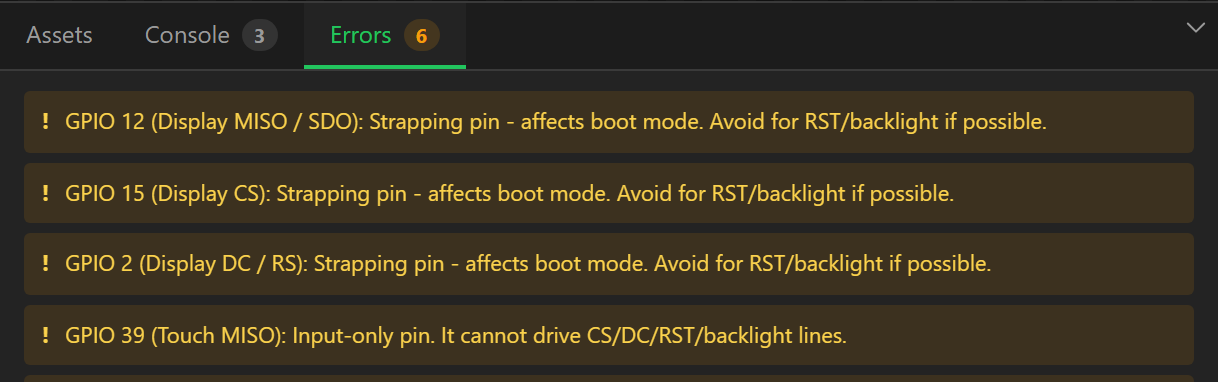
The Check tab, the Errors tab and the export dialog show the same list. Errors block export; warnings do not. The messages name the widget, pin or variable concerned. The ones people ask about:
| Message | Meaning |
|---|---|
| GPIO n (...): Strapping pin - affects boot mode | A warning, not an error. The pin is used at reset to pick the boot mode. Fine for data lines, risky for RST and backlight because a level held at boot can stop the board booting. |
| GPIO n (...) is input-only and cannot drive this signal | GPIO 34-39 on the ESP32 (and 46 on the S2) cannot be outputs. Move CS, DC, RST or the backlight to another pin. |
| GPIO n is assigned twice | Two unrelated signals on one pin. If they are meant to share a bus, mark the touch controller as sharing the display bus, or put both devices on the same named bus. |
| RGB panels need PSRAM for the framebuffer | Enable PSRAM on the Board tab (and in the IDE), or choose an MCU that has it. |
| The draw buffer (n KB) is large for ... | Lower Buffer height in the export settings. |
| "X" on "Screen" extends outside the screen | Part of the widget is past the edge and will be cut off. Move or shrink it. |
| "X" has a chart binding but no series to push onto | Add a series under Chart data, then pick it in the binding. |
| "X" is a scatter chart, so its points need an X value | Set X from on the chart, or change the type to Line. |
| "clock" looks like a clock, and "X" plots it as Y | You have bound the time variable as a value; it belongs in X from. |
| "X" wants a reading every n ms to cover its window | The time span divided by the point count is faster than the refresh loop. Lengthen the window or reduce the points. |
| Address 0x.. is used by both "A" and "B" | Two I2C devices with one address on one bus. Change one's address strap, or put it on another bus. |
| "X" uses <font>, which has no "%" - those are drawn in Montserrat instead | The characters listed are not in the library font, so the Montserrat fallback draws them. Fine for an odd symbol; for a whole word, pick a font that has it. |
| The imported font "X" has no confirmed free licence | An error when a widget uses it, a warning otherwise. Choose the font's licence on the Fonts tab and confirm it, or remove the font. |
| "X" uses an imported font that has been removed from the project | Its style still names the font. It exports as Montserrat; pick another font for it. |
| "X" uses <font> at n px, a size it was not converted at | Library fonts come in fixed sizes. Pick one from the Font control's list; until then the widget exports in Montserrat. |
| "X" sets the backlight, but the board has no backlight pin | A Set backlight action has nothing to drive, so it does nothing. Set the backlight pin on the Display tab - or, on a board whose brightness is a controller or power-chip command (AMOLED, M5Stack Core2), set it from your own code. |
| The backlight can only switch on and off (...) | It is on an I/O expander, or PWM dimming is off, so any Set backlight level above 0 % is full brightness. Move it to a GPIO and switch PWM on to dim. |
| "X" sets the backlight from "Y", a ... | The source widget has no level to read. Use a slider, arc or bar (its range maps onto 0-100 %), or a switch or checkbox (full on or off). |
| Analog input "X" uses prev() or delta() | Those only work in variable formulas, which run after the inputs are read. |
| "X" has transparency but is set to RGB565 | The alpha channel will be discarded. Use RGB565A8 or ARGB8888. |
| Image assets total n KB, more than the roughly 896 KB available | Over the filesystem partition. Shrink or reformat images, compile some in as C arrays, or use an SD card. |
Accounts and quota
- "Confirm your email address before generating code." The confirmation link went to the address you registered with; Resend the link sends another. Check spam.
- The dialog says the allowance is used up. Without an account the guest allowance is five generations for life, counted against your connection, and creating a free account moves you to fifteen a month. On an account the period is a rolling thirty days from the first generation of the period. Accounts and limits.
- Somebody else on my network has used the guest allowance. Yes - it is counted per address, so an office or a campus shares one. Registering is the fix, and is free.
- "Your plan is at its project limit." The free plan stores five projects on the
server. Delete one, or save over an existing one rather than as new. Projects in the browser
and in downloaded
.jsonfiles do not count. - Adding a screen opens a sign-in or upgrade prompt. A project is capped at three screens without an account, five on the free plan and thirty on Pro. The same cap is checked when a project is saved or generated, so opening a larger file does not get round it - the build is refused with the plan named, and nothing is charged.
The gallery
- "Save this design to your account before publishing it." Publishing takes a copy of a saved project; save first.
- "Published, but the preview could not be rendered." The listing exists without its picture. Usually a screen with an unusual size or an asset the renderer could not read; re-publish with Push current version after checking the Errors tab.
- My published design is out of date. Publishing is a copy, deliberately. Open the publish dialog and Push current version.
Still stuck
Report it from the designer with the Report a problem button at the top of the window. The export dialog has the same link, since that is where a build that fails is usually found. Reporting needs a free account with a confirmed address, because the answer is sent to it.
Choose what kind of problem it is, give it a title, and say what you did, what you expected and what happened instead. If there is a compiler error or serial output, paste its first few lines. The report is sent with:
- the export type (Arduino, MicroPython or ESPHome), the LVGL version and the export settings;
- the board preset, MCU, flash and PSRAM, display controller, bus, resolution, rotation, graphics library and touch controller, with their pin numbers;
- what the Problems tab lists, and the last 100 lines of the Console tab;
- which screen and widgets are selected;
- your browser, the size of its window, and which build of the designer you are running;
- the design itself, while Attach this design stays ticked.
The design is the whole project, the same file File > Download project file saves, and it is what lets a fault be reproduced exactly. An API key typed into a widget's settings is left out of it. A design over 8 MB is sent without its images and imported fonts, and the dialog says so before you send. With the box unticked the report still names the board and the export, but the answer may be a question.
The answer arrives by email and in the designer. My reports, in your account menu, lists what you have reported, each with its conversation, and marks the ones with an answer you have not read. You can add to a report at any time, and writing on a closed one reopens it. Your reports are read by you and by LCD Wizard, and by nobody else.
If the designer itself will not open, email
admin@lcdwizard.com with the board, the serial
output from boot and the project .json from File > Download project
file.