Waveshare 4.3 and 7 inch boards: card slot, RS485, CAN and sensor input
Both boards carry four parts beside the screen. Choosing the board adds all four to the Hardware tab; this page is what each one is, how to use it, and what to check when it stays silent.
What the preset adds
The ESP32-S3-Touch-LCD-4.3 and the ESP32-S3-Touch-LCD-7 are the same board behind two sizes of glass: an ESP32-S3 with 16 MB of flash and 8 MB of PSRAM, an 800 x 480 panel on the RGB bus, a GT911 touch controller and a CH422G I/O expander. Choose either on the Hardware tab, or in the wizard, and the design starts with these already wired - each pin read off that board’s own schematic:
| Part | On the board | Pins | In a new design |
|---|---|---|---|
| SDCard | The TF card slot | SPI: SCK 12, MOSI 11, MISO 13. CS is line 4 of the expander (EXIO4) | On |
| RS485 | The A and B terminals | TX 16, RX 15. No direction pin | On, reading nothing until you add a register |
| CanBus | The CAN H and L terminals | TX 20, RX 19. Line 5 of the expander (EXIO5) switches those two pins from the USB socket to the transceiver | Off - see below |
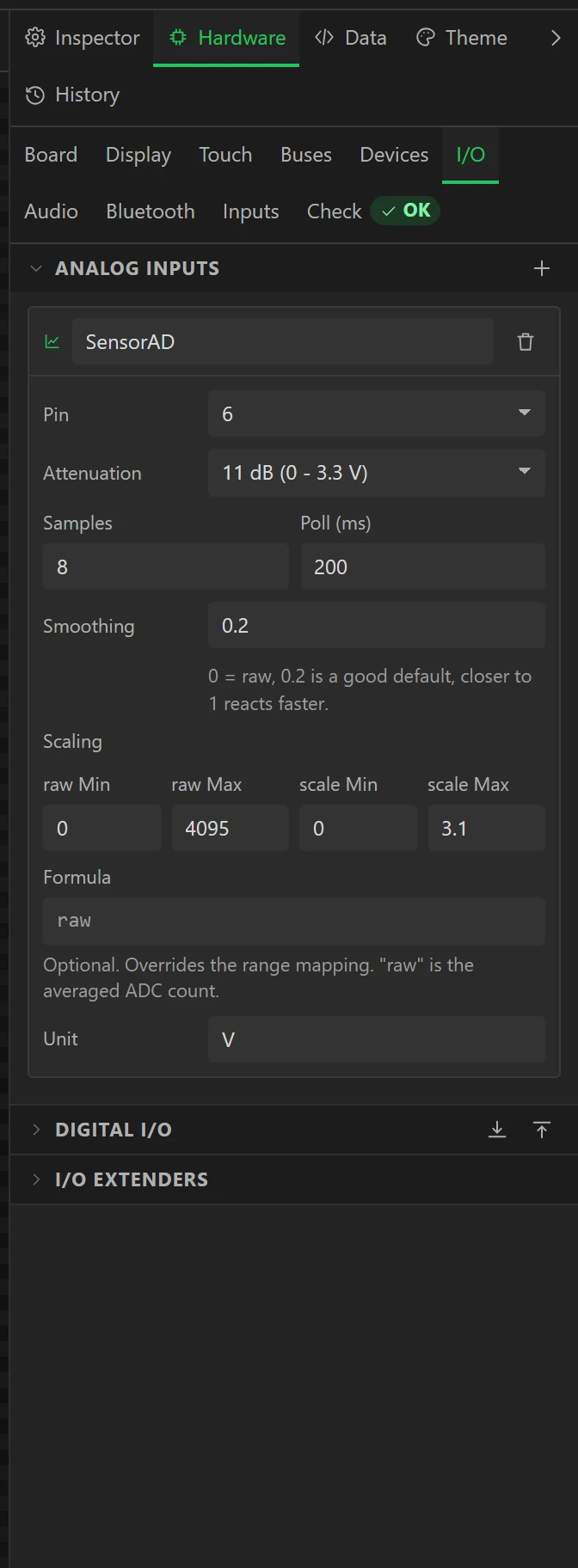
| SensorAD | The Sensor AD terminal | GPIO 6 | On, 0 to 3.1 V |
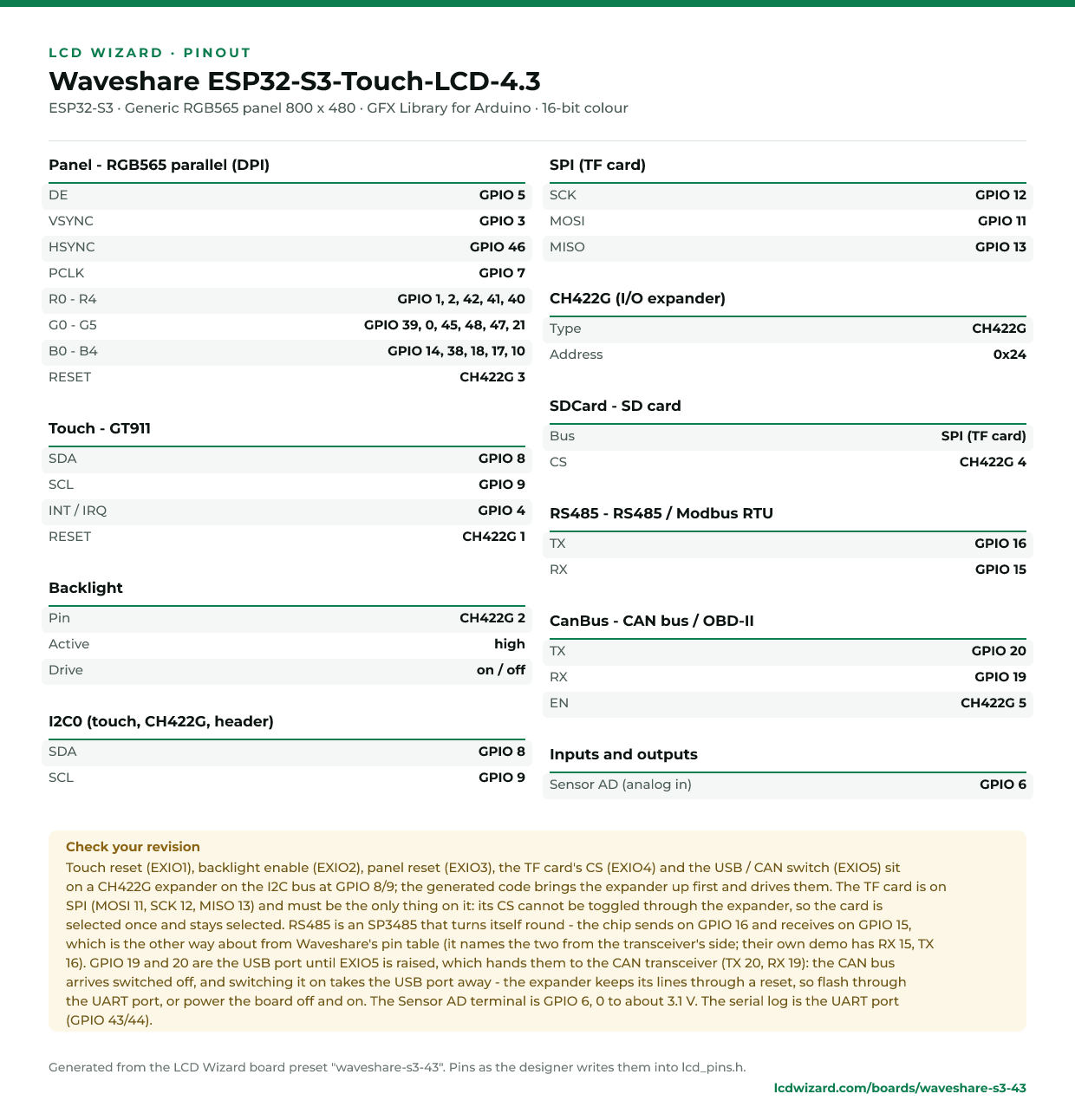
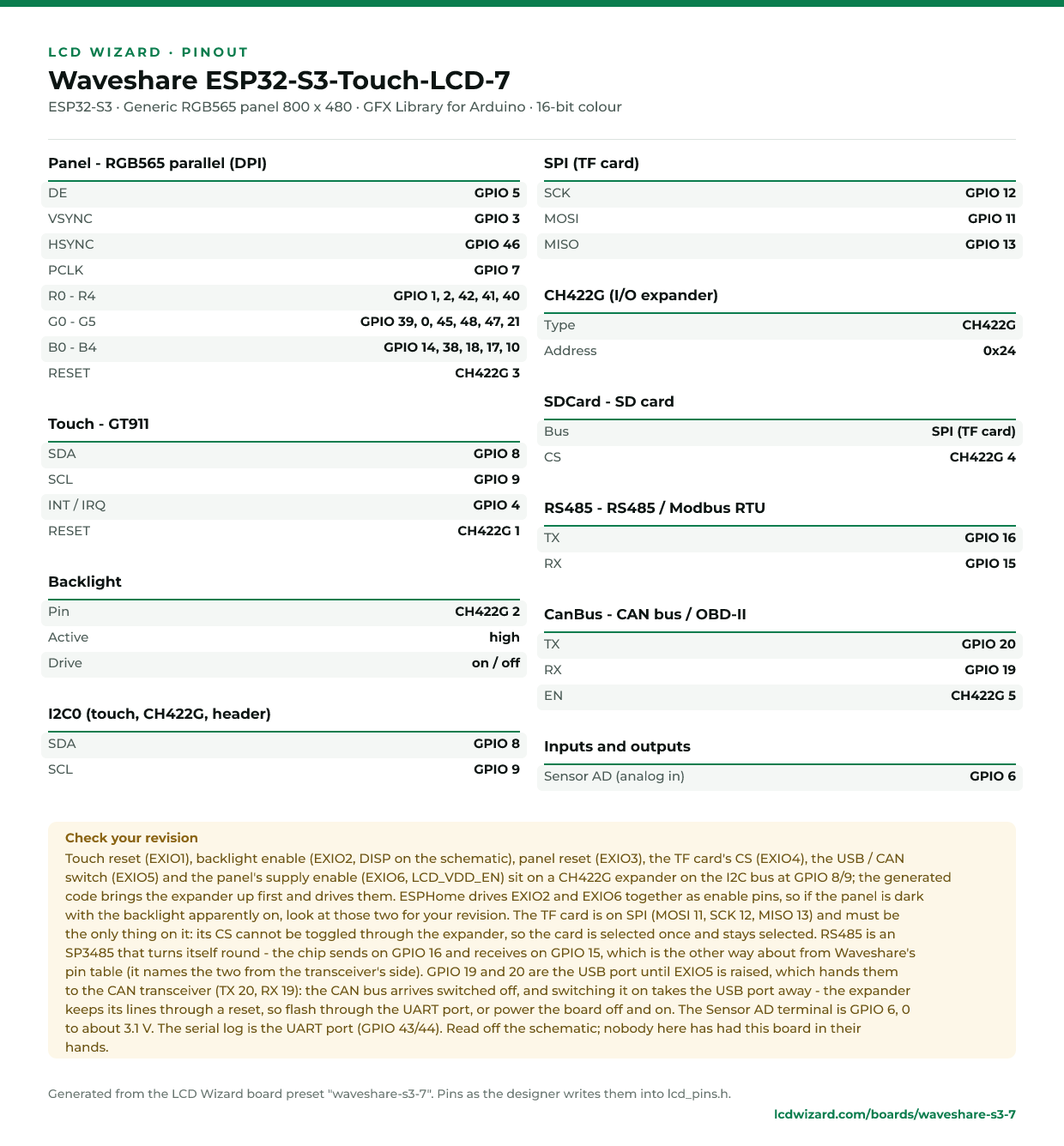
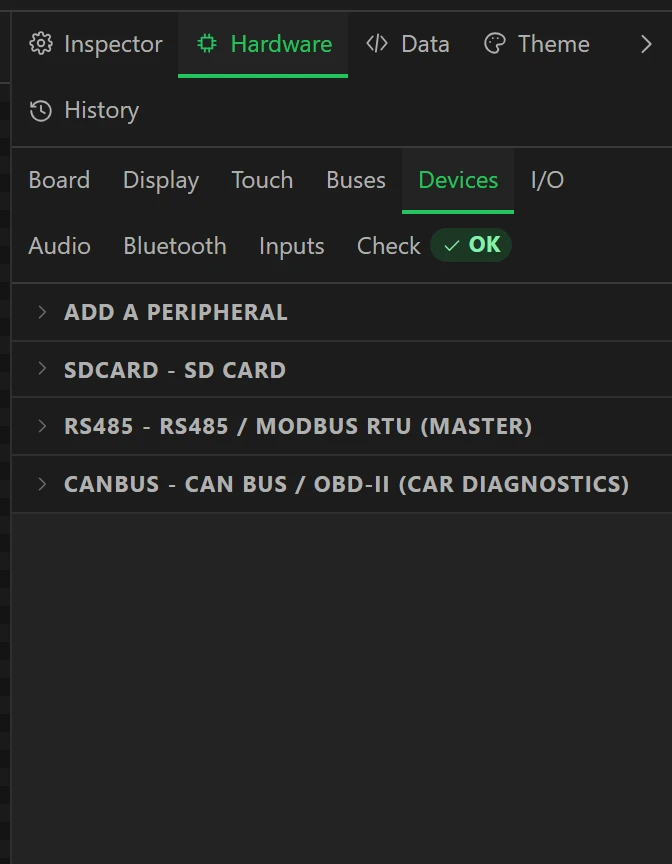
They are on Hardware > Devices (the first three) and Hardware > I/O (the sensor input). Each device card has a line beginning On this board that says what is particular to it here. Every pin is also on the board’s page and its printable pinout: 4.3 inch, 7 inch.
Which export drives what
| Part | Arduino | MicroPython | ESPHome |
|---|---|---|---|
| TF card slot | Yes | No - its CS is on the expander, and only the Arduino export drives a device’s own line through one | No - SD cards are an external component in ESPHome |
| RS485 / Modbus | Yes | No - no Modbus driver yet | No - ESPHome has Modbus components of its own, which this export does not write yet |
| CAN | Yes | No - the firmware has no CAN driver | No - the OBD-II reading is written for the Arduino export |
| Sensor AD | Yes | Yes | Yes |
A MicroPython or ESPHome project for these boards therefore starts with the sensor input and without the other three, rather than with three errors about them, and that export’s README lists what was left out and why. The panel, the touch and the expander’s lines work in all three.
The TF card slot
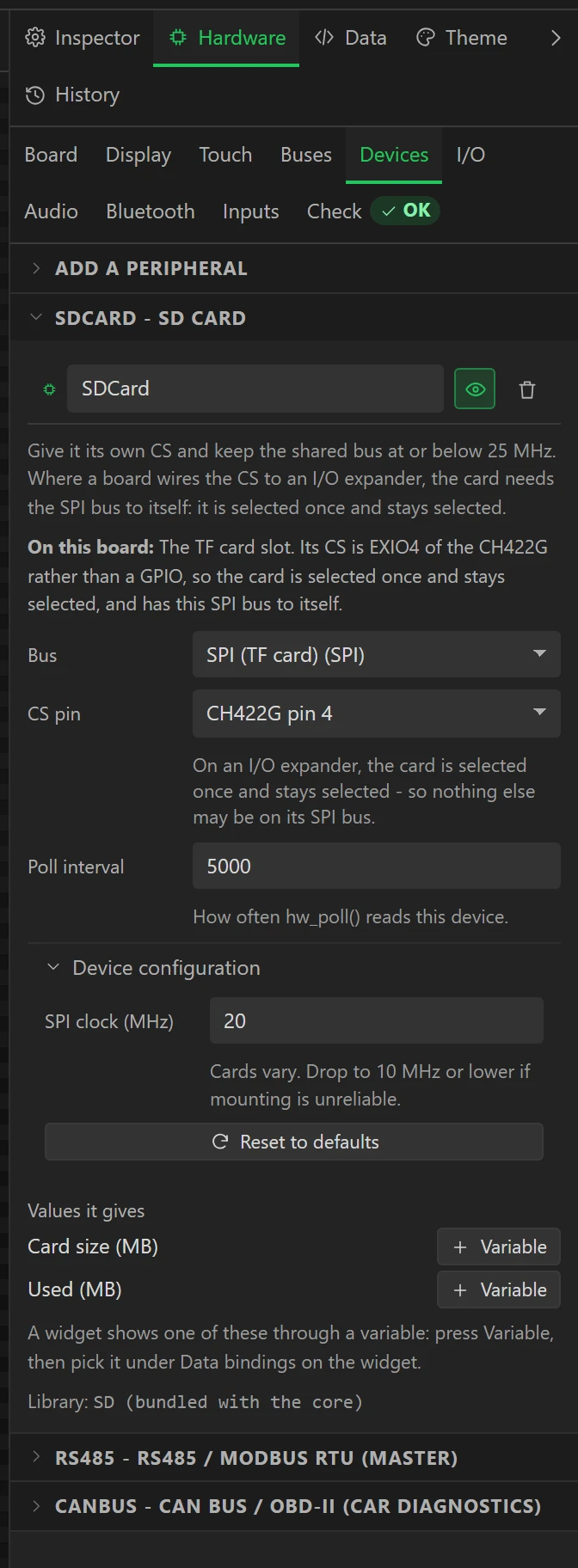
The card is on an SPI bus of its own. It gives two values, Card size (MB) and Used (MB); press
Variable beside either and bind it to a label like any other reading. In your own code the card is the
Arduino SD object, mounted when per_SDCard_ok() is true.
- Put the card in before powering the board. It is looked for once, at start. A size of 0 means none was found.
- Nothing else may share its SPI bus. The card’s CS is a line of the expander, which the SD library cannot switch, so the card is selected once and stays selected - as Waveshare’s own code does it. Add another SPI device to that bus and the Errors tab says why not.
- FAT32. If a card mounts only some of the time, lower SPI clock on the device from 20 MHz to 10.
RS485
The RS485 device is a Modbus RTU master: the board asks, the devices on the line answer. Wire the terminals A to A and B to B. The board has a jumper that puts a 120 ohm resistor across the line, fitted when it ships; leave it on if the board is at one end of the cable.
- On Hardware > Devices, open RS485 and set Speed and Format to what your device uses. Most low-cost devices ship at 9600 baud, 8N1.
- Press Add a register and fill in the device’s address, the table, the register number and the kind of value it holds. A manual’s 40101 is holding register 100.
- Press Variable on the register, then bind that variable to a label, a bar or a gauge under Data bindings on the widget.
- To send a value to a holding register or a coil, give a button the action Write to peripheral and pick the register.
Two values say how the line is doing whatever you read: A device answering and Failed requests. With nothing connected, Failed requests climbs steadily - that is the board asking and hearing nothing, and it is the line working. Every setting is on Peripherals and I/O.

The pins are the other way round from Waveshare’s table. Their pin table calls GPIO 15 “RS485_TXD”, naming it from the transceiver’s side. On the schematic that net is the transceiver’s output, so the ESP32 receives on 15 and sends on 16, which is what the preset uses. It only matters if you write serial code of your own for these pins. The transceiver turns itself round, so there is no direction pin to drive.
For a protocol that is not Modbus, switch the RS485 device off (the eye on its card) and open
Serial1 on RX 15 and TX 16 from your own code.
CAN, and the USB socket it shares pins with
GPIO 19 and 20 are the ESP32-S3’s USB pins and the CAN transceiver’s. A switch on the board decides which, and line 5 of the expander (EXIO5) works it: low is the USB socket, high is CAN. So the CanBus device arrives switched off, and the export holds that line low.
Switch it on (the eye on its card) when the design is to read a CAN bus. From then on:
- The socket marked USB no longer reaches the chip. Flash and read the serial log through the socket marked UART, which always works.
- The switch keeps its setting through a reset, because the expander does. To get the USB socket back, export with CAN switched off, flash that through the UART socket, then power the board off and on.
What it reads is on Peripherals and I/O: a car’s OBD-II values with nothing to configure, any other PID, or bytes of any frame on the bus, each as a value with a Variable button. Listen only reads without ever sending. The bus speed is 500 kbit/s unless you change it, and CAN has a 120 ohm jumper of its own.
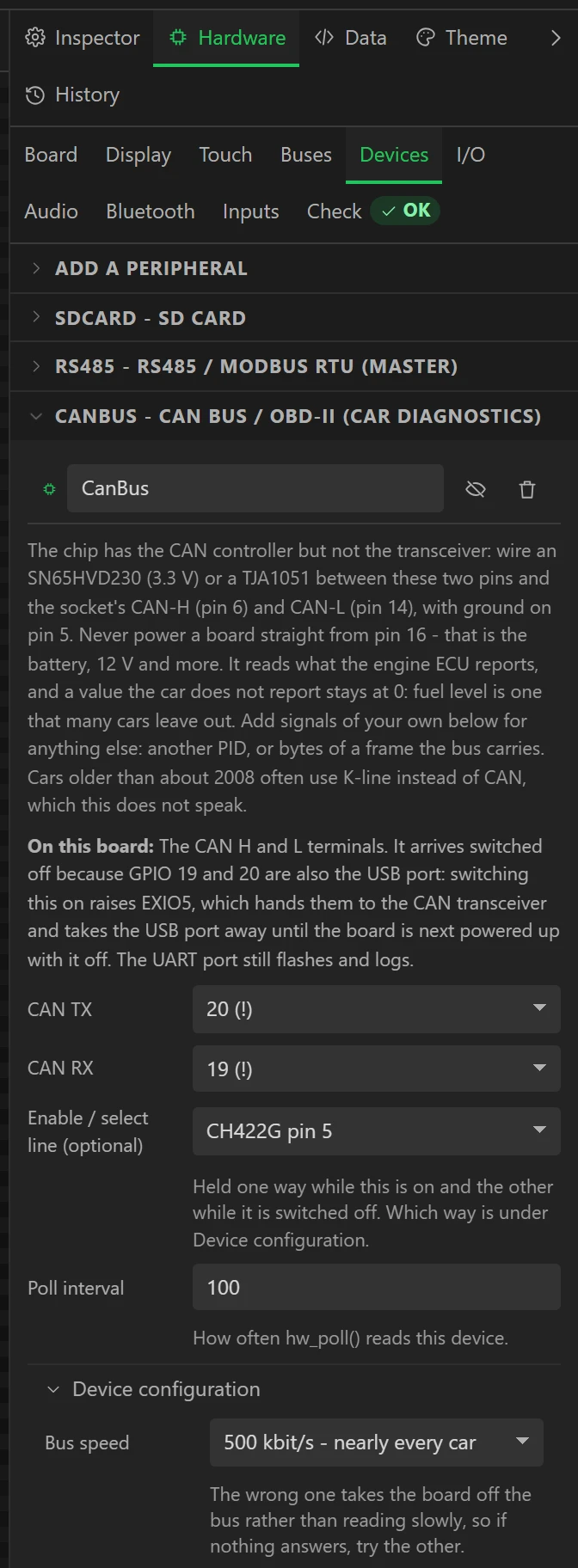
A design started before these parts were added has no CanBus device, and leaves the switch on CAN: the expander’s lines all start high, and nothing in such a design holds this one low. The USB socket then does nothing. The parts arrived in October 2026. Choose the board again on Hardware > Board, which brings all four in, and export: with CanBus switched off the socket is a USB socket once more.
The Sensor AD terminal
Three pins: 3V3, GND and AD, with AD wired straight to GPIO 6. SensorAD on Hardware > I/O reads it as 0 to 3.1 V, which is as far as the ESP32-S3 measures at this setting; trim scale Max against a meter if the last few per cent matter.
- A potentiometer between 3V3 and GND with its wiper on AD reads the whole range.
- Never put more than 3.3 V on AD. A 0-10 V or 4-20 mA sensor needs a divider or a resistor first; put the
arithmetic that undoes it in Formula, over
raw, or change the scale so the value reads in the sensor’s own unit. - With nothing connected the pin floats and the reading wanders. That is not a fault.
There is nothing to add: the input is already in the list. Give it a variable on the Data tab, with the analog input as its source, and bind that to a widget.
What the expander’s lines do
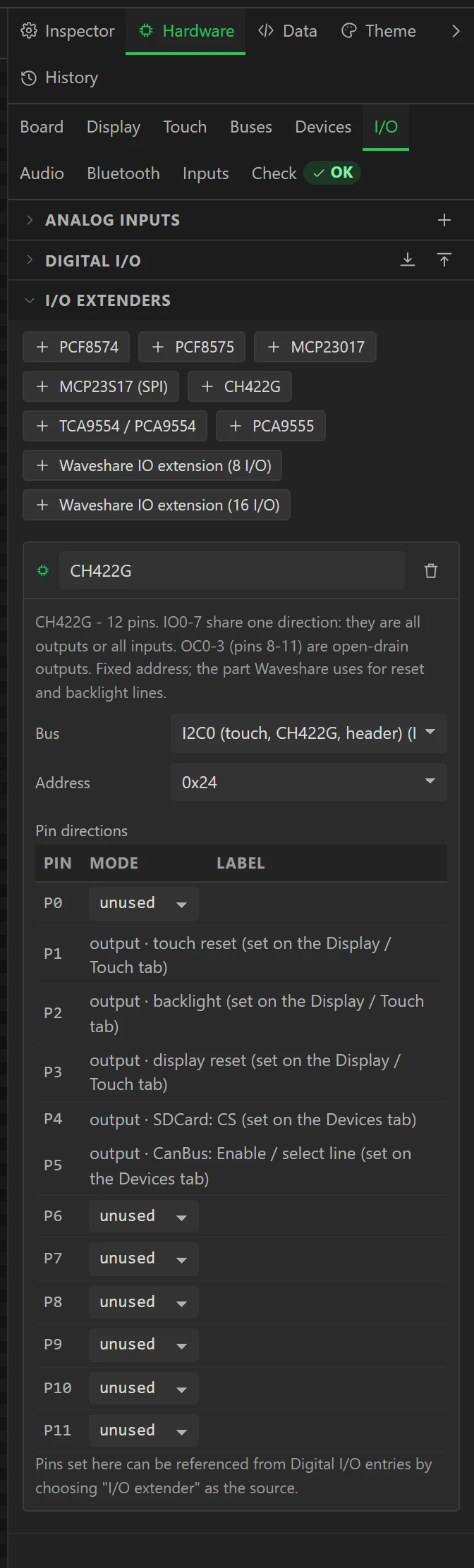
The designer shows these on Hardware > I/O under CH422G, each with what holds it. They are the board’s own, so they are shown and not editable there.
| Line | What it is | Set from |
|---|---|---|
| EXIO1 | Touch reset | Touch tab |
| EXIO2 | Backlight, on or off. It cannot dim through the expander | Display tab |
| EXIO3 | Panel reset | Display tab |
| EXIO4 | The TF card’s CS | The SDCard device |
| EXIO5 | The USB / CAN switch | The CanBus device |
| EXIO6 | On the 7 inch board, the panel’s supply: held high from the start | The board |
What is left over
The panel takes nearly every pin. With the four parts in place the only GPIOs not spoken for are 43 and 44, which are the UART socket’s own.
- More sensors go on the I2C terminal (GPIO 8 and 9), which the touch controller and the expander share: add the part on Hardware > Devices and choose the bus named I2C0. Check its address against the ones Waveshare lists as taken on this board.
- There is no pin for sound. An I2S amplifier or a microphone needs three, so an audio output or a microphone has nothing to be wired to here, and the Errors tab asks for its pins if one is switched on.
Flashing
Two USB-C sockets. UART goes through a serial chip: it flashes and shows the log at 115200 baud whatever the design does. USB is the ESP32-S3’s own, and is the CAN transceiver’s while CAN is switched on. In the Arduino IDE the module is 16 MB of flash with OPI PSRAM; the export’s README has the Tools settings as a table, and Flashing and configuration has the rest.
When something does not answer
| What you see | What to check |
|---|---|
| The PC does not see the board on the USB socket | CanBus is switched on, or the design has no CanBus device at all because it was started before the parts were added - choose the board again on Hardware > Board. Use the UART socket; export with CanBus off, flash, and power the board off and on. |
| RS485: nothing answers | Speed and format against the device, then its address, then swap A and B - makers disagree about which is which. In code of your own, TX is 16 and RX is 15. |
| RS485: Failed requests climbs with nothing connected | That is right: the board is asking and nothing is there to answer. |
| RS485: a reading is nonsense | A 32-bit value is two registers and devices disagree about which half comes first: change Word order. Then the register number: a manual’s 40101 is 100. |
| SD card: size reads 0 | The card has to be in the slot when the board powers up. FAT32. Lower the device’s clock. Nothing else on its SPI bus. |
| CAN: no readings | Is CanBus switched on? Then the bus speed, H and L the right way round, and a 120 ohm resistor at each end of the bus. A car answers only with the ignition on. |
| Sensor AD wanders or sits at full scale | Nothing is driving the pin, or more than 3.1 V is on it. |
| The screen stays dark | The backlight is EXIO2; on the 7 inch board the panel’s supply is EXIO6. Both are driven by the export, so a dark screen is usually the expander not answering: the serial log says so at start. |
How far this has been tested
The 4.3 inch board’s panel, touch and expander have run on a board here. The card slot, RS485, CAN and sensor input were written from each board’s schematic and compiled for both boards; as of October 2026 they have not yet been run on hardware here, and nobody here has had the 7 inch board in their hands. The Modbus driver is tested on a PC against a simulated line. If a part does not behave as this page says, Report a problem on the designer’s title bar reaches the person who wrote it.