ESPHome export
The same design as one ESPHome YAML file - no compiler to install, one command to flash, and the widgets you bind can appear in Home Assistant as real entities.
ESPHome builds ESP32 firmware from a configuration file rather than from source you write. It has carried an LVGL component for a while now, which makes it a third way to put an LCD Wizard design on a board: screens, widgets, styles, events, variables, bindings, automations and peripherals all come across, and what you flash is described by a file you can read.
It suits you if you already run Home Assistant, or if the Arduino toolchain is more setup than you want for a panel that shows four numbers and a button. It does not suit you if you need a chart, a calendar or a board outside the ESP32 family - see what it covers.
Choosing it
The toolchain is picked when the project is made, in the setup wizard, and stays with it. That is deliberate: it decides what you can draw. ESPHome has no chart widget at all, so offering one and refusing it at export time would waste your afternoon. Pick ESPHome on the first step and the palette, the board list and the hardware pickers follow - a widget it cannot build stays in its place, greyed, with the reason on it.
It cannot be changed afterwards. A design is built for one toolchain. If you picked the wrong one, start a new project - the wizard takes about twenty seconds.
An ESPHome build is one generation, metered exactly like an Arduino one - see Accounts and limits. A design it refuses costs nothing, and the export dialog tells you what it refused and why before you spend anything finding out.
What it covers
| Supported | Not yet | |
|---|---|---|
| MCU | ESP32, ESP32-S2, ESP32-S3, ESP32-C3, ESP32-C6 | ESP32-P4, STM32, RP2040 |
| Panel | SPI and quad SPI: ILI9341, ILI9342, ILI9481, ILI9486, ILI9488, ST7735, ST7735S, ST7789, ST7796, GC9A01, GC9107, ST77916, CO5300, RM690B0, AXS15231B. 8-bit parallel on an ESP32-S2 or S3, which ESPHome drives as an octal SPI bus. RGB on an ESP32-S3 with PSRAM: ST7262, EK9716, generic RGB565 panels, and the ST7701 on boards ESPHome has a model for | An ST7701 on any other wiring, and GC9503V panels - both need a register load written for the particular glass, and ESPHome keeps those inside its board models; SH8601 and RM67162 AMOLEDs, which ESPHome has no model for; an AMOLED its maker runs under an orientation setting of its own (Waveshare’s 1.32", 1.43C and 2.16"), since ESPHome cannot be handed one and the touch would land elsewhere; MIPI-DSI panels; 16-bit parallel; monochrome panels, because ESPHome renders LVGL in 16-bit colour only |
| Touch | XPT2046, GT911, FT6206, FT6236, FT5x06, FT3168 / FT6146, CST816S, CST820, CST226SE, CST328, CST9217 / CST9220, TT21100, CHSC6540, AXS15231B | GT9271, FT3267, ADS7846, STMPE610, NS2009, TSC2007; encoder and button inputs |
| Board presets | Sixteen: ESP32 + ILI9341 2.8" SPI, both Cheap Yellow Displays and LCDWIKI's E32R28T, WT32-SC01, WT32-SC01 Plus, M5Stack Core2, ESP32-S3 + ILI9341, ESP32-S3 + GC9A01 round, LilyGO T-Display-S3, Sunton ESP32-8048S043 (4.3") and ESP32-8048S070 (7"), Waveshare ESP32-S3-Touch-LCD-4.3, -7 and -3.5B, Guition ESP32-4848S040. The 3.5B arrives without its IMU, RTC, power chip and card slot, which ESPHome has no component for here | The ST7701 round, AMOLED, LCDWIKI ES3C35P (ST77922, which ESPHome has no driver for), STM32 and RP2040 presets |
| Widgets | Twenty-four, including every control, the scale (ESPHome calls it a meter), line, tileview, tabview, keyboard, spinner and the QR code, which is ESPHome's own | Chart, Calendar, Colourwheel, List, Image Button and Window, none of which ESPHome has; and the other ready-made widgets |
| Design | Every style property and state, every trigger, variables of every type but a list, formulas, bindings, automations, analog inputs, digital I/O, backlight, images, library fonts and icons - and, in this export only, Material Design Icons chosen by name; web data, MQTT and Home Assistant entities | Play animation and Switch theme actions; styles on a dropdown's open list or a tabview's button row, which ESPHome cannot address separately |
| Peripherals | Eighteen, each becoming its own ESPHome component: BME280, BMP280, SHT31, AHT20, SCD4x, SEN66, MLX90614, BH1750, MCP9808, ADS1115, INA219, MPU6050, VL53L0X, MAX6675, MAX31855, MCP3008, PCA9685, NeoPixel | MAX17048, ADXL345, DS3231, QMI8658, PCF85063, AXP2101 and the SD card slots |
| I/O expanders | All seven, natively - a control line behind a PCF8574 or a CH422G is written as a pin belonging to that component | - |
Built against ESPHome 2026.8.2, which bundles LVGL 9.5. A design drawn for LVGL 8 is exported as LVGL 9 all the same. The lists above are not approximate: the export reads ESPHome's own component tables, and anything it has not read is refused rather than guessed at - a wrong driver is a blank panel with nothing to say why.
Every file
| File | What it is |
|---|---|
<name>.yaml | The whole configuration: the board, its buses, the panel, touch, the backlight, every sensor and switch, and the interface under lvgl:. Commented throughout, with the pins gathered into substitutions: at the top. |
fonts/ | Any font that is not one of LVGL's built-in Montserrat cuts. ESPHome converts them itself at build time, so these are the real font files - and their licences travel with them. |
images/ | Your pictures, as you imported them. ESPHome converts and compiles them in. |
images/icons/ | One PNG per icon and size used, for icons from the built-in library: white, with the shape in the alpha channel, tinted by image_recolor. Material Design Icons are not files at all - they are glyphs of a font ESPHome fetches. |
licenses/ | The licence of each font that travels with the design, and Pictogrammers' licence file when the design uses Material Design Icons. |
lw_math.h | Only when a formula uses map, clamp, constrain or random - the same arithmetic the Arduino export uses, so the two behave alike. |
lw_read.h | Only when the design reads web data or MQTT. It reads an answer as it arrives and keeps what the design asks for, and the YAML includes it. Keep it beside the YAML. |
secrets.yaml.example | With Home Assistant turned on, or when the design reads web data or MQTT. Rename it and put your own values in; nothing in the YAML itself is a credential. |
README.md | The command for this board, what to copy where, and anything about this design worth knowing. |
It is one file on purpose. ESPHome's unit of work is a file - esphome run x.yaml,
or the "+" button in its dashboard - and splitting the config across
packages
would buy a shorter file at the cost of a folder that has to stay together anyway.
Flashing it
Copy the YAML and the folders beside it into your ESPHome configuration directory, then:
esphome run my-panel.yamlThat is the whole of it. The first build takes a few minutes while ESPHome fetches its toolchain; after that, plug the board in over USB and it flashes. If you run the ESPHome dashboard - as an add-on in Home Assistant, or on its own - drop the file in and press Install instead.
There is no lv_conf.h to edit, no library versions to pin and no partition
scheme to choose. ESPHome sizes its own partition table, which is why the layout on the
designer's Hardware tab has no effect here.
Home Assistant
The wizard asks whether the panel should join Home Assistant, and Join Home Assistant in File > Project settings changes the answer later. Left off - the default - the YAML has no network in it at all: the panel runs on its own, and the Wi-Fi block is written commented out so you can change your mind with one edit. The one exception is a design that reads web data or MQTT: that joins Wi-Fi either way, since it has to.
Turned on, the export adds Wi-Fi, the ESPHome API and updates over the air, and publishes
every widget you have bound as an entity through ESPHome's own LVGL platforms - a slider
becomes a number, a switch a switch, a dropdown a
select, a label a text_sensor. Move the slider on the panel and the
entity moves in Home Assistant; change it in Home Assistant and the panel follows.
What Home Assistant is shown
With Join Home Assistant on, the panel is one device there, and these are its entities with nothing more to do. The export’s README lists them by name for your own design.
| In the design | In Home Assistant |
|---|---|
| A device on the Hardware tab - a BME280, an SHT31, an INA219 | A sensor for each reading, named after the device and the reading (Room Temperature), with the unit and device class ESPHome’s own component gives it |
| An analog input | A sensor, in the unit and decimals set on the input |
| A digital input | A binary sensor |
| A digital output | A switch, which Home Assistant can switch |
| The backlight, where it dims | A light |
| A widget with a binding | A slider, an arc or a spinbox is a number; a bar a sensor; a switch or a checkbox a switch; a dropdown or a roller a select; a label a text sensor holding the text it shows; an LED a light |
| A variable with Report to Home Assistant ticked | A sensor, a binary sensor or a text sensor of its own - see below |
A widget with no binding is not an entity, and nor is a variable by itself: a battery percentage worked out from a voltage reaches Home Assistant only as the text of a label bound to it, unless the variable is reported.
Setting a slider’s number from Home Assistant moves the slider and writes the variable
the slider is bound to, as a finger does - and the same goes for an arc, a spinbox, a switch, a
checkbox, a dropdown and a roller whose binding writes a variable. ESPHome tells the widget with
an update event of its own, not the one a finger sends, so such a widget has an
on_update in the YAML beside its on_change. It writes the variable only
when the variable does not already hold the value, so the variable’s script, the widgets
bound to it, an automation on it changing and its report to Home Assistant each run once. A value
the panel itself puts on the widget - from the variable of a two-way binding, or from a Set
Property action - is not written back: the YAML counts those in a global called
lw_set_here, and the README names the widgets this applies to. Read in the C++ ESPHome
generates, not run against Home Assistant.
Reporting a variable
On the Data tab, open the variable and tick Report to Home Assistant. A number becomes a sensor, an on/off a binary sensor, text a text sensor. Three fields appear:
- Called - its name in Home Assistant. Left empty, the variable’s own name.
- Device class - what kind of reading it is: battery, temperature, humidity, power. It chooses the icon and how Home Assistant shows it. The list is the one the ESPHome release this export is built for accepts, read from that release.
- State class, for a number - whether Home Assistant keeps long-term statistics. Measurement is a reading that goes up and down; Total, only ever rising is a count.
The unit and the decimals are the variable’s own. So a battery gauge is an analog input,
a variable that reads it with a formula such as clamp((raw - 3.3) / 0.9 * 100, 0, 100),
a unit of %, device class battery - and one tick.
In the YAML it is a platform: template entity with no lambda of its own, and the
last step of the variable’s script sends it:
sensor:
  - platform: template
    id: rep_battery_pct
    name: "Battery level"
    unit_of_measurement: "%"
    accuracy_decimals: 0
    device_class: battery
    state_class: measurement
update_interval: never- It is sent when the variable changes, and at no other time. Nothing republishes a value that has not moved.
- A variable that reads an analog input or a device is first sent with that sensor’s first reading, so Home Assistant is never told the 0 it holds before one. Any other variable is sent from power-up, as what it starts with.
- A variable that reads Home Assistant is not offered the tick. That would be your own entity handed back under another name.
- Two entities of one kind cannot share a name. A reported variable called what an analog input is called is refused before anything is built, in a sentence that names both.
- In an Arduino project the same thing is the MQTT section’s Announce variables to Home Assistant; this tick is the ESPHome export’s.
Changing something in Home Assistant
The other direction is an action, like everything a design does: Call a Home Assistant action, on any event or in an automation. To have a slider set a thermostat, give the slider an event on Released with:
| Field | Value |
|---|---|
| Calls | climate.set_temperature |
| Entity | climate.living_room |
| Data | temperature: {widget} |
Data is a line for each thing the action takes, a name and a value with a colon
between. A variable’s name in braces puts its value in, and {widget} is the
value of the widget the event is on - or of the one chosen under Widget for {widget},
which an automation needs since it is on no widget. A slider, an arc, a bar and a spinbox give
their number; a switch and a checkbox give true or false. Developer tools > Actions in
Home Assistant lists every action with the data it takes.
Home Assistant has to be told to let the device. Open the device in Home Assistant’s ESPHome integration, choose Configure and tick Allow the device to perform Home Assistant actions. Until then it ignores the call, and nothing on the panel says so. The YAML has this as a comment at the first call, and the README repeats it.
- It is ESPHome’s own
homeassistant.action, sent over the linkapi:makes, so Join Home Assistant has to be on. Off, the action is written as a comment and the Errors tab says so. - Everything sent is text, which is how ESPHome sends data, and Home Assistant turns it into the number or the on/off an action asks for. A list - a colour as three figures - cannot be sent this way.
- Nothing comes back. The panel is not told whether the action worked. To show the thermostat’s real setting, read it into a variable as an entity.
- In Preview the call is written to the Console tab with its values filled in, and sent to nobody.
- In an Arduino or MicroPython project the action is greyed: there the same thing is said with Publish to MQTT or a Web request to Home Assistant’s REST API.
None of this has been run against a Home Assistant: the YAML passes esphome config
and the C++ ESPHome writes from it has been read.
ESPHome restarts a board that nothing has connected to for fifteen minutes. That is
ESPHome’s own default for its API, and the export leaves it as it is: it is how a device
that has lost Home Assistant comes back. A panel that should carry on by itself whether Home
Assistant is there or not wants reboot_timeout: 0s under api:; the
YAML has that line as a comment where it goes, and the README says the same.
No credentials are written. The YAML names them - !secret wifi_ssid and
so on - and reads them from a secrets.yaml you make yourself. The export ships a
secrets.yaml.example to rename rather than a real one, so it cannot overwrite the
one you already have.
Material Design Icons
An ESPHome project has a second icon set beside the built-in
library: Material Design
Icons, the set Home Assistant uses - about 7,200 of them. Writing ESPHome by hand, putting one
on a screen means finding its code point on Pictogrammers' site, adding it to a
font: block and typing it again as a label's text. Here you choose the icon by its
name and the export writes all of that.
Choosing one
- Select an Icon widget, or a button, and open its Icon setting in the Inspector.
- Under the built-in icons, press Material Design Icons. The viewer opens with the whole set.
- Type in the search box. It looks at each icon's name, the other names it goes by and what it is for, so temperature finds the thermometers and bulb the lights. The list beside it narrows to one kind of icon - Weather, Home Automation, Battery.
- Press an icon to see it large and at 48, 32, 24 and 16 px, then Use this icon - or double-click it. From the keyboard: Down from the search box moves into the icons, the arrow keys move between them and Enter uses the one you are on.
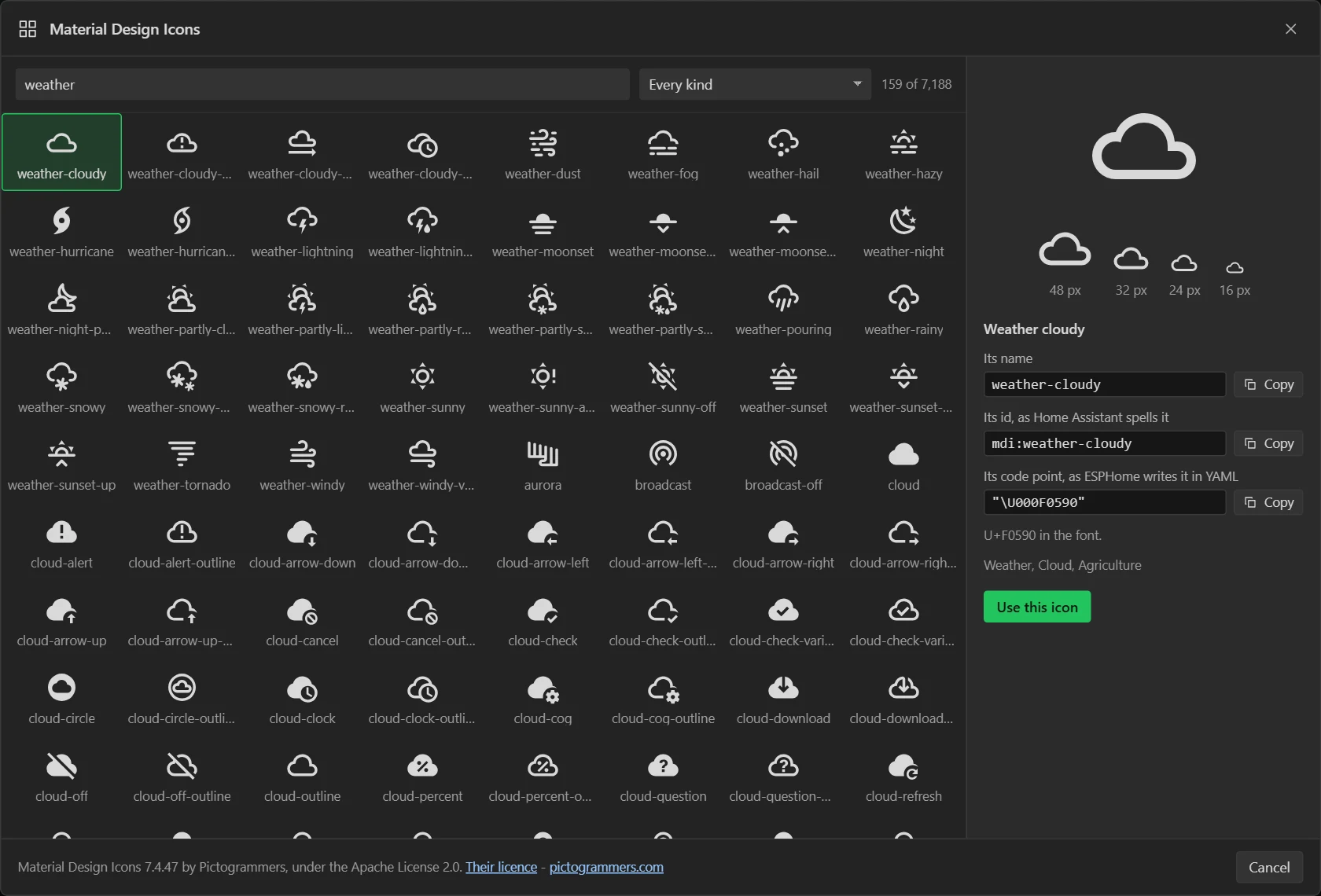
The viewer is also on the Icons tab of the bottom panel, where it offers
Add Icon widget instead, and Use on whichever Icon or button is selected. Either
way it shows three things with a Copy button each, for a YAML file of your own: the icon's
name, weather-cloudy, which is what a comment beside a code point says; its id
as Home Assistant spells it, mdi:weather-cloudy, and its code point as ESPHome writes
it, "\U000F0590".
An icon is drawn in the Text colour, like the built-in ones: an Icon widget in its own, under Style settings, and an icon on a button in the button's text colour - so a Pressed or Checked text colour changes the icon and the caption together. Any size from 8 to 160 px; these icons are drawn on a 24 px grid, so 24, 48 and 72 px are the sharpest.
What the export writes
One font: entry for each size the design draws these icons at, holding exactly
the icons used at that size, each with its name beside it:
font:
  - id: mdi_48
    file: "https://raw.githubusercontent.com/Templarian/MaterialDesign-Webfont/v7.4.47/fonts/materialdesignicons-webfont.ttf"
    size: 48
    bpp: 4
    glyphs:
      - "\U000F0590"  # weather-cloudy
      - "\U000F0594"  # weather-night
and each icon as a label in that font whose text is the glyph:
- label:
    id: ui_sky
    width: 48
    height: 48
    text_color: 0xFFB300
    text_font: mdi_48
    # mdi:weather-cloudy
    text: "\U000F0590"
The font is not in the download. file: is an address: ESPHome fetches
Pictogrammers' own font from their repository when it builds, converts the glyphs listed and
keeps the file in its cache. The first build therefore needs a network. To build without one,
save that file as fonts/materialdesignicons-webfont.ttf beside the YAML and put that
path after file: instead. The address is pinned to release 7.4.47, which is the one
the code points are from, so a later release cannot move an icon under you.
On a button the icon and the caption sit in a container with nothing written for
their colour. That is on purpose: text colour is inherited, a container has no style of its own
to get in the way, and so both take whatever text colour the button has in the state it is in.
Glyphs for a lambda
A font holds only the icons the design draws. If a lambda of your own changes an Icon's text to another icon - a weather icon that follows the forecast, say - that icon has to be in the font too, with no widget drawing it. In the viewer, choose the icon, pick the font under Add to the font (it starts at the icon font the design already uses most, or 32 px) and press Add to mdi_32. A size no icon is drawn at gets a font of its own. Everything added is listed on the Icons tab by font, each glyph with its code point to copy and a button to take it out again; Undo takes back an addition like any other change.
The export lists the added glyphs in their font after the drawn ones, under a comment, and the README names each with its font's id and code point. An Icon widget at that size is already a label in that font, so either of these changes it:
lv_label_set_text(id(ui_sky), "\U000F0599");

- lvgl.label.update:
    id: ui_sky
    text: "\U000F0599"
A label of your own needs text_font: mdi_32 (the font's id) before it can show
one. Scaling the design to another display moves the added glyphs to the new size with the icons
they sat beside, so they stay in the same font.
The licence. Material Design Icons and its fonts are under the Apache License
2.0, which - unlike the built-in library - asks to be passed on: the export puts
Pictogrammers' licence file in licenses/, and the README says where the font comes
from. Keep both with anything you hand on that has these icons in it. Brand and logo icons are
left out: Pictogrammers mark them deprecated and keep them outside that licence.
ESPHome projects only. In an Arduino or a MicroPython project the Material Design Icons button is still there, greyed, and says why; a design that already holds one of these icons - a copy of an ESPHome design, say - shows it on the canvas and has an error on the Problems tab for each, since those exports draw their icons from the built-in library and would draw nothing there. An icon cannot be put inside a line of ordinary text yet: it is a widget of its own, or a button's icon.
Web data, MQTT and Home Assistant entities
A panel can read three things over the network. Each is set up in the designer as it is for the other exports, and each is written as ESPHome’s own component, with ESPHome’s own defaults left as they are.
Web data
A web source on the Data tab is an address, how often it is
asked, and the values to take out of the JSON that comes back. In the YAML it is an
http_request, a script that makes the request, and an interval: at the
source’s own period. Every ready-made source that does not fill a list works here,
MET Norway’s forecast among them.
- The screen stands still while a request is out. ESPHome makes a request from its main
loop, so nothing is drawn and no touch is read until the answer has come: a second or two over
https, and up to ESPHome’s
timeoutof 4.5 seconds for each step when a server does not answer. The Arduino export asks from a task of its own. Ask as seldom as the data changes. - An answer of any size. ESPHome’s own JSON parser holds a whole answer in memory,
twice, and then a parsed copy of it. A forecast of 38 KB needs more than 75 KB that way, which a
board without PSRAM does not have to spare. So the export ships
lw_read.h, which reads the answer as it arrives and keeps only the values a variable reads. Reading that forecast for five values takes under 1 KB. - https is checked. ESPHome verifies the server’s certificate against the common
certificate authorities it carries. That is safer than the Arduino export, which does not check.
If a service is refused, add
use_full_certificate_bundle: trueunderesp32: framework: advanced:. - A source is asked when the board joins Wi-Fi, then at its interval. One asked less often than once a minute is tried again 20 seconds after a failure, three times at most.
- A source’s key is never in the YAML. It is a name in your
secrets.yaml, andsecrets.yaml.examplehas a line for it. - “Asking now” stays off, since no screen is drawn while a request is out. A source that fills a list is refused: lists are the Arduino export’s.
MQTT
The MQTT section of the Data tab becomes ESPHome’s
mqtt: component. Each topic the design listens to is an on_message, read
as a number, an on/off or text, or one value out of a JSON payload. Publish to MQTT is
mqtt.publish.
- The password goes in
secrets.yaml, asmqtt_password. - TLS needs the broker’s certificate pasted in. ESPHome has no bundle of authorities for MQTT, so a broker set to TLS with no certificate is refused before the export is made.
- ESPHome’s own habits are kept. It restarts the board after 15 minutes without a
broker, announces the device’s entities to Home Assistant over MQTT, says
onlineandofflineon<device name>/statusunless the design names a status topic, and sends its log to<device name>/debug. The YAML has a commented line that changes each one. - Announcing variables to Home Assistant, the Pro part of the MQTT section, is left out and the export says so. ESPHome announces its own entities: switch on Join Home Assistant in File > Project settings and every bound widget becomes one.
Reading a Home Assistant entity
A variable can read an entity of your Home Assistant: a thermometer in another room, a door,
who is home. On the Data tab choose An entity of Home Assistant as the variable’s
Source and type the entity’s id, such as sensor.outside_temperature.
Developer tools > States in Home Assistant lists every entity with its id, its state and
its attributes. Add an attribute to read that instead of the state, such as a thermostat’s
current_temperature. A number is read by a sensor, an on/off by a
binary_sensor and text by a text_sensor, each of
platform: homeassistant:
sensor:
  - platform: homeassistant
    id: ha_sensor_outside_temperature
    entity_id: "sensor.outside_temperature"
    on_value:
      - then:
          - lambda: |-
              if (std::isnan(x)) return;
              {
                auto was = id(v_outside);
                id(v_outside) = x;
                if (id(v_outside) != was) id(lw_v_outside_changed).execute();
              }
The reading goes into the variable through its formula, and the variable’s script then updates every widget bound to it and runs its “variable changes” automations, as any other reading does.
The weather, by way of Home Assistant. This is the short road to a forecast on an ESPHome
panel. Home Assistant already fetches the weather. Make template sensors there for the numbers
you want on the screen - sensor.forecast_temperature,
sensor.forecast_rain, a text one for the sky - then give the design a variable for
each and bind a label to it. The board asks nobody: there is no request, no key and no JSON on
it, and the screen never waits for a server. A web source does the same
job with no Home Assistant, at the cost of a long script in the YAML and a pause while each
request is out.
- Join Home Assistant has to be on. The entities reach the board over ESPHome’s own link. With it off the Variables tab says so and offers the switch, and the export is refused with the same sentence. It is also in File > Project settings.
- Before Home Assistant has spoken a variable holds what it starts with, which is the Until it is heard field under the entity: 0, off or no text unless you give it something else. A label bound to a temperature reads 0.0 for the first seconds after power-up. The first time the device is added to Home Assistant, nothing arrives until it has been allowed there.
- While an entity is unavailable or unknown the variable keeps the last thing it was told. ESPHome hands a number sensor not-a-number and a text sensor the word itself; neither is put on the screen. An attribute’s text is taken as it comes.
- A variable that reads an entity only reads it. Writing to the variable sends nothing back, so a binding from one goes one way, and a Set variable aimed at one lasts until Home Assistant next speaks - the Errors tab warns of it. To change the entity, use Call a Home Assistant action.
- What shows an entity is not published back. With Join Home Assistant on, every widget
bound to a variable becomes an entity of the panel. A widget that only shows what Home Assistant
said would be your own entity handed back under another name, so it is left out; the README names
them. The
homeassistantcomponents are internal, which is ESPHome’s default. - It is this export’s alone. In an Arduino or MicroPython project the choice is greyed, and the same reading can come from MQTT or a web source.
- In Preview each entity is a field in the drawer’s Simulated inputs. Until you type into it, the variable holds its starting value, as on the board.
Whatever arrives, a variable is written only when the value differs from the one it holds. A label bound to it is not given the same text again, so a scrolling one keeps its place.
Where it differs from the Arduino export
Most of the design comes across unchanged. Ten things behave differently enough to be worth knowing before you wonder why:
| In the designer | On an ESPHome device |
|---|---|
| A binding updates every refresh | ESPHome updates when the reading changes, which is what its sensors are built around. In practice you see the same numbers, a little less often. |
| A widget bound to another control - an arc that shows where a slider is, a label that says it - is given the control’s value on every refresh | It follows when the control changes: under a finger, and when a variable, an action or Home Assistant sets it. Each control something is bound to has a script at the foot of the YAML, lw_ui_dial_drives for a slider called Dial, which the control’s on_value runs and on_boot runs once, so a bound widget starts where its control is. A bound widget that is itself moved keeps that until its control next changes; the Arduino firmware puts it straight back. A Scale’s needle cannot be read back, or set from a control, in this export: the export dialog names any such binding it leaves out, and the YAML says so on the widget. |
| An icon is a font glyph and takes its colour from the text around it | An icon from the built-in library is a tinted image. It looks identical - the same rasteriser draws it - but the colour is written out per state rather than inherited, so restyling one by hand means setting image_recolor. A Material Design icon is a glyph here too, in a font ESPHome fetches, and takes the text colour. |
| A resistive panel calibrates itself on the first boot | ESPHome takes fixed calibration values. The ones from the designer are written into the touchscreen: block; ESPHome has its own procedure for redoing them. |
| An RGB board preset carries its own pins and timings | For the 7" Sunton and the Waveshare 4.3", ESPHome ships a model of the same board (ESP32-8048S070, ESP32-S3-TOUCH-LCD-4.3) whose timings were written against it, and the YAML names that model instead. Change any pin or timing on the Hardware tab and your values are written out in full against ESPHome's generic RPI model. Every other RGB design is written out that way from the start. |
A spinbox holds a whole number with a point drawn in it: 150, three digits, one before the point, reads 1.50 | ESPHome’s spinbox holds the number as it reads, so the YAML says decimal_places: 2, range_to: 3.00 and value: 1.50. A variable bound to it still holds 150 - the export does the converting, both ways. Two lines in the file are there on purpose and worth leaving: ESPHome keeps a range to whole numbers, so a range like 0 to 2.50 is set by LVGL’s own call in on_boot; and it works a value out as a float with the fraction dropped, which lands some one step low (0.53 becomes 0.52), so such a value is written half a step over with a comment saying so. |
| A screen has four events: Screen load start and Screen loaded, Screen unload start and Screen unloaded - before and after the change of screen’s animation | An ESPHome page has two, on_load and on_unload, and ESPHome runs both as the change starts. All four of the designer’s are written as those two, the start ones first, so Screen loaded runs before a transition’s animation and not after it. With no animation it is the same moment. The YAML says so above each one it applies to, and so does the README. |
| A Text variable keeps a fixed number of characters, and anything longer is cut | It is a std::string and keeps whatever it is given. The Length on the Data tab is not used. |
| Web data is asked from a task of its own, and https is not checked | ESPHome asks from its main loop, so the screen stands still for the second or two a request takes, and it checks the certificate. See Web data, MQTT and Home Assistant entities. |
A Call function action becomes a stub in ui_events.c | It becomes a script: with an empty lambda at the bottom of the YAML. Fill it in there - and keep a copy, because regenerating writes the empty one again. |
What is not here yet
ST7701 panels on a wiring of your own, GC9503V, and MIPI-DSI. An ST7701 or a GC9503V takes its pixels over the RGB bus but shows nothing until its registers are loaded over SPI, and that sequence belongs to the glass rather than to the controller - there is no generic one to fall back on. ESPHome keeps the sequence inside its model for a handful of named boards, so this export drives an ST7701 on one of those - the Guition ESP32-4848S040 is the 480x480 square - and refuses any other ST7701 wiring rather than sending a sequence that was written for different glass. There is no GC9503V model at all, and MIPI-DSI is not written yet. The Arduino export drives all of them: it ships nine ST7701 sequences and two for the GC9503V, and the Display tab is where you pick which one your panel wants.
The six widgets ESPHome has no equivalent for. A Chart is the one most likely to matter; there is no way to draw one, and no arrangement of other widgets that stands in for it. A design that needs a chart wants the Arduino export.
Encoder and button inputs. ESPHome has both, and they are not wired up here yet.