Sharing with a client
A private link to one of your projects. Whoever has it can try the design, comment on it, or work on it with you.
A link is to the project itself, as it is saved in your account. Only somebody who has the link can open it, and you can switch it off at any time. Nothing is published. The gallery is the public way to show a design, and it takes a copy. A link takes no copy, so what your client sees is your last save.
Making links is part of Pro. Opening one needs no plan, and for viewing and commenting it needs no account.
Making a link
Save the project to your account, then choose File > Share with a client. Pick what the link allows, write who it is for, and press the button. The new link appears at the top of the list with Copy link beside it. Send it however you like.
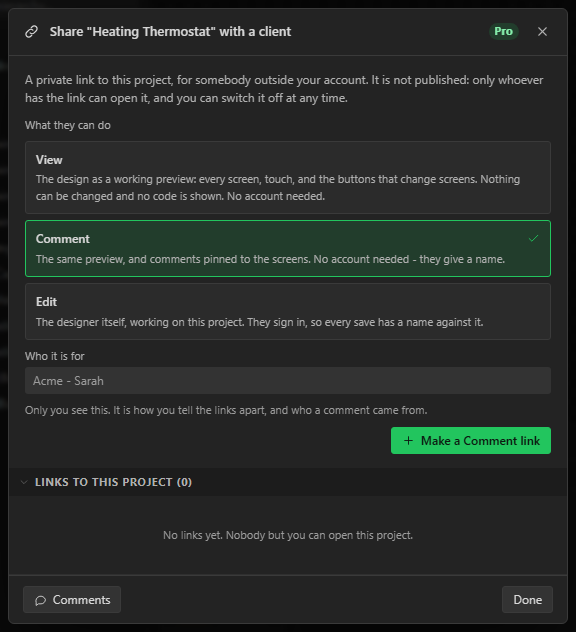
The label is how you tell links apart later, and it is shown beside each comment so you know which client wrote it. Make one link per person. Then you can switch off one person's link without touching anybody else's.
What each kind of link allows
| Link | What they can do | Account |
|---|---|---|
| View | Use the design as a working preview: every screen, touch, sliders, and the buttons that change screens. | None |
| Comment | Everything a View link allows, and read and write comments pinned to the screens. | None. They type a name once. |
| Edit | Everything a Comment link allows, and open the project in the designer and save changes to it. | A free account, so each save has a name against it. |
An Edit link opened by somebody who is not signed in works as a Comment link and offers Sign in to edit.
What your client sees
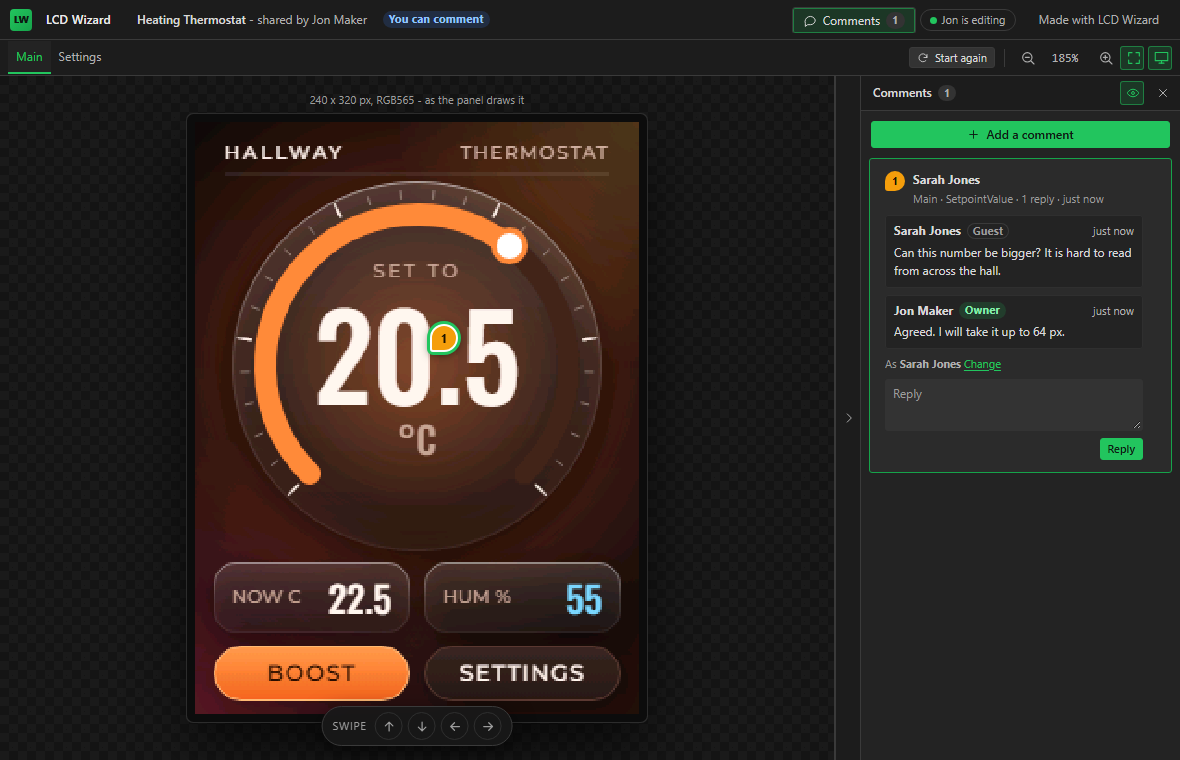
A View or Comment link opens a page with the design on it and nothing of the editor. The screens are tabs across the top. The design behaves as it does in Preview: buttons press, sliders drag, and an event that changes screen changes it. Start again puts every screen back as it was. The page works on a phone.
Three things never leave your account through a link:
- An API key typed into a widget's settings. The copy a link hands out has it emptied.
- Your email address. The page says who shared the design by name.
- Generated code. Export is not offered through a link of any kind.
Opening a link does not touch the design your client already has in their own browser. When they go back to the designer without the link, their own work is as they left it.
Comments
Add a comment, then click the place on the screen it is about. The comment is pinned to the widget under the click, and the pin follows that widget if you move or resize it later. A comment can also be about the whole screen, with no pin. In the designer, select a widget first and the new comment is pinned to it without a click on the canvas.
Each comment is a thread. Anybody who can comment can reply. You, and anybody working through an Edit link, can mark a thread resolved or reopen it. A client on a Comment link cannot resolve, but a reply from them on a resolved thread reopens it. Only you can delete a comment or a reply.
The Comments button on the title bar opens the panel. Open threads come first and resolved ones are under Resolved. Clicking a pin opens its thread, and opening a thread shows its screen and selects its widget. While you are in Preview the pins show only when the panel is open, so they do not sit on the buttons you are trying.
If you delete a widget that has a comment pinned to it, the comment stays on the screen at the point where it was made. If you delete the whole screen, the comment stays in the list.
Hearing about a comment
When somebody else comments, the title bar shows how many threads you have not read, across all of your projects, and clicking it takes you to them. You also get an email with the comment in it and a link that opens the project. A run of comments sends one email, not one each. For half an hour after it, later comments on that project wait with the first, unless you have opened the project's comments in between.
Working on the same project
An Edit link opens your project in the full designer for the person you gave it to. Their File menu has a save that names you, such as Save to Jon Maker's project, and Ctrl+S does the same. It also has Save a copy to my account, which makes a project of their own with no link to yours.
At the same time
Everybody who has a shared project open is working on the same design, live. When you move a widget it moves on your client's screen as you do it, usually within a tenth of a second. Nobody presses anything to send a change or to receive one.
- Who is here. The title bar says Live and names everybody who has the project open and what they are doing: Priya is editing, Sam is viewing. Each person has a colour.
- Where they are. Other people's pointers and selections are drawn on the canvas in their colour. If somebody is on a different screen, their name on the title bar is a button that takes you there.
- Following. Somebody on a View or Comment link can press Follow and their preview shows whichever screen the person editing opens. That is the easy way to walk a client through a design while you talk.
- Saving. A live design saves itself a few seconds after the last change, and the title bar says Live - saved. Ctrl+S saves it at once. Each save goes into the version history under the name of whoever changed the design last.
- Undo. Your undo steps back through your own changes. It does not undo somebody else's.
- Comments appear as they are written, as a pin on the canvas.
If two people change the same thing at the same moment, the change that reaches the server last is the one everybody ends up with. If one of you deletes a widget the other is changing, the delete stands.
If your connection drops
You can keep working. A strip says Offline - your changes are kept here and will be sent when you are back, with how many are waiting, and other people see that your connection has dropped. When you are back your changes are sent and you are given what you missed.
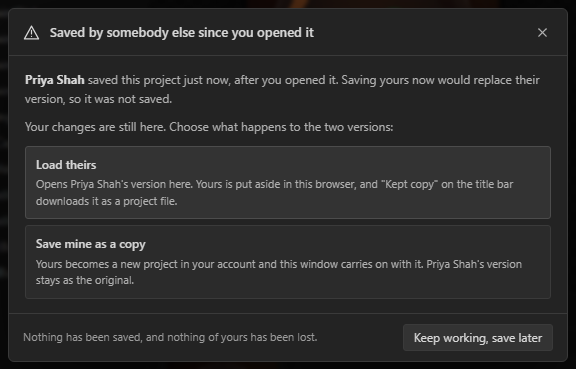
The one time you are asked anything is when what you changed while away no longer fits: a widget you were working on has been deleted in the meantime. Then nothing of yours is sent, your version stays on your screen, and the designer asks what to do with the two versions:
| Choice | What happens |
|---|---|
| Load theirs | The shared design opens and you are live again. Your version is kept in your browser, and Kept copy on the title bar downloads it as a project file. |
| Save mine as a copy | Your version is saved as a new project in your own account. The shared one stays as it is. |
Changes you have not sent are kept in your browser, so a reload does not lose them.
One rule protects an API key. A widget that holds a key of yours keeps all of its settings as you saved them, whatever a collaborator sends, because the setting beside a key is the address the key is sent to. A collaborator can still move, resize, rename and restyle that widget. Their Console tab says so when a save left its settings alone.
A classroom
For creator accounts. A classroom is a fourth kind of link, for an audience and not a client: any number of people watch you work on the project, live, with no account. It is made for streaming and teaching. Put the link in your stream's description and your viewers have the design itself on their own screen, changing as you change it.
- What they see. Your designer, mirrored on their screen: the same panels, the widget you select with its settings beside it, the tab and the sections you have open, a variable as you create it, and the preview running when you run it and reacting to what you press. They can scroll a panel to read it.
- Menus and lists. A menu you open on the title bar opens on theirs, with the item you are pointing at marked. A list you open to choose from, such as an event's trigger or its action, is drawn under the same setting on their screen with the present choice marked, and what you choose is marked for a moment before it closes. Chrome and Edge tell a page when a list is open. In a browser that cannot, it is worked out from your clicks and keys, and a list you dismiss by clicking away can stay on their screen until your next click.
- Your pointer, clicks and keys. Your pointer is shown wherever it is on your designer, over the same control on their screen whatever size their window is. A dot on its tip shows a button held down, and a ring marks each click. A key you press is named at the bottom of their screen for a moment, for example Ctrl + Z. What you type into a field is never shown and never sent: from a field only Enter, Escape, Tab and shortcuts are named, and from a password or API key field nothing is. While you have a dialog open their screen says so, and your pointer is not shown.
- Dragging. A widget you drag or resize moves on their screen as you move it, not only when you let go.
- What they do not see. Dialogs, which includes the export dialog and the code in it; a colour picker, which belongs to your browser; your account menu; your Console; and anything on your screen that is not the designer.
- What they cannot do. Change anything, press anything, or comment. Their page is for watching.
- On a phone. The designer does not fit a narrow screen, so a watcher on one is shown the design itself as a preview, which follows you from screen to screen.
- Who is there. Your title bar says how many are watching, not who. Watchers see the same number, your name, and nobody else's.
- Delay. A video stream reaches its viewers some seconds after you speak. Set the classroom's delay to the same number of seconds, up to 120, and the page changes when the video does. While a classroom is open the delay is on your title bar, beside the count of who is watching, so you can change it in the middle of a stream; taking it off sends what was waiting at once. Somebody who arrives is shown the design as it is, and is behind by the delay from then on.
- Stopping and starting. While a classroom link exists, your title bar has a classroom button that says how many are watching. Press it and choose Stop the classroom. Everybody watching is told at once that it has stopped for now, and their page waits. Start the classroom on the same button lets them back in through the same link, with nothing for them to do. A link in a stream's description or on a course page stays good between sessions. Somebody who opens the link while it is stopped is told the classroom is not open, and nothing about the design.
- Ending it for good. Stop and delete the link on the same button, or Revoke in the Share dialog. Every watcher's page says the classroom has ended, and the link then answers as one that never existed.
To draw the design, each watcher's browser is sent the design. Open a classroom on a project you are content for your audience to have. An API key typed into a widget is never sent to anybody.
Switching a link off
The dialog lists every link to the project with when it was last opened. Revoke switches a link off at once. The next thing its holder tries says the link has been switched off, and the link then answers as one that never existed. A revoked link cannot be switched back on. Make a new one.
You can change what a link allows from the same list. Anybody who has it open is told to reload. Comments stay when a link is revoked. Deleting the project deletes its links and its comments.
Treat a link as you would a password for that project. Anybody it is forwarded to can do what the link allows.
Limits
| What | Limit |
|---|---|
| Links to one project | 20 |
| People in one project at the same time | 24 |
| People watching a classroom | 500, counted apart from the 24 |
| Comments and replies on one project | 2,000 |
| Replies in one thread | 200 entries, the comment included |
| Length of one comment | 4,000 characters |
The room in a shared project is its owner's plan's. A collaborator cannot add more screens than your plan allows.
What is stored
A comment stores the name its author gave, the text, the time, and which link it came through. A visitor with no account leaves nothing else. See the privacy policy.