A camera: live on the screen, saved pictures, and a stream over Wi-Fi
A camera is a device on the Hardware tab. A widget shows what it sees, an action takes a picture, and anything on the same network can watch it. The same widget can show another camera’s stream instead, and an ESP32-P4’s own camera can be watched over RTSP.
What it is
A camera with a parallel (DVP) ribbon connector - an OV2640 or OV5640 module, the kind sold for ESP32 boards - driven by the camera driver that is already in the ESP32 core, so there is no library to install. It has four parts in the designer, and each is where you would look for it:
| Part | Where | What it is for |
|---|---|---|
| The camera | Hardware > Devices | Its pins, and the picture: size, quality, mirrored, upside down, and whether it is streamed. |
| Camera view | The palette, under Ready-made | A box on a screen that plays what the camera sees. As many as you like. |
| Three actions | Events on any widget, and automations | Take a picture; Camera: start or stop; Camera stream on or off. |
| Its values | The device’s card, each with a Variable button | Frames a second, pictures taken, whether the stream is on and how many are watching. |
It needs an ESP32-S3 with PSRAM, and it is written by the Arduino export. On another chip, or in a MicroPython, ESPHome or ESP-IDF project, the palette and the device list say why not. An ESP32-P4 has a camera of its own kind, on its MIPI connector: see below. And a Camera view needs no camera at all when it shows a stream from an address.
The quick way
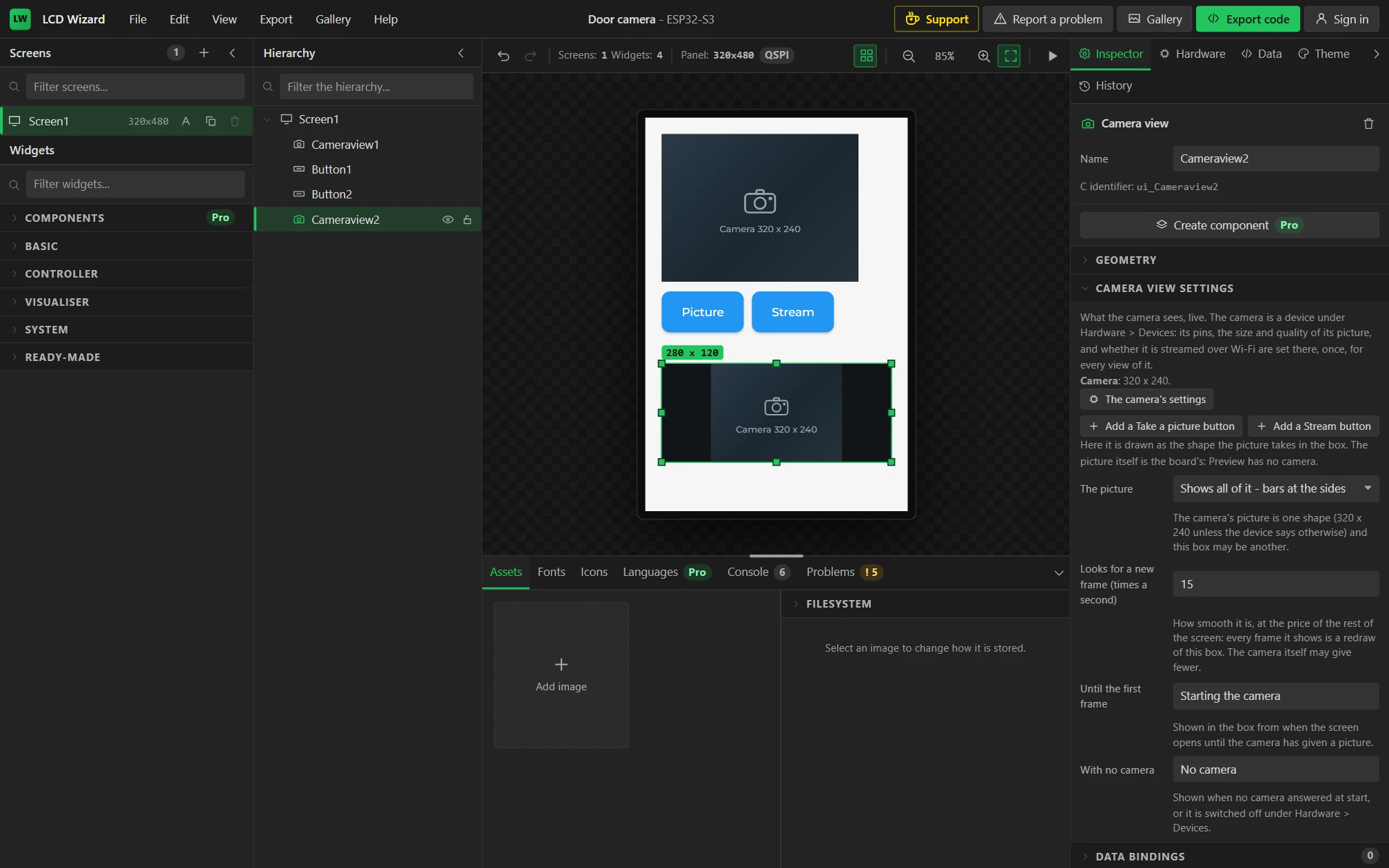
- Drag a Camera view onto a screen. Where the design has no camera, one is added under Hardware > Devices; on a board whose preset brings one switched off, it is switched on.
- If the camera is your own wiring, open Hardware > Devices > Camera, choose the I2C bus its SDA and SCL are on, and set its twelve pins. The Problems tab names any that are missing.
- With the view selected, the Inspector has Add a Take a picture button and Add a Stream button: each puts a button under the view, already wired.
- Export, and upload.
Wiring one
A camera module has two control lines, four timing lines, eight data lines, and sometimes a power-down and a reset.
| On the module | In the designer | Notes |
|---|---|---|
| SDA, SCL (also SIOD, SIOC) | Bus: an I2C bus from the Buses tab | The control lines. They can share a bus with other parts, and on boards with a camera connector they do. The driver finds which sensor is fitted, so there is no address to choose. |
| XCLK | XCLK | A clock the board gives the camera: 20 MHz, or 10. |
| PCLK, VSYNC, HREF | The same names | The camera’s own clock and its two sync lines. |
| D0 to D7 (also Y2 to Y9) | D0 to D7 | The picture. Modules number these two ways; the labels show both. |
| PWDN | Power down (optional) | A GPIO or a pin of an I/O extender. Held low while the camera is on and high while it is switched off; the other way round is a setting. |
| RESET | Reset (optional) | Leave unset where the module ties it high. |
That is twelve pins beside the bus, so a camera suits a board whose screen is on SPI or QSPI and leaves pins over. A camera that is switched off (the eye on its card) is not started and its pins are free for something else; a design for a board with a camera connector and no camera fitted loses nothing.

The picture’s settings
| Setting | What it does |
|---|---|
| Picture size | 160 x 120 up to 640 x 480; 320 x 240 unless you change it. A view scales the picture to its own box, so choose the size nearest your largest view: bigger is slower and takes more PSRAM for nothing. |
| Picture quality | Of a saved picture and of the stream, which are JPEGs. 80% to start with. |
| Mirrored, Upside down | For a camera that faces you, or is mounted the other way up. |
| Swap colour bytes | If a view’s colours are wrong - skin blue or green - tick this. Sensors differ in which half of a pixel they send first. |
| Camera clock | 20 MHz, or 10 for long wires or a picture with torn lines. |
| Stream over Wi-Fi, Stream port | See the stream. Off unless you tick it. |
With a Camera view at 320 x 240 the camera takes about half a megabyte of PSRAM: two frames for the driver, one for the screens to read, and each view’s own picture. The Problems tab says the figure for your design.
The Camera view
A box that plays the camera. It has no pins and no picture settings of its own: it is a window on the device, which is why a design can have several. Its own settings are how the picture is put into this box:
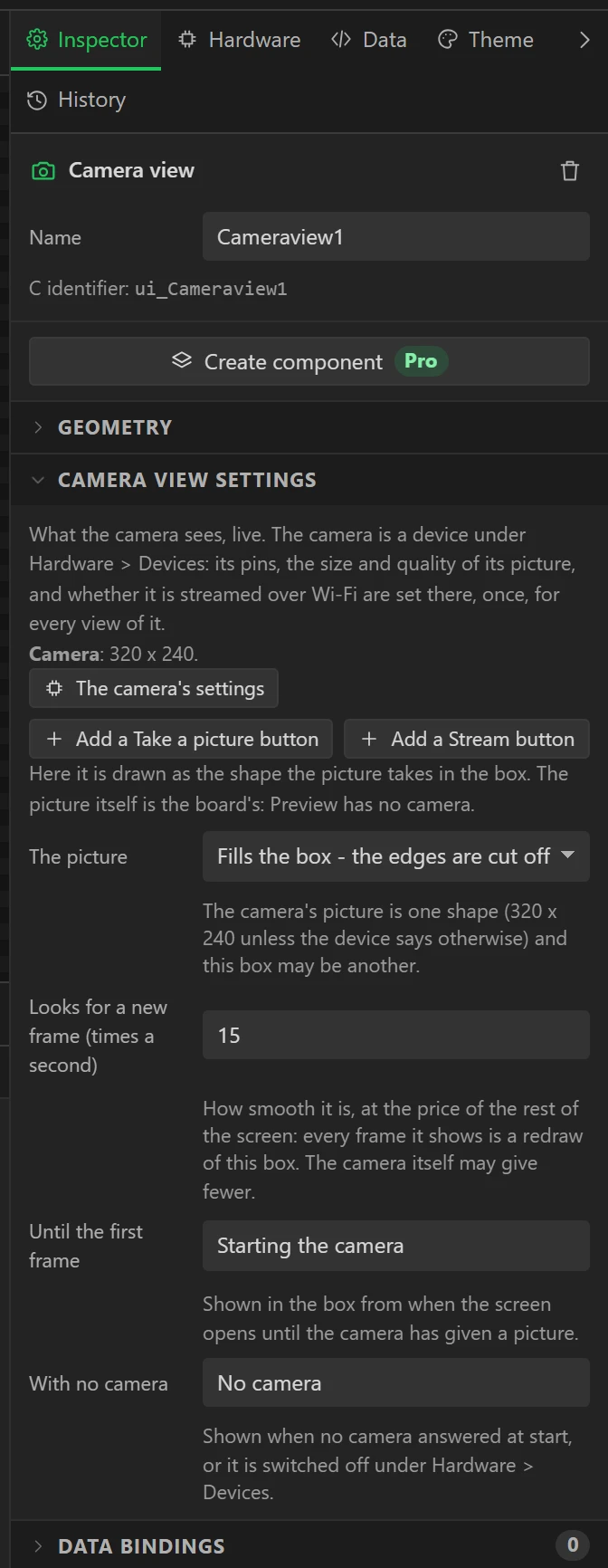
- The picture fills the box and loses its edges, is shown whole with bars beside it, or is stretched. The canvas draws the shape the picture will take, bars included.
- Looks for a new frame so many times a second: 15 to start with. Every frame it shows is a redraw of the box, so a high figure is paid for by the rest of the screen.
- Two lines of text: one until the first frame, one for when there is no camera - none answered at start, or it is switched off.
Its look is the box’s: the colour behind a picture that does not fill it, a border, rounded corners, and the font and colour of its line of text, all under Styles. In the designer and in Preview it is drawn as a placeholder; the picture is the board’s. The Camera view is one of the Ready-made pieces, which are part of Pro when code is generated; the camera device, its pictures and its MJPEG stream are not.
Its first setting, Shows, is This board’s camera or An MJPEG stream at an address: the next section.
A Camera view of a stream
Set Shows to An MJPEG stream at an address and the view plays a stream from the network instead:
another board’s camera stream (http://its-address:81/stream), or an IP camera’s MJPEG
address. No camera is needed on the board showing it, only PSRAM and a network. ESP32-S3 or ESP32-P4 (on a P4 the
chip’s JPEG engine decodes it), Arduino export.
| Setting | Default | What it does |
|---|---|---|
| Stream address | empty | The http:// address. A user name and password go in it: http://user:password@camera/video.mjpg. https is not played. |
| Plays when the board starts | on | Off, it waits for the Camera view action set to Play. |
| When the stream drops, tries again after | 5 seconds | 0 waits for Play instead. |
| While there is no picture | Keeps the last frame | Or shows the box and its text. |
| When the stream is lost | No signal | The text shown when it cannot be reached, and while it is stopped. |
| Sound from | empty | An MJPEG stream has no sound of its own. An audio stream’s address here (MP3, AAC or WAV, as a radio station is) plays through the board’s speaker while the picture plays. The two start together and are not kept in step. |
| Largest frame | 200 KB | A frame bigger than this is skipped. |
The Camera view action (Pro) plays, pauses, stops, or plays-if-paused the stream, and Play can take the address from a text variable: a roller of cameras sets the variable, and the action plays it. The view sends Stream playing when its first frame is up and Stream lost each time it drops. The frames are read and decoded on core 0, with the network; the screen only copies the newest. For RTSP streams and MP4 files on an ESP32-P4, use the Video player.
The three actions
| Action | What happens |
|---|---|
| Take a picture | What the camera sees is saved as a JPEG: on the SD card if the design has one, otherwise in the board’s flash filesystem. The files are /pic_0001.jpg and counting, and the number carries on after a restart. Pictures taken goes up by one when the file is written. |
| Camera: start or stop | Stopped, no frames are taken: a view keeps its last picture and the stream sends nothing. A picture that is asked for is still taken. |
| Camera stream on or off | Switches the stream while the design runs. Switched off, whoever was watching is cut off. |
They are actions, so anything that fires an event can do them: a button, a timer automation that takes a picture every minute, a pin, a doorbell on a digital input.
The stream
With Stream over Wi-Fi ticked on the device - or once an action switches it on - the board serves the live picture to anything on the same network:
| Address | What it gives |
|---|---|
http://<the board’s address>:81/stream | The live picture, as MJPEG: a browser, VLC and Home Assistant’s MJPEG camera all play it. |
http://<the board’s address>:81/capture | One picture, as a JPEG. |
http://<the board’s address>:81/ | A page with the live picture and a link to save one. |
- The design has to join a network: add a WiFi Setup widget. The serial log prints the stream’s address once the board is on one, and a label bound to the network’s address shows it on the panel.
- It is plain HTTP, and on an ESP32-S3 it has no password. Anybody on the same network can watch. That is why it is off unless you switch it on, and why the Problems tab says so when it is. An ESP32-P4’s camera can ask for a user name and password (below).
- Three can watch at once. Port 81 keeps it clear of a Web server widget on the same board, which has port 80.
- Frames go over Wi-Fi as fast as the board can pack them. With no Camera view in the design the camera sends JPEGs itself, which is the quicker way; with one on screen each streamed frame is packed by the chip. Neither has been timed on a board yet.
An ESP32-P4’s camera, and RTSP
On an ESP32-P4 the camera is Camera on the MIPI connector (OV5647, SC2336 and the like), a device under Hardware > Devices: its two control lines on an I2C bus of the design (on most boards the touch panel’s), and a reset and a power-down line where the board has them. The sensor sets its own picture size, so there is none to choose. Dropping a Camera view on a P4 design adds it. Everything above works the same: the Camera view, Take a picture, and the MJPEG stream, made by the chip’s JPEG engine.
A P4’s camera adds an RTSP server (Pro): rtsp://<the board’s address>:554/live, H.264
from the chip’s own encoder, over TCP, for VLC, an NVR, Home Assistant, or another P4’s
Video player. Two can watch at once; the encoder runs only while somebody does.
| Setting | What it does |
|---|---|
| MJPEG stream, MJPEG port | As on an S3: free. |
| RTSP server (H.264), RTSP port | Off by default; 554. Pro. It needs a chip of revision 3 (Hardware > Board, Chip revision): the encoder of the chips before it cannot take the camera’s picture, and the Problems tab says so. |
| RTSP bit rate | 2000 kbit/s to start with. Higher is clearer and more of the network; through the C6 Wi-Fi co-processor keep it modest. |
| User name and password for the streams | Empty: no password. Set, the MJPEG stream asks for them (Basic) and RTSP asks for them (Digest). |
A new viewer waits up to a second for its first picture: the encoder makes a key frame every second. The value
Watching over RTSP counts the viewers, and camera_rtsp_viewers() is the same from your own code.
What it says of itself
On the device’s card, each with a Variable button: Frames a second, Camera running, Pictures taken, Stream switched on and Watching the stream. Bind one to a label, light a lamp while somebody is watching, or disable the Picture button while the camera is stopped.
From your own code
The export writes lw_camera.h, and everything in it returns at once - the camera has a task of
its own. camera_snapshot(), camera_set_running(bool),
camera_stream_enable(bool), camera_fps(), camera_pictures(),
camera_last_picture(), camera_viewers(), and camera_error(), which
says in words what went wrong last. camera_frame() scales the newest frame into a buffer of yours.
Boards with a camera connector
The Waveshare ESP32-S3-Touch-LCD-3.5B preset brings its camera connector’s pins, with the camera switched off: only the “-C” version of that board has a camera fitted, and its twelve lines are header pins otherwise. Drop a Camera view and it is switched on, wired. Three more Waveshare boards carry their camera in the preset the same way, switched off until you drop a Camera view, on Waveshare’s own pins: the ESP32-S3-Touch-LCD-3.5, the ESP32-S3-LCD-2 and the ESP32-S3-Touch-LCD-2. A design saved before that has to choose the board again to get it. Live picture on screen and Take a picture, Arduino; compiled, not run on a board. On any other ESP32-S3 board with PSRAM and the pins to spare, add the device and set its pins.
What is not here
- Autofocus. It is not in the core’s camera driver, so the lens stays where it is.
- Video saved to the card, the board’s microphone sent with its stream, and recognising faces or codes in it.
- MicroPython, ESPHome and ESP-IDF: the firmware behind MicroPython has no camera driver, ESPHome’s camera sends pictures to Home Assistant, not to the screen, and the ESP-IDF export does not carry the camera’s streams or a P4’s camera yet. Each says so in the Problems tab.
- A password on an ESP32-S3’s stream, RTSP from an ESP32-S3, and UDP for RTSP.
When it does not work
| What you see | What to check |
|---|---|
| The view says No camera | The serial log says why at start, on lines beginning [camera]. No camera answering is the ribbon cable, a pin, or the power-down line the wrong way; “would not start” with PSRAM off is the Tools > PSRAM setting in the Arduino IDE. |
| The view stays on Starting the camera | The camera answered and gives no frames: PCLK, VSYNC, HREF or a data line. |
| Wrong colours | Tick Swap colour bytes on the device. |
| Torn or rolling lines | Lower Camera clock to 10 MHz, and keep the cable short. |
| Nothing at the stream’s address | Is the stream switched on, and the board on the network? The serial log prints the address when it is. A phone on mobile data is not on the same network. |
| Take a picture saves nothing | With an SD card in the design the card has to be in the slot at start. The serial log says how many bytes were written, or why none. |
How far this has been tested
It is compiled for the ESP32-S3 on LVGL 9 and 8 - a view with every action and the stream, the stream alone, a view alone, a camera switched off, and the Waveshare 3.5B with the camera from its preset - and the function that scales a frame into a view is tested on a PC against 6,489 boxes. As of October 2026 it has not run on a board here: no camera has been fitted to anything it was built for. Colours in particular depend on the sensor, which is what Swap colour bytes is for. If it does not behave as this page says, Report a problem on the designer’s title bar reaches the person who wrote it.
A Camera view of a stream (on an S3 and a P4), and a P4’s camera with its MJPEG and RTSP servers, are compiled for LVGL 9 and 8, and the code that reads a stream and packs RTSP is tested on a PC against streams made for it. None of it has run on a board yet (October 2026).