Web server
Makes the board a small web server. What is in its folder is a site: a browser that asks for
the board’s address is shown index.html, and any other file by its name. A
second page, at /files, lists what is there, takes new files - chosen, or dropped
onto it - and deletes them. Routes are addresses it answers
with code of your own, which is what a page asks for live values and sends changes to. On a screen
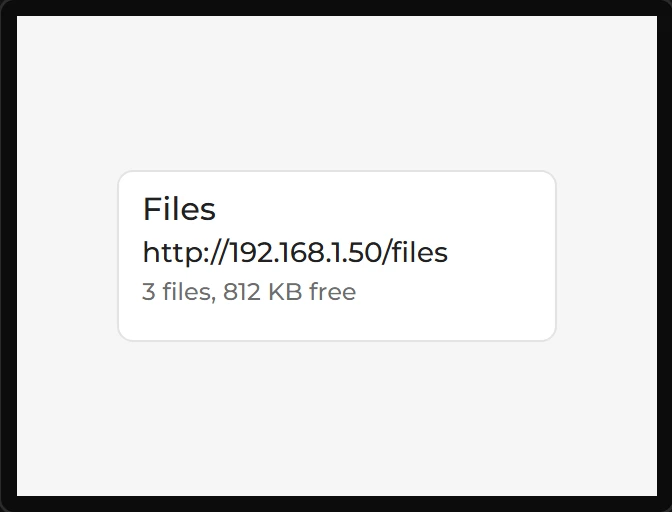
it is a card that says where to find it. A design has one. Arduino export, on an ESP32.
| Setting | Default | What it does |
|---|---|---|
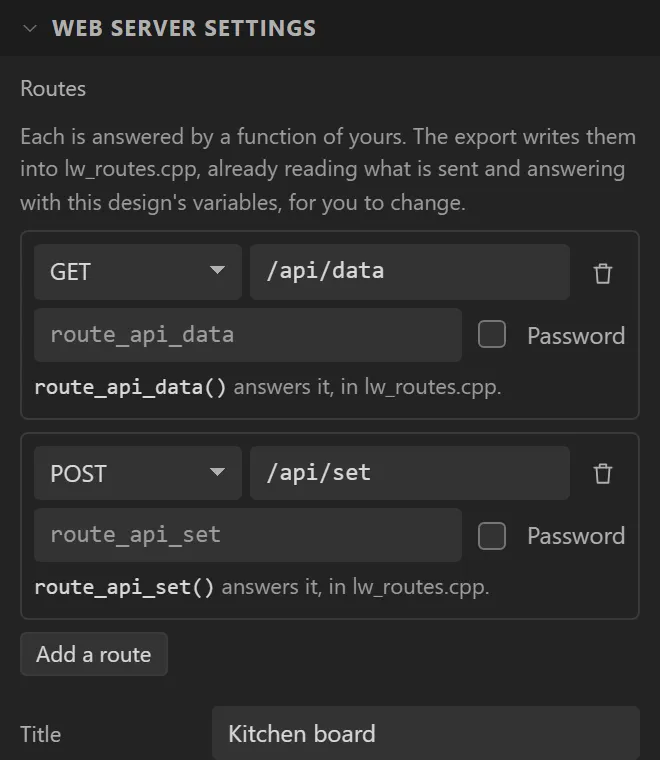
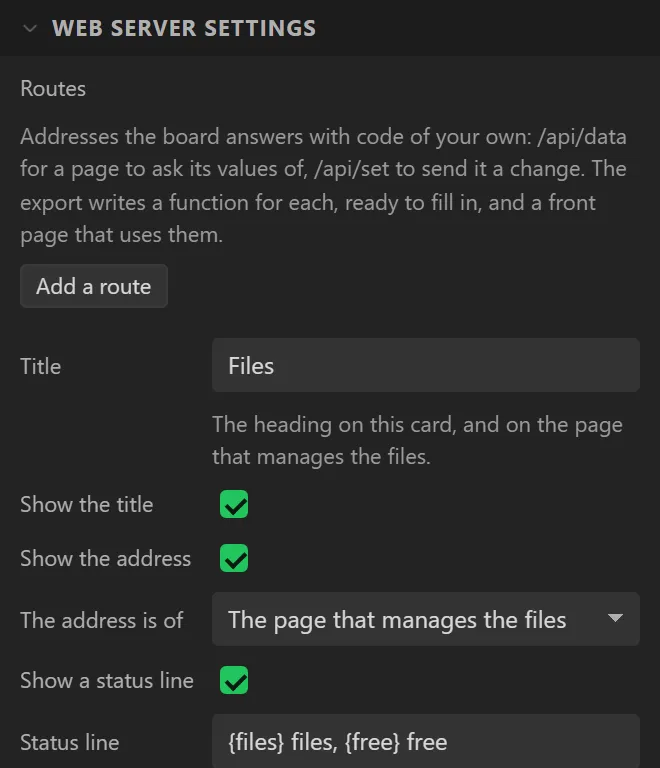
| Routes | none | The addresses answered by your own functions: Add a route, then its address, whether it is asked (GET), sent to (POST) or either, and - if you want - the function’s name and whether it asks for the password. See Routes below. |
| Title | Files | The heading on the card and on the page. Switch Show the title off for a card without one. |
| Show the address, The address is of | on, the files page | The line somebody types into a browser: the page that manages the files, or the site itself. |
| Show a status line, Status line | on, {files} files, {free} free | Words of your own with the server’s figures in them: {files} how many it keeps, {free} the room left, {uploads} how many have arrived since the board started, {last} the name of the last one. |
| With no network | Waiting for the network | Said where the address would be until the board has one. |
| Files are kept | On the board’s flash | Or on an SD card, when the design has one under Hardware. The flash is the filesystem the design’s own pictures use, and as big as the partition layout makes it. |
| In the folder | /www | The folder that is the site. Give it one of its own: the top folder of the flash is where the design’s pictures live, and they would be listed and could be deleted. |
| Opens with | index.html | The file a folder’s own address shows. Until the folder has one, the board serves a starter page of its own at /. |
| Starter page title | My board | The heading of that starter page. |
| Files page at | /files | The address of the page that manages the files. |
| Takes uploads, Lets files be deleted | on | Off, the page only lists. With both off the board only serves. |
| Log download page, Log page at | off, /logs | Pro, Arduino export. A page that lists the files the design’s Stream to card logs have written, with a download for each and, if Lets files be deleted is on, a delete behind a confirm. It needs a log under Hardware > Devices > Stream to card. The page, its three addresses and the code that sets it. |
| Largest file | 0 | In KB. 0 takes whatever there is room for. |
| Name, Password | admin, none | Asked for by the files page, and for every upload and delete. What is in the folder is served to anybody who asks: it is a site. The password is kept in the design and written into the firmware, and is taken out of any copy you publish. |
| HTTPS | off | Encrypts the connection. Needs a board with PSRAM. Always on in a design with a Firmware update. |
| Port | 0 | 0 is the usual one: 80, or 443 with HTTPS. |
| Name on the network | none | Given one - kitchen, say - the board also answers at kitchen.local. |
Over plain HTTP a password is sent where anybody on the network can read it. That is what HTTP is, and on a home network it may be all you need. With HTTPS the board makes itself a certificate the first time it starts and keeps it; nobody has vouched for that certificate, so a browser warns before the first visit, and the connection is encrypted all the same. An encrypted connection takes about 40 KB of the board’s memory while it lasts, so two browsers are served at once and no more.
A variable can read what the server says of itself - on the Data tab, under Web server: its address, whether it is being served, how many files it keeps, the room left, how many have arrived and the name of the last, how many times a route has been asked for and which was last. A QR code bound to the address is a link somebody can point a phone at. The card has two events of its own, File received and A route was asked for.
Routes: a site of your own, with live data
A route is an address the board answers by running a function you write - /api/data
for a page to ask the board’s values of, /api/set to send it a change,
/update/getdata, whatever your pages need. You add one in the inspector, and the
export does the rest of the wiring:
lw_routes.cpphas a function for every route, with a first answer already in it. One that is asked answers with the design’s variables as JSON, by name; one that is sent to sets each variable it was sent a value for. They are yours from there: change what each reads and sends back.- A front page is served at the board’s address until the folder has an
index.htmlof its own. It asks the first route for its values every two seconds and lists them, and has a button for each of the others - so a design with one route and one variable already shows live data in a browser. The same page is in the export as a file (data/www/index.html), to change and send back through/files.
// GET /api/data
void route_api_data(ServerRequest & req)
{
    ServerJson j;
    j.add("Level", var_Level);          // the design's variables, by name
    j.add("Room", var_Room);
    req.json(j);                        // {"Level":5,"Room":"Kitchen"}
}

// POST /api/set
void route_api_set(ServerRequest & req)
{
    if (req.hasArg("Level")) var_Level_set((int32_t)req.argInt("Level"));
    req.ok();
}
And from a page of your own:
fetch("/api/data").then(r => r.json()).then(d => { level.textContent = d.Level; });
fetch("/api/set", { method: "POST", body: new URLSearchParams({ Level: 50 }) });| In a function | What it does |
|---|---|
req.arg("name"), argInt, argFloat, argBool, hasArg | A value sent with the request: ?name=value on the address, or a field of a posted form. |
req.body(), req.isPost(), req.header("Accept") | What was posted, whole; which kind of request it is; one of its headers. |
req.json(j), req.text("..."), req.html("..."), req.ok() | The answer. ServerJson builds the JSON a name at a time and does the quoting. |
req.error(400, "why"), req.redirect("/"), req.send(200, "text/csv", "..."), req.sendHeader(...) | Anything else an answer can be. |
A function runs on the same thread as the screens, between two refreshes, so it may read and set the design’s variables and use its widgets without any locking - and the screen waits while it runs, so keep it short and never wait in one. A route ticked Password asks for the Web server’s name and password first. A POST is taken from the board’s own pages and from anything that is not a browser; a browser sent by a page on another site is refused.
lw_routes.cpp is written afresh by every export, like the events file: keep
your own copy and take only a new route’s function from the new one. A route whose function is
missing still builds - the board answers 501 for it and names the function to write. What a route is
sent is read whole into memory, so a large upload belongs on the files page, not in a route.
The page is the board’s own, in English, and needs nothing from the internet. A folder inside the folder is served but not listed; an upload that stops part way leaves no file behind. None of this has been run on a board yet: the firmware is compiled, and the pages have been used in a browser against a stand-in for the board, not against one.
The log download page
Pro, Arduino export. A soil logger in the ground, its SD card out of reach: the CSV files come over Wi-Fi
instead. Switch Log download page on and the board serves a page, at Log page at (/logs),
that lists every file the design’s Stream to card logs have written - the card or the flash, as each log is
set - with its size and date, a download link for each, and a Delete button when Lets files be deleted is on.
The file a running log is writing is marked “being written”: it can be downloaded, never deleted.
A log whose card is out says so. The page asks for the Web server’s Name and Password, and the Problems tab
warns if deleting is allowed with no password.
The page is made of three plain addresses under the page’s own, so a page of yours can use them with fetch():
| Address | Does |
|---|---|
GET /logs/list | The files, as JSON. |
GET /logs/get?log=N&name=FILE | One file as a download: Content-Disposition: attachment, text/csv, sent a chunk at a time so a large file needs no memory. |
POST /logs/delete?log=N&name=FILE | Deletes it. Needs the header X-LW: 1. Refused with 409 for the file a running log is writing, and for one being downloaded. |
{"delete":true,"logs":[{"id":0,"name":"Readings","store":"sd","present":true,
  "files":[{"name":"log_1.csv","size":1234,"time":1760000000,"writing":true}]}]}
id is the log’s number (N), present is false while its card is out, time is
0 when the board does not know the date, and writing marks the file a running log is writing. Only a file
that belongs to a log can be read or deleted.
Style it, or replace it. The export carries logs.css and logs.example.html in the site’s folder
(data/www/, or sdcard/www/ on a card). The built-in page links logs.css when the file is there: change it and
send it back through /files. A file named logs.html in the folder is served at /logs in place of the built-in page and
can call the three addresses; logs.example.html is the built-in page, to start from. The names follow the address: at /data they are
data.html and data.css. Everything comes from the board - nothing from the internet.
From your own code. lw_logpage.cpp in the export holds logpage_configure(), run each time the server starts, before it answers.
What it sets wins over the designer, and every line is a comment to take the comment off:
| Field | What it sets |
|---|---|
c->base | The page’s address; /list, /get and /delete are under it. |
c->page_file, c->css_file | The page of your own, and the stylesheet the built-in page links, in the site’s folder. An empty page file always uses the built-in page. |
c->allow_delete | Whether a file may be deleted. |
c->folder, c->every_file | List this folder in place of each log’s own, and every file in it rather than only the log’s own. |
c->add_routes, server_handle() | Your own function, called with the server’s httpd_handle_t before the catch-all is registered, to add addresses with httpd_register_uri_handler(). server_handle() is the same handle, later. The Arduino export’s server is esp_http_server, not the WebServer class. |
lw_logpage.cpp is written afresh by every export: keep your copy. Without the file the board builds just the same.
The server follows Wi-Fi
The Web server has no switch of its own. In a design with the Wi-Fi on or off action it starts once the board has an address and stops, cleanly, when the network goes - a download in progress included - and starts again when Wi-Fi returns. Is being served (Data tab > Web server) says which it is. A battery logger can keep Wi-Fi off, switch it on for a button press, and off again once the files are fetched. It is compiled for the ESP32 and the S3; it has not been run on a board.
Example: two routes for a page of your own
- Drag a Web server onto the screen and set its Title to
Kitchen board. - Under Routes press Add a route: it suggests GET
/api/data. Press it again for POST/api/set. Each is answered by a function of yours inlw_routes.cpp, already written to answer with the design’s variables. - On the Data tab add a variable,
Level: the first route will answer with it as JSON. - It is served over a network: add a WiFi Setup, and a Password, as the Problems tab says.