Alarm
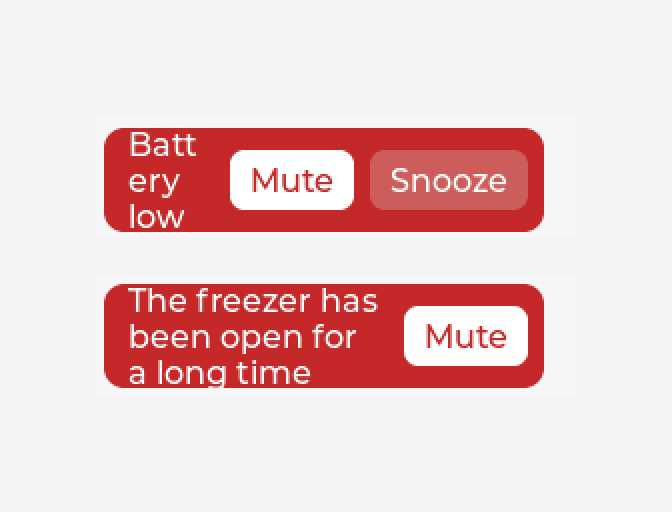
Something that goes off while a condition holds: a battery below 15 %, a door left open, a freezer too warm. You give it the condition, and what it does is its events: a beep, a song from the SD card, a widget turned red, a message over MQTT, any actions, as many as you like. It shows a box with its words and a Mute button while it is going off, does its actions again every so often until it clears, and can be muted or snoozed. Without it the same thing is a variable, two automations, a timer and a hidden panel.
| Setting | Default | What it does |
|---|---|---|
| Goes off while | (empty) | A formula over the design's variables, by name: battery < 15, temp > 30 && fan == 0. Not 0 is true. It goes off when this turns true and clears when it turns false. The line under it says what it would be with the variables as they start. |
| Says | Battery low | The words in its box. |
| Again every | 60 s | While it stays true and is not muted or snoozed, its Alarm started actions run again this often, timed from when it went off. 0: once, when it goes off. |
| Repeats do something else | off | On, a repeat runs the Each repeat actions instead of Alarm started: a long beep the first time and a short one after, say. |
| Snooze for | 0 min | 0: no Snooze button. Otherwise Snooze quietens it for this long, after which it repeats again if it is still going off. |
| Show its own box | on | Off, nothing shows, for a design that does it all through actions: turning a gauge red, showing a panel of its own. The Alarm action still mutes or snoozes it. |
| Mute button says, When muted it says, Snooze button says | Mute, Unmute, Snooze | The buttons' words. While it is muted or snoozed the Mute button unmutes it. |
What it does: its events
Under Events it has four triggers of its own, each with the same action list every event has. Add as many events as you like on each.
| Trigger | When |
|---|---|
| Alarm started | Its condition has turned true. Unless Repeats do something else is on, also every repeat while it stays true and is not muted or snoozed. |
| Each repeat | Every repeat, with Repeats do something else on. |
| Alarm cleared | Its condition has turned false. Muted or not, this runs: the place to put things back, the colour or the panel. |
| Muted | Mute or Snooze was pressed, on its own box or by the Alarm action. |
Mute keeps it quiet until its condition clears; when it goes off again it starts afresh. Snooze keeps it quiet for its length. Neither holds back Alarm cleared. The Alarm action (Mutes it, Unmutes it, Mutes or unmutes, Snoozes it) does the same from any button or event, for a design with buttons of its own.
Two values can be read off it with a binding, from the widget into a
variable: Going off and Muted (1 while muted or snoozed), so a muted mark can be shown
by a Hidden binding with the formula !raw.
How it looks is its four parts under Style settings: the box (Main), its Words, the Mute button and the Snooze button. It is dropped red with white words. In the designer its box is always drawn, so it can be styled; on the board and in the preview it is hidden until it goes off. In the preview it runs as it does on the board, its buttons work, and its events run.
It looks ten times a second, by the board's own clock. It keeps watching on any screen that is
not Temporary (a Temporary screen is deleted when it is left). Arduino and ESP-IDF exports,
LVGL 8 and 9. The MicroPython and ESPHome exports do not have it: there a
Condition changes automation with Repeat every does the
repeating, and a binding shows a panel of your own. In your own code it is
ui_alarm_mute(), ui_alarm_snooze(), ui_alarm_active() and
ui_alarm_muted() from lw_parts.h.
A board with a battery gauge gives the percentage directly: a variable whose source is the AXP2101's or AXP192's Battery charge, or the MAX17048's State of charge. A battery read on an analog pin gives a voltage, which a formula turns into a percentage.
Example: a low-battery alarm
- On the Data tab add a variable
battery, a whole number from 0 to 100. On a board with a battery gauge, set its source to the gauge's charge. To try it in the preview, bind a slider to it both ways. - Drag an Alarm onto the screen. Set Goes off while to
battery < 15, Again every to60and Snooze for to5. - Give it an event: Alarm started, Action Beep (on a buzzer under Hardware), or
Play audio for a speaker or a song on the SD card. Add another: Alarm cleared, Show toast,
Battery OK. - Press Preview and pull the slider below 15: the box shows and it beeps, then again every minute. Mute quietens it until the battery is back above 15; Snooze for five minutes.