Two boards with a microphone and a speaker. Hold a button on one, talk, and your voice comes out of the other. No Wi-Fi network, no router, no phone app. Just two ESP32s talking to each other over ESP-NOW.
Paired, like a proper handset
Two boards pair once and remember each other. After that the link is private and encrypted, and each board knows when the other stops answering. You can also talk on a shared channel name, for more than two.
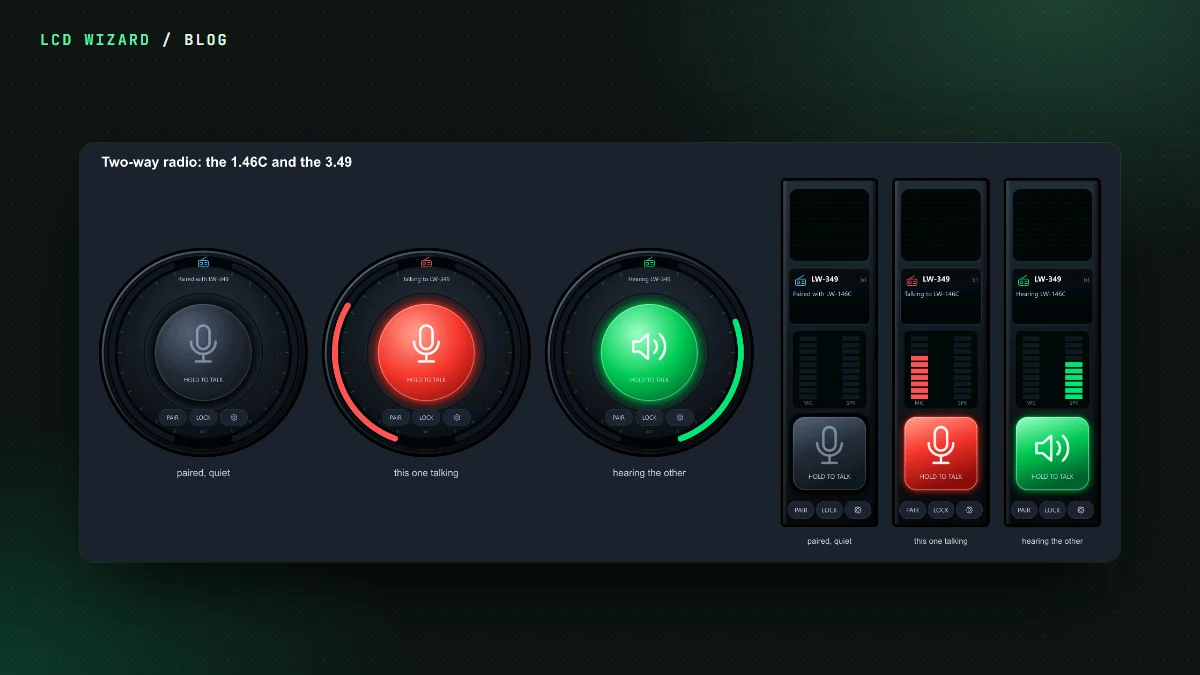
In the designer it's a widget: a handset icon with six states (idle, talking, hearing and so on) and actions for push to talk and pairing. Hold to talk can be on the glass, on the BOOT button, or a LOCK key so you don't have to keep a thumb on it.
What the first run taught us
The first time it ran, between my Waveshare 3.49 and a round 1.46C, the verdict was "okay the radio works". Pairing worked and voice went both ways. Two things came back from that run:
- Holding the button on the 3.49 wouldn't stay held. Its touch chip reports a held finger slightly differently from a tap, and a tap and a drag both passed the test while a hold failed. Fixed, and "a hold is its own test" is now on our list for every touch chip.
- The 1.46C was very, very quiet. Nothing broken, just two microphones at two different levels. The radio now evens out the voice by itself, raising a quiet one by up to 12, 18, 24 or 30 dB, your choice.
Now it sends data too
The same pairing can carry values between boards. Tick a variable to share it, and the other board reads it like any other source. A temperature from the shed, a button in the kitchen, a counter on the bench. Two of my 3.49s ran voice and data at the same time on one pairing. Sending data over ESP-NOW is Pro and works on Arduino and ESP-IDF; the ESP-NOW data page has the rest, including how a board with no screen can join in from a sketch of its own.
Build one
The two-way radio tutorial builds the whole handset on the Waveshare ESP32-S3-Touch-LCD-3.49, 33 steps with a picture for each. Or open the handset or the round one in the gallery. The two-way radio page explains every setting.