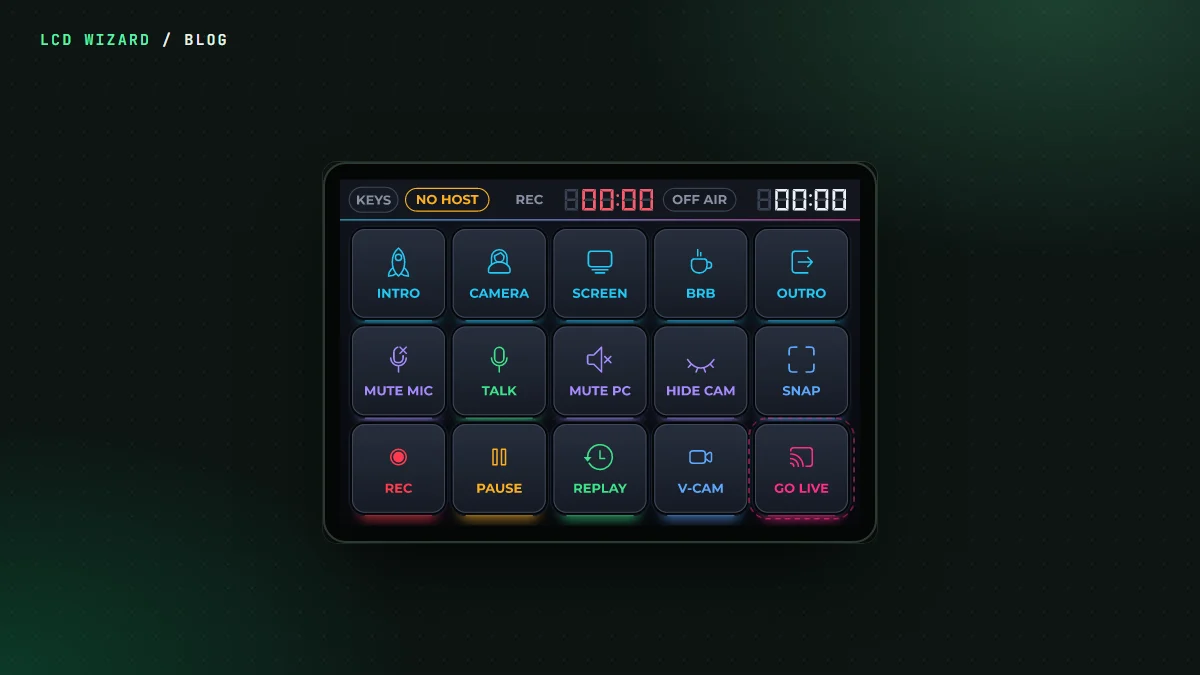
A proper stream deck costs a fair bit. A 3.5-inch ESP32 touchscreen costs a lot less, and with LCD Wizard it can do the same job: pair with your PC as a Bluetooth keyboard and fire OBS Studio's hotkeys.
What it does
- Scene keys, mute, start and stop recording, and GO LIVE.
- GO LIVE needs a hold, so a stray thumb doesn't put you on air.
- Push to talk works while you hold it.
- Record and on-air timers count up on the screen.
- The keys use F13 to F24 with a modifier, so they never clash with anything you type.
I flashed it, paired it and set up the hotkeys in OBS. The verdict: "obs integration tested and working", holds and all.
Step by step
The OBS stream deck tutorial builds it from an empty screen on the LCDWIKI ES3C35P: 50 steps and 57 pictures. Every step was done in the real designer to take its picture, so if a step can't be done, we'd have found out first. Driving the designer through it turned up six faults, all fixed before the tutorial went up.
The table of OBS hotkeys to type into OBS is on the Bluetooth page, made from the same table the deck uses, so they can't disagree.
Make it yours
Open the deck in the gallery, change the keys, the colours, the board. A Bluetooth keyboard role and the Timer widget are Pro; see pricing. Any widget, button, encoder or automation can send a key, so a rotary knob can be your volume.