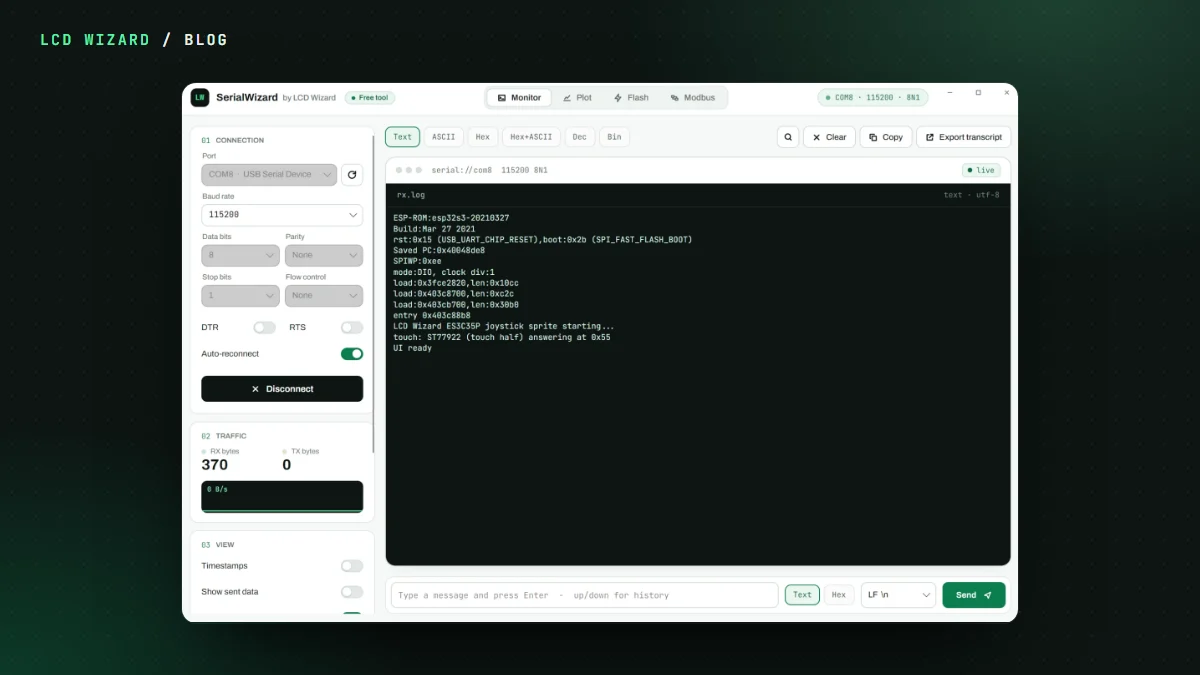
Every ESP32 project ends up with three or four tools open. A serial monitor, something to plot the numbers, a flasher, and maybe a Modbus tester if you're talking to kit. I got fed up juggling them, so we made one. It's called SerialWizard and it's free for everybody.
What's in it
- Monitor. Search, a send box with history, and it reconnects by itself when a board resets or is unplugged.
- Plot. Numbers are picked out of each line as it arrives, like
temp:23.5C, hum:41%, plain columns or a CSV header. The axes scale themselves. Record a run and save it as CSV, or as a PDF report with the chart and statistics. - Modbus. An RTU and TCP master. Read and write coils and registers, as 16 or 32-bit integers or floats in any word order, with every frame shown in hex and its CRC checked. There's a demo device built in, so you can try it with no hardware at all.
- Flash. Drop in .bin files or a whole build folder. It recognises the bootloader, partition table, app and merged images from what's inside them and puts each at the right address.
Nine chips, and hard to brick
It flashes the ESP32, ESP32-S2, S3, P4, C2, C3, C5, C6 and H2. An address that would break the board is refused before anything's written. It checks the write, then hands the port straight to the monitor so you catch the very first boot line.
Free, honestly
No account, no trial, no Pro tier. Windows, macOS and Linux. It isn't code-signed yet, so your browser and your computer will grumble the first time. The download page lists an MD5 and SHA-256 for every file and walks you through checking one. VirusTotal scanned the Windows build and none of its 66 security vendors flagged it.
It pairs nicely with the designer: design the screen, export the firmware, flash it with SerialWizard and watch it boot. The SerialWizard docs have the rest.