The M5Stack Core2 has three little circles printed under its screen. They look like decoration. They're actually buttons, and they sit on the same touch panel as the screen. Which caused a fun one.
The ghost presses
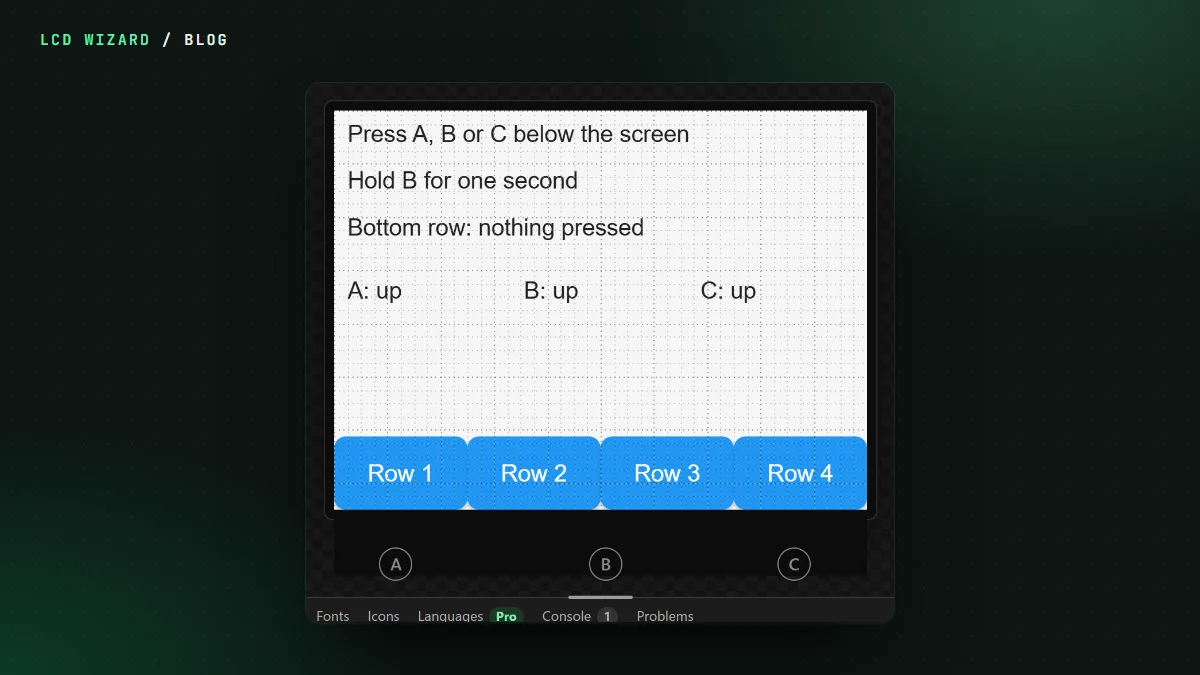
The touch panel on the Core2 is taller than the screen. Tap one of the circles and the touch chip reports it like any other touch, just below the bottom of the picture. LVGL doesn't know about a strip below the screen, so it pinned those touches to the bottom row and pressed whatever was there. Put a row of keys along the bottom of your design and tapping B would fire one of them.
I measured it on my own Core2 v1.3. The circles came in as screen touches at the very bottom, and the board test's bottom keys took presses nobody had made.
Now they're buttons A, B and C
We do these things the way the board's maker does, so the strip is read the way M5Stack's own code reads it:
- a tap on the strip never reaches LVGL, in any rotation;
- the three circles are buttons A, B and C, digital inputs with pressed, released and held, like any other button on a board;
- a finger that slides down off the screen doesn't press anything.
It is in the Arduino, ESP-IDF and MicroPython exports. On my Core2, from the Arduino export: "all works". Designs already saved for a Core2 pick it up by themselves.
The designer is the board
On the canvas, the three circles are drawn under the screen where they are on the real thing, and in Preview you can click them. So an automation on "B held" can be tried before it's ever flashed.
While we were in there: the IMU
The Core2's motion sensor changed between versions, an MPU6886 on the early boards and a BMI270 on the v1.3. Under Hardware > Devices you can now switch it on and get acceleration, rotation and temperature. The firmware asks the chip which one it is at start-up, as M5Stack's own code does, so one design suits every Core2. That's Arduino for now, and on my v1.3 "all work as they should".
See the M5Stack Core2 board page for its pins and parts, or design for it now.